AWS Controllers for Kubernetes (ACK): let your app's Helm chart own its AWS resources
How ACK lets each app's Helm chart own its buckets, queues and databases — and how kro gets values like DATABASE_URL into the Deployment automatically, with no copy-paste.
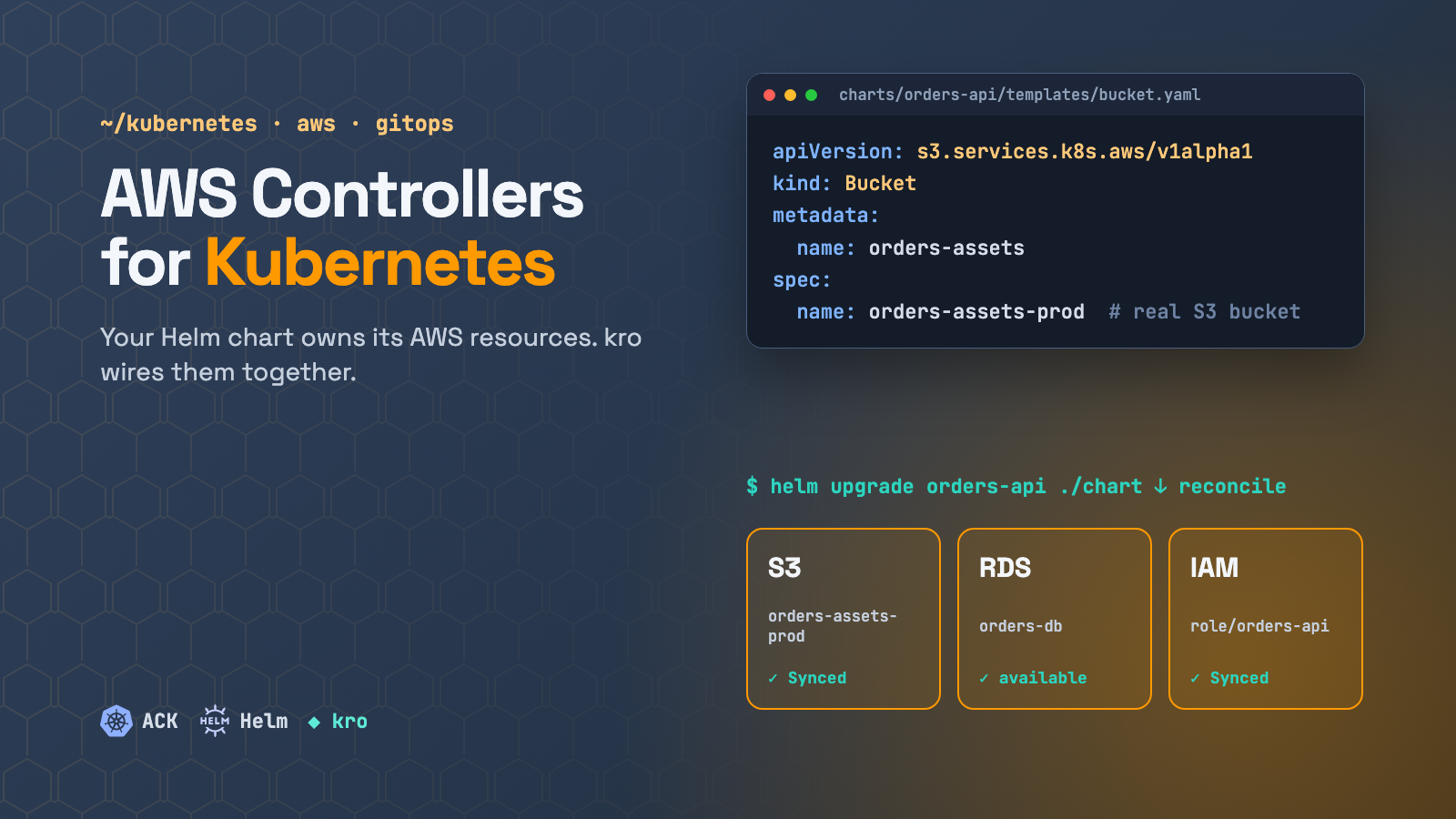
Here is a story most platform teams know. A developer needs an S3 bucket and an IAM role for a new service. The application lives in a Helm chart deployed by Argo CD. The bucket lives in a Terraform repo that another team owns. So there is a ticket, a second pull request, a terraform apply, and then someone copies the bucket name and role ARN into values-prod.yaml by hand. Six months later nobody remembers which bucket belongs to which service, and deleting the service leaves orphaned infrastructure behind.
AWS Controllers for Kubernetes (ACK) closes that gap. It lets you declare AWS resources as Kubernetes objects, so each app’s Helm chart can own the AWS resources that app needs. They travel in the same chart, the same pull request and the same Argo CD sync as the code that uses them. The configuration wires itself too: create a database in the chart, and DATABASE_URL shows up in the Deployment’s environment with nobody copying an endpoint. Add kro on top and the platform team can turn those raw resources into a small, safe API for developers.
What ACK is
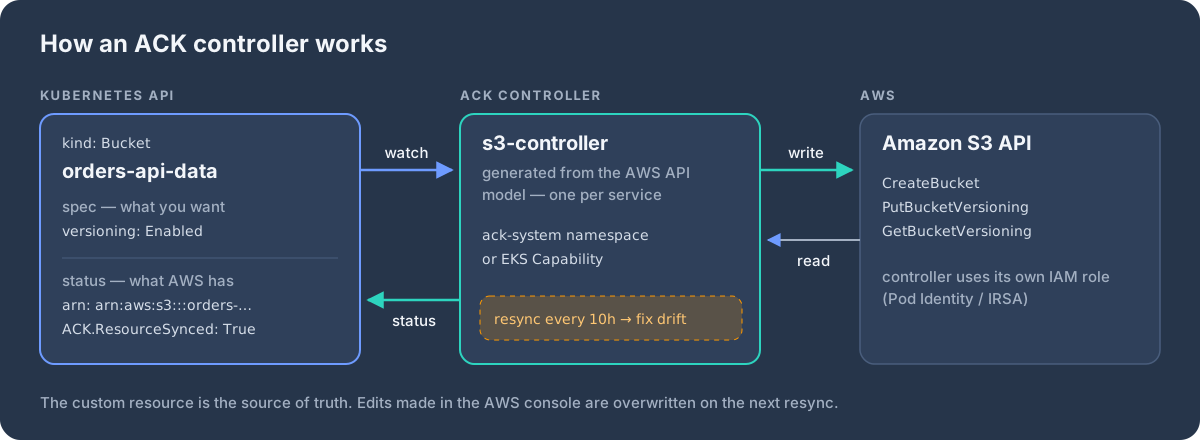
ACK is an open-source project from AWS: a set of Kubernetes controllers, one per AWS service (s3-controller, iam-controller, rds-controller, eks-controller, …), covering more than 50 services. Each controller is generated from the AWS API model, so its custom resources map almost one-to-one to the real API.
status.apiVersion: s3.services.k8s.aws/v1alpha1
kind: Bucket
metadata:
name: orders-api-data
spec:
name: orders-prod-orders-api-data
versioning:
status: Enabled
publicAccessBlock:
blockPublicACLs: true
blockPublicPolicy: true
ignorePublicACLs: true
restrictPublicBuckets: trueAfter kubectl apply, the controller creates the bucket and fills in the status:
status:
  ackResourceMetadata:
    arn: arn:aws:s3:::orders-prod-orders-api-data
    ownerAccountID: "111122223333"
    region: eu-west-1
  conditions:
  - type: ACK.ResourceSynced
    status: "True"
Three properties matter in practice:
- Continuous reconciliation. This is not a one-shot
apply. By default every controller re-checks its resources every 10 hours and reverts drift, such as someone turning off versioning in the console. The period can be tuned per controller (reconcile.defaultResyncPeriod) or per resource kind (reconcile.resourceResyncPeriods) in the Helm values. - Status is an API. ARNs, endpoints and IDs end up in
.status, where other tools can read them. Conditions such asACK.ResourceSynced,ACK.RecoverableandACK.Terminaltell you whether the resource is healthy. - Kubernetes RBAC and audit apply. Who can create a
Bucketin which namespace is now a Kubernetes RBAC question, and every change shows up in the API server audit log.
Installing it
Controllers are distributed as OCI Helm charts on Amazon ECR Public:
export SERVICE=s3
export RELEASE_VERSION=$(curl -sL https://api.github.com/repos/aws-controllers-k8s/${SERVICE}-controller/releases/latest | jq -r '.tag_name | ltrimstr("v")')

helm install --create-namespace -n ack-system ack-$SERVICE-controller \
  oci://public.ecr.aws/aws-controllers-k8s/$SERVICE-chart \
  --version=$RELEASE_VERSION --set=aws.region=eu-west-1
Each controller needs its own IAM permissions. Give it an IAM role via EKS Pod Identity or IRSA and scope the permissions to that one service.
If you don’t want to run the controllers yourself, EKS Capabilities offers ACK, kro and Argo CD as AWS-managed features. They run in EKS rather than on your worker nodes, and AWS handles upgrades and scaling.
Pattern 1: the app’s Helm chart owns its AWS resources
This is the core idea of the article. An app’s Helm chart should describe everything that app needs: its image and Kubernetes objects, and also its own AWS resources, such as the bucket it writes to, the queue it consumes, the database it owns and the IAM role it runs as. Shared foundations stay with the platform team.
| Belongs in the app’s chart | Stays in the platform foundation |
|---|---|
| S3 buckets, SQS queues, SNS topics, DynamoDB tables | VPC, subnets, NAT, Transit Gateway |
| The service’s own RDS / Aurora database, ElastiCache | EKS clusters and node pools |
| IAM role + Pod Identity association for the app | ACK controllers and their IAM roles |
| CloudWatch alarms for the app | Org-level IAM, SCPs, DNS zones |
charts/orders-api/
├── Chart.yaml
├── values.yaml
├── values-dev.yaml
├── values-prod.yaml
└── templates/
    ├── _helpers.tpl
    ├── deployment.yaml
    ├── service.yaml
    ├── serviceaccount.yaml
    └── aws/
        ├── bucket.yaml
        ├── queue.yaml
        ├── database.yaml
        ├── role.yaml
        └── podidentityassociation.yaml
# templates/aws/bucket.yaml
{{- if .Values.aws.bucket.enabled }}
apiVersion: s3.services.k8s.aws/v1alpha1
kind: Bucket
metadata:
name: {{ include "orders-api.fullname" . }}-data
annotations:
services.k8s.aws/deletion-policy: {{ .Values.aws.deletionPolicy }}
spec:
name: {{ include "orders-api.bucketName" . }}
versioning:
status: Enabled
{{- end }}# templates/aws/podidentityassociation.yaml
apiVersion: eks.services.k8s.aws/v1alpha1
kind: PodIdentityAssociation
metadata:
name: {{ include "orders-api.fullname" . }}
spec:
clusterName: {{ .Values.aws.clusterName }}
namespace: {{ .Release.Namespace }}
serviceAccount: {{ include "orders-api.serviceAccountName" . }}
roleRef:
from:
name: {{ include "orders-api.fullname" . }} # ACK Role in the same namespace# values-prod.yaml
aws:
region: eu-west-1
accountId: "444444444444"
clusterName: prod-eu-1
deletionPolicy: retain # never delete prod data with the release
bucket:
enabled: trueWhat you get:
- One pull request, one version. The code change, the new bucket and the IAM permission are reviewed and released together, and rolled back together.
- The lifecycle follows the app. A preview environment is created by
helm installand removed byhelm uninstall, its bucket and queue included (deletionPolicy: deletein dev). In prod,retainkeeps the data even if the release is deleted. - Per-environment values for free. Dev gets a
db.t4g.microand no Multi-AZ. Prod gets a bigger instance with Multi-AZ, from the same templates. - Clear ownership. Every AWS resource belongs to a Helm release in a namespace.
kubectl get buckets,queues,dbinstances -n orders-prodanswers “what does this service own?”. - Configuration that wires itself, which is the next part.
Wiring AWS outputs into the Deployment
An application doesn’t care about ARNs. It needs values in its environment: BUCKET_NAME, QUEUE_URL, DATABASE_URL. These split into two kinds:
| Value the app needs | Example | Known when Helm renders? | How to inject |
|---|---|---|---|
| S3 bucket name | orders-prod-orders-api-data |
✅ you choose it | template |
| SQS queue URL | https://sqs.eu-west-1.amazonaws.com/444444444444/orders-prod-events |
✅ region + account + name | template |
| DynamoDB table name | orders-prod-orders |
✅ you choose it | template |
| IAM role ARN | arn:aws:iam::444444444444:role/orders-prod-orders-api |
✅ account + name | template or ACK roleRef |
| RDS endpoint | orders-prod-orders-api.c9xyz….rds.amazonaws.com |
❌ generated by AWS | kro → ConfigMap |
| ElastiCache endpoint | ….cache.amazonaws.com |
❌ generated by AWS | kro → ConfigMap |
Values you choose: define the name once and use it twice. Put the name in _helpers.tpl and use it both in the ACK resource and in the Deployment’s env. The resource and the config can then never drift apart:
# templates/_helpers.tpl
{{- define "orders-api.bucketName" -}}
{{ .Release.Namespace }}-{{ include "orders-api.fullname" . }}-data
{{- end }}

{{- define "orders-api.queueName" -}}
{{ .Release.Namespace }}-{{ include "orders-api.fullname" . }}-events
{{- end }}
# templates/deployment.yaml (container env)
env:
- name: BUCKET_NAME
value: {{ include "orders-api.bucketName" . }}
- name: QUEUE_URL
value: https://sqs.{{ .Values.aws.region }}.amazonaws.com/{{ .Values.aws.accountId }}/{{ include "orders-api.queueName" . }}Values AWS generates need a small piece of runtime glue. An RDS endpoint doesn’t exist until AWS has created the instance, long after Helm has finished rendering. ACK used to offer a FieldExport resource for this, but it is deprecated. The recommended glue is kro, covered in depth in the next section. The next example shows the whole flow.
Example: create a database and get DATABASE_URL in the Deployment
The goal: a developer adds a database to the app’s chart, and the pods receive a working DATABASE_URL. Nobody copies endpoints, runs scripts or restarts anything by hand.
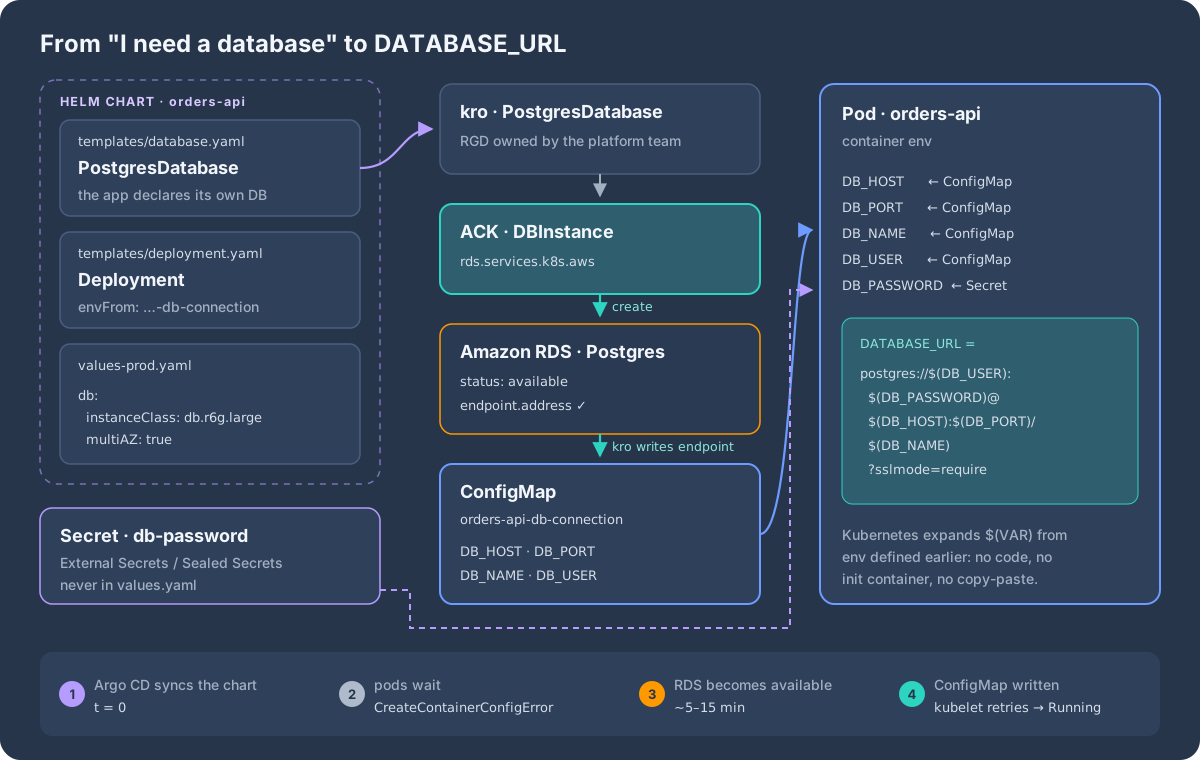
DATABASE_URL when the pod starts.Step 1, once, by the platform team: a PostgresDatabase API built with kro. It creates the ACK DBInstance and, once RDS reports an endpoint, a ConfigMap with the connection details:
apiVersion: kro.run/v1alpha1
kind: ResourceGraphDefinition
metadata:
  name: postgresdatabase.kro.run
spec:
  schema:
    apiVersion: v1alpha1
    kind: PostgresDatabase
    spec:
      dbName: string
      username: string | default="app"
      passwordSecretName: string
      instanceClass: string | default="db.t4g.micro"
      allocatedStorage: integer | default=20
      engineVersion: string | default="16.10"
      multiAZ: boolean | default=false
      subnetGroupName: string
      securityGroupIDs: "[]string"
    status:
      host: ${dbinstance.status.endpoint.address}
      connectionConfigMap: ${connection.metadata.name}

  resources:
  - id: dbinstance
    readyWhen:
    - ${dbinstance.status.dbInstanceStatus == "available"}
    - ${has(dbinstance.status.endpoint)}
    template:
      apiVersion: rds.services.k8s.aws/v1alpha1
      kind: DBInstance
      metadata:
        name: ${schema.metadata.name}
        annotations:
          services.k8s.aws/deletion-policy: retain
      spec:
        dbInstanceIdentifier: ${schema.metadata.namespace}-${schema.metadata.name}
        engine: postgres
        engineVersion: ${schema.spec.engineVersion}
        dbInstanceClass: ${schema.spec.instanceClass}
        allocatedStorage: ${schema.spec.allocatedStorage}
        multiAZ: ${schema.spec.multiAZ}
        storageEncrypted: true
        backupRetentionPeriod: 7
        dbName: ${schema.spec.dbName}
        masterUsername: ${schema.spec.username}
        masterUserPassword:
          namespace: ${schema.metadata.namespace}
          name: ${schema.spec.passwordSecretName}
          key: password
        dbSubnetGroupName: ${schema.spec.subnetGroupName}
        vpcSecurityGroupIDs: ${schema.spec.securityGroupIDs}

  - id: connection
    template:
      apiVersion: v1
      kind: ConfigMap
      metadata:
        name: ${schema.metadata.name}-connection
      data:
        DB_HOST: ${dbinstance.status.endpoint.address}
        DB_PORT: "5432"
        DB_NAME: ${schema.spec.dbName}
        DB_USER: ${schema.spec.username}
Step 2, in the app’s chart: declare the database next to the Deployment that uses it:
# templates/aws/database.yaml
apiVersion: kro.run/v1alpha1
kind: PostgresDatabase
metadata:
  name: {{ include "orders-api.fullname" . }}-db
spec:
  dbName: orders
  passwordSecretName: {{ .Values.db.passwordSecretName }}
  instanceClass: {{ .Values.db.instanceClass }}
  multiAZ: {{ .Values.db.multiAZ }}
  subnetGroupName: {{ .Values.db.subnetGroupName }}
  securityGroupIDs: {{ toJson .Values.db.securityGroupIDs }}
# templates/deployment.yaml (container)
envFrom:
- configMapRef:
name: {{ include "orders-api.fullname" . }}-db-connection # written by kro
env:
- name: DB_PASSWORD
valueFrom:
secretKeyRef:
name: {{ .Values.db.passwordSecretName }}
key: password
- name: DATABASE_URL
value: "postgres://$(DB_USER):$(DB_PASSWORD)@$(DB_HOST):$(DB_PORT)/$(DB_NAME)?sslmode=require"# values-dev.yaml # values-prod.yaml
db: # db:
instanceClass: db.t4g.micro # instanceClass: db.r6g.large
multiAZ: false # multiAZ: true
passwordSecretName: orders-api-db-password
subnetGroupName: dev-private # subnetGroupName: prod-private
securityGroupIDs: [sg-0dev…] # securityGroupIDs: [sg-0prod…]$(DB_USER)-style references are a built-in Kubernetes feature: a variable can reference variables defined earlier in the same container, including those loaded with envFrom. The URL is assembled by the kubelet, with no entrypoint script and no init container.
Step 3: the password. Keep it out of Git and out of values.yaml. Create the Secret with External Secrets Operator (from AWS Secrets Manager) or Sealed Secrets. For a quick test:
kubectl create secret generic orders-api-db-password -n orders-prod \
  --from-literal=password="$(openssl rand -hex 24)"   # hex = URL-safe
If you’d rather have RDS generate and rotate the password itself, ACK also supports manageMasterUserPassword: true. The secret then lives in AWS Secrets Manager (status.masterUserSecret.secretARN), and you sync it into the cluster with External Secrets Operator.
What happens on the first deploy:
- Argo CD syncs the chart. The
PostgresDatabase, Deployment and Service are created together. - The pods start in
CreateContainerConfigError, because the ConfigMap doesn’t exist yet. That is expected, not an error to fix. - ACK creates the RDS instance. After a few minutes it reports
availablewith an endpoint. - kro writes
orders-api-db-connection, the kubelet retries, and the pods start with a completeDATABASE_URL. No restart, no manual step.
Day 2 is just as simple. Change instanceClass in values-prod.yaml, merge the pull request, and ACK modifies the instance in place. The endpoint stays the same, so the app doesn’t notice.
Where plain Helm hits its limits
The example above already uses kro for the one thing Helm can’t do. More generally, Helm renders templates and applies everything at once. It has no idea that resources depend on each other:
- Ordering. The Deployment’s pods can be admitted before the
PodIdentityAssociationexists. The Pod Identity webhook only injects credentials at pod creation, so those pods start without AWS credentials until they are restarted. - Outputs at render time. Anything AWS generates (endpoints, IDs) is unknown when Helm renders. You need runtime glue like the
PostgresDatabaseabove. helm --waitdoesn’t understand ACK. It doesn’t know thatACK.ResourceSynced=Truemeans ready.- Copy-paste standards. Every team ends up with its own slightly different
bucket.yamlandrole.yaml. Encryption, tags and public-access blocks drift between teams.
Pattern 2: compose with kro
kro (Kube Resource Orchestrator) is a Kubernetes SIG project, backed by AWS, Google and Microsoft. It lets a platform team define a new API, such as WebService, as a ResourceGraphDefinition (RGD): a schema plus a set of resource templates. kro then:
- creates a CRD for the new kind,
- reads the
${...}CEL references between templates and builds a dependency graph (DAG), - creates resources in dependency order, waits on
readyWhen, and copies values (ARNs, names, endpoints) from one resource into another, - exposes selected fields in the instance’s
status.
apiVersion: kro.run/v1alpha1
kind: ResourceGraphDefinition
metadata:
  name: webservice.kro.run
spec:
  schema:
    apiVersion: v1alpha1
    kind: WebService
    spec:
      image: string
      replicas: integer | default=2
      port: integer | default=8080
      clusterName: string
    status:
      bucketARN: ${bucket.status.ackResourceMetadata.arn}
      roleARN: ${role.status.ackResourceMetadata.arn}
      availableReplicas: ${deployment.status.availableReplicas}

  resources:
  - id: bucket
    readyWhen:
    - ${has(bucket.status.ackResourceMetadata.arn)}
    template:
      apiVersion: s3.services.k8s.aws/v1alpha1
      kind: Bucket
      metadata:
        name: ${schema.metadata.name}-data
        annotations:
          services.k8s.aws/deletion-policy: retain
      spec:
        name: ${schema.metadata.namespace}-${schema.metadata.name}-data
        versioning:
          status: Enabled
        publicAccessBlock:
          blockPublicACLs: true
          blockPublicPolicy: true
          ignorePublicACLs: true
          restrictPublicBuckets: true

  - id: role
    template:
      apiVersion: iam.services.k8s.aws/v1alpha1
      kind: Role
      metadata:
        name: ${schema.metadata.name}
      spec:
        name: ${schema.metadata.namespace}-${schema.metadata.name}
        assumeRolePolicyDocument: |
          {
            "Version": "2012-10-17",
            "Statement": [{
              "Effect": "Allow",
              "Principal": { "Service": "pods.eks.amazonaws.com" },
              "Action": ["sts:AssumeRole", "sts:TagSession"]
            }]
          }
        inlinePolicies:
          bucket-access: |
            {
              "Version": "2012-10-17",
              "Statement": [{
                "Effect": "Allow",
                "Action": ["s3:GetObject", "s3:PutObject"],
                "Resource": "${bucket.status.ackResourceMetadata.arn}/*"
              }]
            }

  - id: serviceaccount
    template:
      apiVersion: v1
      kind: ServiceAccount
      metadata:
        name: ${schema.metadata.name}

  - id: podidentityassociation
    template:
      apiVersion: eks.services.k8s.aws/v1alpha1
      kind: PodIdentityAssociation
      metadata:
        name: ${schema.metadata.name}
      spec:
        clusterName: ${schema.spec.clusterName}
        namespace: ${schema.metadata.namespace}
        serviceAccount: ${serviceaccount.metadata.name}
        roleARN: ${role.status.ackResourceMetadata.arn}

  - id: deployment
    readyWhen:
    - ${deployment.status.availableReplicas == schema.spec.replicas}
    template:
      apiVersion: apps/v1
      kind: Deployment
      metadata:
        name: ${schema.metadata.name}
      spec:
        replicas: ${schema.spec.replicas}
        selector:
          matchLabels:
            app: ${schema.metadata.name}
        template:
          metadata:
            labels:
              app: ${schema.metadata.name}
            annotations:
              # referencing the association makes it a dependency, so pods
              # are only created once Pod Identity is in place
              example.com/pod-identity: ${podidentityassociation.status.ackResourceMetadata.arn}
          spec:
            serviceAccountName: ${serviceaccount.metadata.name}
            containers:
            - name: app
              image: ${schema.spec.image}
              ports:
              - containerPort: ${schema.spec.port}
              env:
              - name: BUCKET_NAME
                value: ${bucket.spec.name}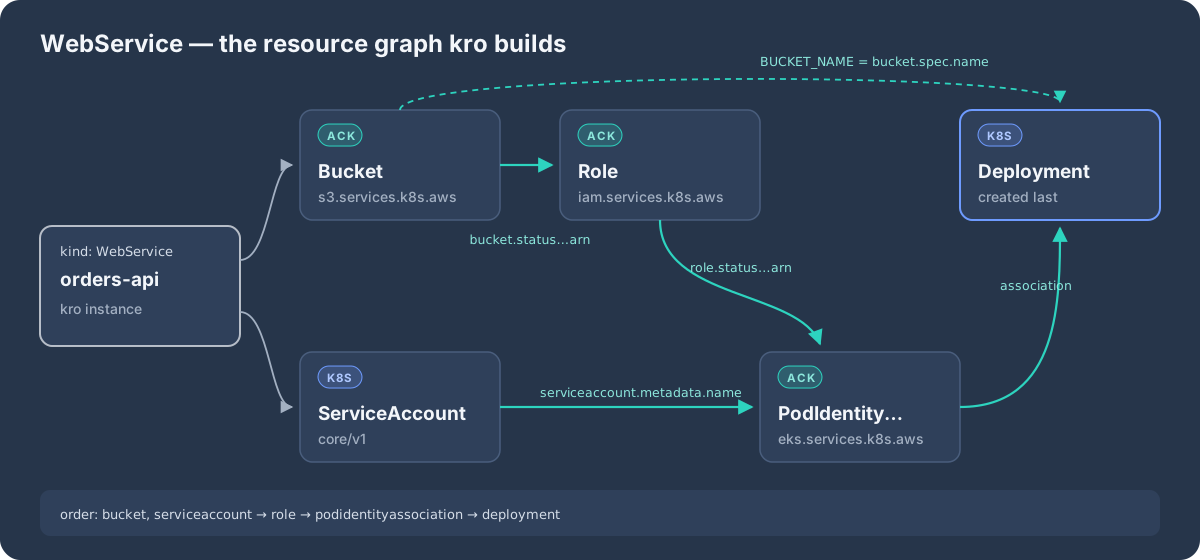
${...} references and works out the order itself. Nobody writes sync waves or init containers.A developer now writes this, and nothing else:
apiVersion: kro.run/v1alpha1
kind: WebService
metadata:
  name: orders-api
  namespace: orders
spec:
  image: 111122223333.dkr.ecr.eu-west-1.amazonaws.com/orders-api:1.4.2
  replicas: 3
  clusterName: prod-eu-1
kubectl get webservice orders-api -n orders -o jsonpath='{.status.bucketARN}'
# arn:aws:s3:::orders-orders-api-dataWhat changes:
- Ordering is solved by data, not by convention. The role waits for the bucket ARN, the association waits for the role ARN, and the pods wait for the association.
- Standards are encoded once. Encryption, public-access blocks, deletion policy, naming and tags live in the RGD. Every
WebServicegets them, and a fix to the RGD rolls out to everyone. - A smaller and safer API. The developer sets
imageandreplicas. They never touch IAM JSON. - Least privilege by RBAC. Developers only need permission to create
WebServiceobjects. kro creates the underlyingRole,Bucketand so on with its own service account, so app teams never get the power to create arbitrary IAM roles, which would be a privilege-escalation path.
Pattern 3: Helm + kro + ACK together
kro doesn’t replace Helm. They solve different problems. Helm is packaging: versioned charts, values per environment, and a release lifecycle that Argo CD understands. kro is runtime composition: dependencies and outputs. ACK is the AWS API.
In practice, the app’s chart shrinks to the app-specific parts plus one WebService:
# charts/orders-api/templates/webservice.yaml
apiVersion: kro.run/v1alpha1
kind: WebService
metadata:
  name: {{ include "orders-api.fullname" . }}
spec:
  image: "{{ .Values.image.repository }}:{{ .Values.image.tag }}"
  replicas: {{ .Values.replicas }}
  clusterName: {{ .Values.clusterName }}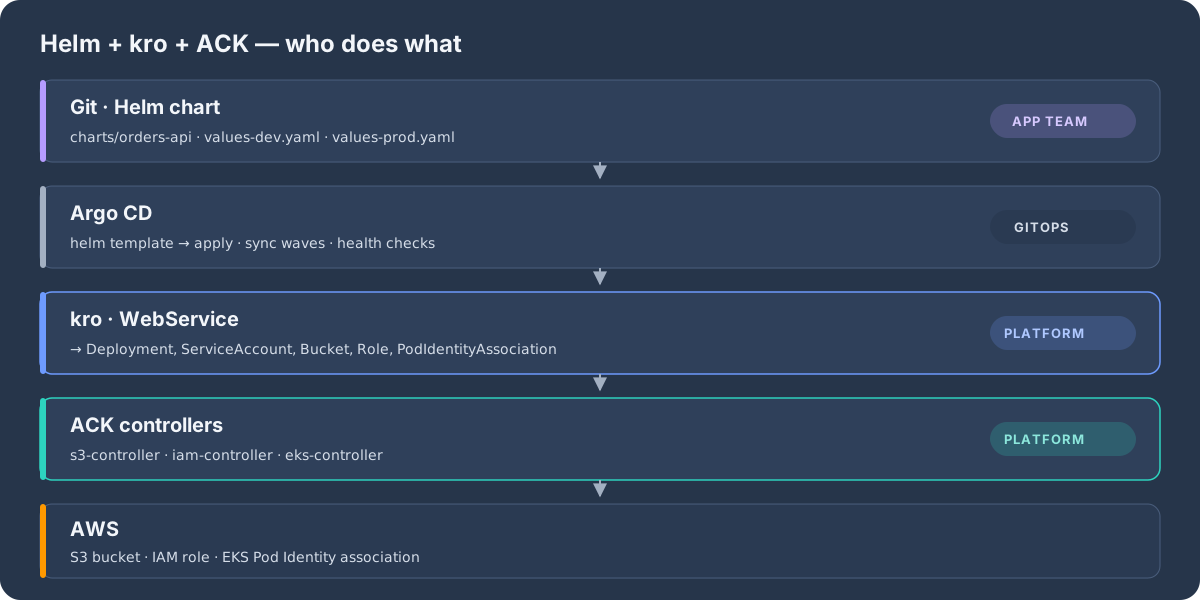
| Terraform + Helm (split) | Helm + ACK | Helm + kro + ACK | |
|---|---|---|---|
| Pull requests per feature | 2+ (often 2 teams) | 1 | 1 |
| Infra outputs into the app | Copied by hand | ACK refs only | Any field, via CEL |
| Creation order | Manual / pipelines | None (all at once) | Automatic DAG |
| Drift correction | Next terraform plan |
Continuous (ACK) | Continuous (ACK + kro) |
| Org standards | Modules | Copy-pasted templates | Encoded once in the RGD |
| Developer needs IAM rights | Often | Yes (creates Role) |
No (only WebService) |
| Cleanup when the app is removed | Separate destroy | With the release | With the release |
Pattern 4: one control plane for many AWS accounts
Few organisations run a single AWS account. Most run an AWS Organization with separate accounts per environment, team or business unit. Installing ACK in every workload cluster means N copies of the controllers, N sets of permissions and N places to debug. A cleaner model is hub and spoke: one dedicated control-plane EKS cluster in a management (platform) account runs Argo CD, kro and the ACK controllers, and manages AWS resources in every other account.
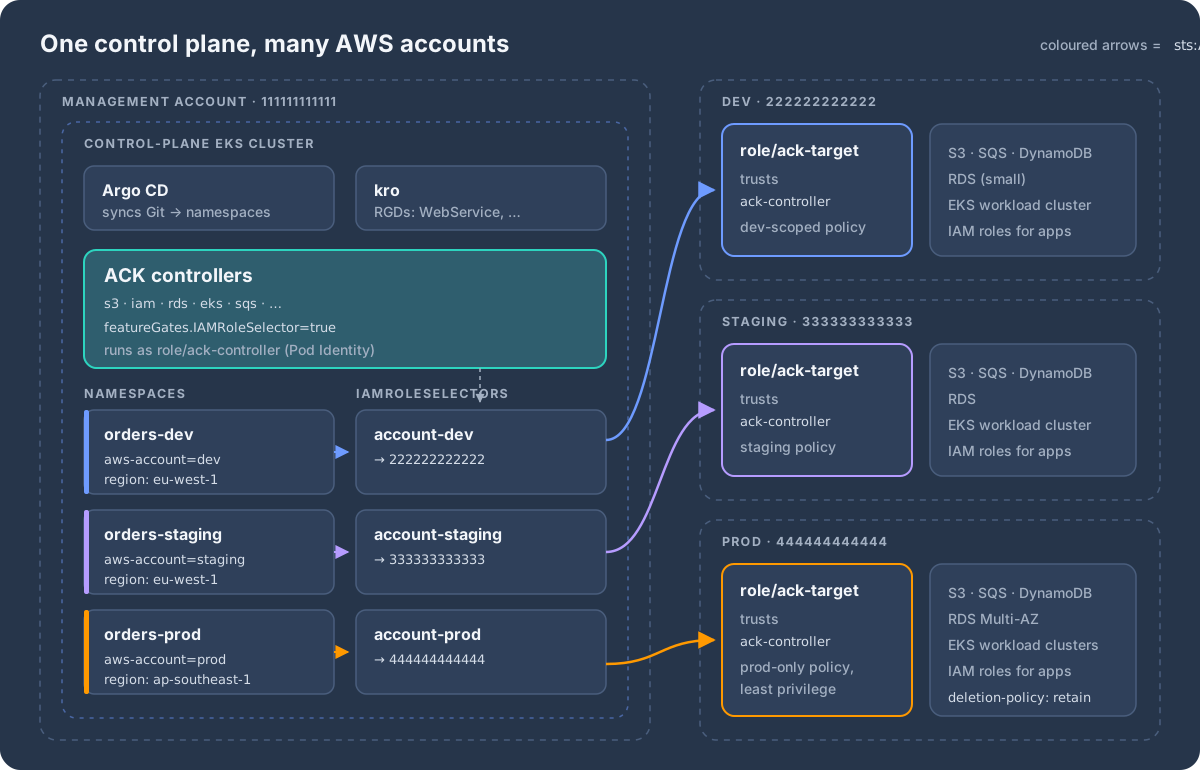
IAMRoleSelector decides which role ACK assumes for every resource in it.The moving parts:
- The ACK controllers run with one identity in the management account:
role/ack-controller, granted via Pod Identity. - Every target account has a
role/ack-targetthat trustsack-controllerand holds only the permissions that account needs. - Each namespace in the control plane represents one target: a label says which account, an annotation says which region.
- An
IAMRoleSelectormaps that label to the target role. For every resource in the namespace, ACK assumes the role and calls the AWS API in the target account.
ACK used to do this with CARM (a
ack-role-account-mapConfigMap plus aservices.k8s.aws/owner-account-idannotation on namespaces). CARM is being deprecated. New setups should useIAMRoleSelector, and enabling it turns CARM off.
Step 1: a target role in every account
Each target account trusts the controller’s role in the management account:
{
  "Version": "2012-10-17",
  "Statement": [{
    "Effect": "Allow",
    "Principal": { "AWS": "arn:aws:iam::111111111111:role/ack-controller" },
    "Action": "sts:AssumeRole"
  }]
}
Attach only the permissions for the services ACK manages in that account, and make prod stricter than dev. Roll the role out with CloudFormation StackSets or Terraform across the organisational unit, so every new account gets it automatically. This is part of the small foundation that stays outside ACK.
Step 2: let the controller assume them
The controller role in the management account may assume exactly those roles, and nothing else:
{
  "Version": "2012-10-17",
  "Statement": [{
    "Effect": "Allow",
    "Action": "sts:AssumeRole",
    "Resource": [
      "arn:aws:iam::222222222222:role/ack-target",
      "arn:aws:iam::333333333333:role/ack-target",
      "arn:aws:iam::444444444444:role/ack-target"
    ]
  }]
}
Step 3: turn on the feature gate on every controller
for SERVICE in s3 iam rds eks sqs; do
  helm upgrade --install -n ack-system ack-$SERVICE-controller \
    oci://public.ecr.aws/aws-controllers-k8s/$SERVICE-chart \
    --version "<pinned version for this controller>" \
    --set aws.region=eu-west-1 \
    --set featureGates.IAMRoleSelector=true
done
Step 4: one namespace and one selector per target
apiVersion: v1
kind: Namespace
metadata:
  name: orders-prod
  labels:
    aws-account: prod
  annotations:
    services.k8s.aws/region: ap-southeast-1   # default region for ACK resources here
    s3.services.k8s.aws/deletion-policy: retain
---
apiVersion: services.k8s.aws/v1alpha1
kind: IAMRoleSelector
metadata:
  name: account-prod
spec:
  arn: arn:aws:iam::444444444444:role/ack-target
  namespaceSelector:
    names: []            # required, even when matching by label
    labelSelector:
      matchLabels:
        aws-account: prod
From now on, any ACK resource created in orders-prod, or created there by a kro WebService, lands in account 444444444444 in ap-southeast-1. The resource tells you which selector it used:
status:
  conditions:
  - type: ACK.IAMRoleSelected
    status: "True"
    message: "roleARN: arn:aws:iam::444444444444:role/ack-target, selectorName: account-prod, selectorResourceVersion: 89424719"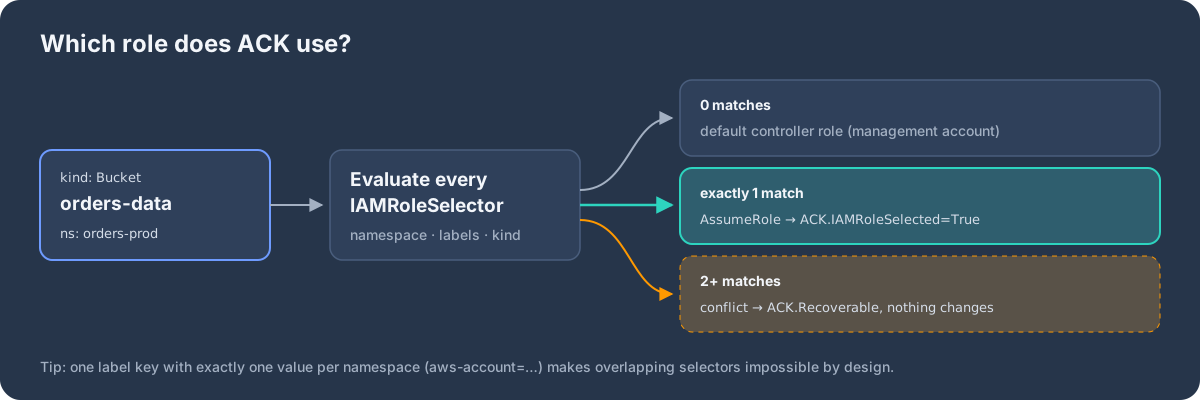
ACK.Recoverable and is not reconciled.Two details that bite:
- Overlaps are conflicts, not priorities. A more specific selector does not win over a broader one. For example, a selector using
resourceTypeSelectorforBucketplus another one for the whole namespace both match a bucket, and that’s a conflict. A single label key with exactly one value per namespace (aws-account=…) makes overlap impossible by design. - Zero matches falls back to the management account. A namespace you forgot to label silently creates resources in the control-plane account. Guard against it with a Kyverno or Gatekeeper policy that rejects ACK resources in namespaces without an
aws-accountlabel, and keep the controller’s own role nearly empty.
Step 5: let Argo CD fan out
With the plumbing in place, an environment is just a namespace. An Argo CD ApplicationSet renders the same chart once per account:
apiVersion: argoproj.io/v1alpha1
kind: ApplicationSet
metadata:
  name: orders-infra
  namespace: argocd
spec:
  generators:
  - list:
      elements:
      - env: dev
      - env: staging
      - env: prod
  template:
    metadata:
      name: 'orders-infra-{{env}}'
    spec:
      project: default
      source:
        repoURL: https://github.com/example/platform.git
        targetRevision: main
        path: charts/orders-infra
        helm:
          valueFiles:
          - 'values-{{env}}.yaml'
      destination:
        server: https://kubernetes.default.svc   # the control-plane cluster
        namespace: 'orders-{{env}}'
      syncPolicy:
        automated: {}
In the hub-and-spoke model, keep two destinations:
- AWS resources (
Bucket,Role,PodIdentityAssociation, RDS…) go to the control-plane namespace. - Workloads (
Deployment,Service) go to the workload cluster in the target account.
A kro RGD for this model is the WebService above without the Deployment. Its PodIdentityAssociation.clusterName points at the workload cluster in the same account, so the ACK EKS controller creates the association there. Workload clusters stay thin: they run apps, not infrastructure controllers.
Operating the control plane
- Treat it as tier 0. It can create resources in every account. Put it in its own account with a private API endpoint, give humans read-only RBAC, and let Argo CD be the only writer.
- Outages are boring, by design. If the control plane is down, existing AWS resources keep running and workload clusters are unaffected. Only changes and drift correction pause until it comes back.
- Split hubs if isolation matters. Many teams run one control plane for non-prod and a separate one for prod, so a mistake in dev tooling can never reach production credentials.
- Audit in the target account. CloudTrail in each account shows
AssumeRolecalls fromack-controllerfollowed by the API calls made with that session. - Debugging order: check the
ACK.IAMRoleSelectedcondition, then the target role’s trust policy, then the controller role’ssts:AssumeRolepermission, then the controller logs.
Production checklist
- Protect stateful resources.
services.k8s.aws/deletion-policy: retainkeeps the AWS resource when its Kubernetes object is deleted. The default isdelete. Set it per resource, per namespace, or with the controller’s--deletion-policyflag. Combine it withhelm.sh/resource-policy: keepon objects Helm should never remove. - Adopt instead of recreate. For buckets and databases that already exist, use the
services.k8s.aws/adoption-policyannotation (adoptoradopt-or-create) withservices.k8s.aws/adoption-fields. This requires the ResourceAdoption feature gate. The olderAdoptedResourceCRD is no longer recommended. - Multi-account and multi-region. Use
IAMRoleSelector(Pattern 4) for accounts and theservices.k8s.aws/regionannotation for regions. Don’t start new setups on CARM, which is deprecated. - Make Argo CD understand health. Add custom health checks so ACK resources report
ProgressinguntilACK.ResourceSyncedisTrue, andDegradedonACK.Terminal. Otherwise Argo shows “Healthy” while AWS is still creating the resource. - Guardrails. Use RBAC to stop app namespaces from creating raw
iam.services.k8s.awsobjects, and add Kyverno or Gatekeeper policies to require tags and encryption. This matters most for IAM, because creating aRoleis effectively creating permissions. - Bootstrapping still needs IaC. The cluster, VPC and the controllers’ own IAM roles must exist before ACK can run. Keep that small foundation in Terraform (or in a management cluster), and let ACK and kro handle everything the applications need.
- Version pinning. kro’s API is still
v1alpha1, so pin the version and read release notes before upgrading. Pin ACK controller chart versions too, or use EKS Capabilities and let AWS manage upgrades.
When ACK is not the right tool
- Your organisation is multi-cloud and wants a single abstraction across providers. Crossplane, or Terraform with a GitOps controller, may fit better.
- The resource is foundational and shared (VPCs, transit gateways, org-level IAM). It changes rarely, outlives any single app, and belongs in a separate, slower pipeline.
- You don’t run Kubernetes as your control plane. ACK’s whole value comes from using the Kubernetes API as the interface.
Wrap-up
ACK turns AWS resources into Kubernetes objects, which means they can be packaged, versioned, reviewed and deleted together with the application that needs them. Helm gives you that packaging and per-environment configuration. kro adds what Helm lacks: dependency ordering, wiring outputs between resources, and a small, opinionated API that encodes your platform’s standards. Together they make “I need a database” a few lines in the app’s own chart, and DATABASE_URL arrives in the pod’s environment by itself.
Sources
- ACK overview: https://aws-controllers-k8s.github.io/community/docs/community/overview/
- ACK cross-account resource management: https://aws-controllers-k8s.github.io/community/docs/user-docs/cross-account-resource-management/
- ACK guide: cross-account (IAMRoleSelector): https://aws-controllers-k8s.github.io/docs/guides/cross-account
- ACK FieldExport: https://aws-controllers-k8s.github.io/community/docs/user-docs/field-export/
- ACK community repository: https://github.com/aws-controllers-k8s/community
- kro overview: https://kro.run/docs/overview
- kro repository: https://github.com/kubernetes-sigs/kro
Comments