Workload Identity on Azure: Microsoft Entra Workload ID for AKS, from az CLI to GitOps
Give every AKS pod its own Azure identity without client secrets: how Entra Workload ID works, step-by-step setup with az CLI and Terraform, Key Vault CSI, scaling past 20 federated credentials, and managing it all from the app's Helm chart with Azure Service Operator.
A pod on AKS that reads Key Vault or writes to Storage needs an Azure identity. The usual shortcuts are an app registration with a client secret in a Kubernetes Secret, or the cluster’s kubelet managed identity shared by every pod on the node. The first leaks, and the second gives every workload the same permissions.
Microsoft Entra Workload ID gives each Kubernetes ServiceAccount its own Azure identity, using standard OIDC federation. Nothing secret is stored in the cluster. It replaces the old AAD Pod Identity, which intercepted IMDS traffic with a node-level daemon and is deprecated.
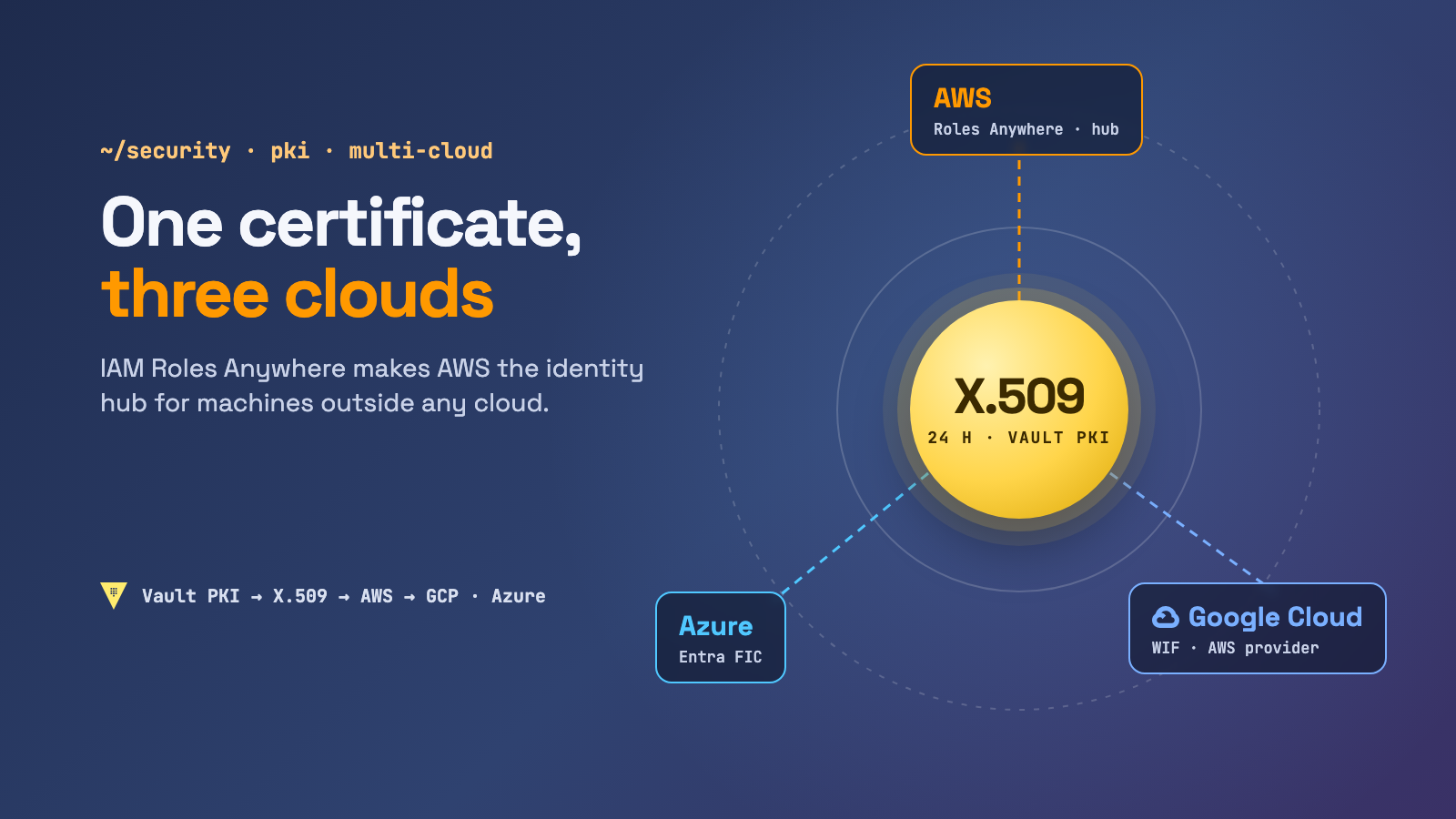
This completes the series: EKS Pod Identity vs IRSA for AWS, Workload Identity on GKE for GCP, and the cross-cloud guides AWS → GCP and AWS → Azure.
How it works
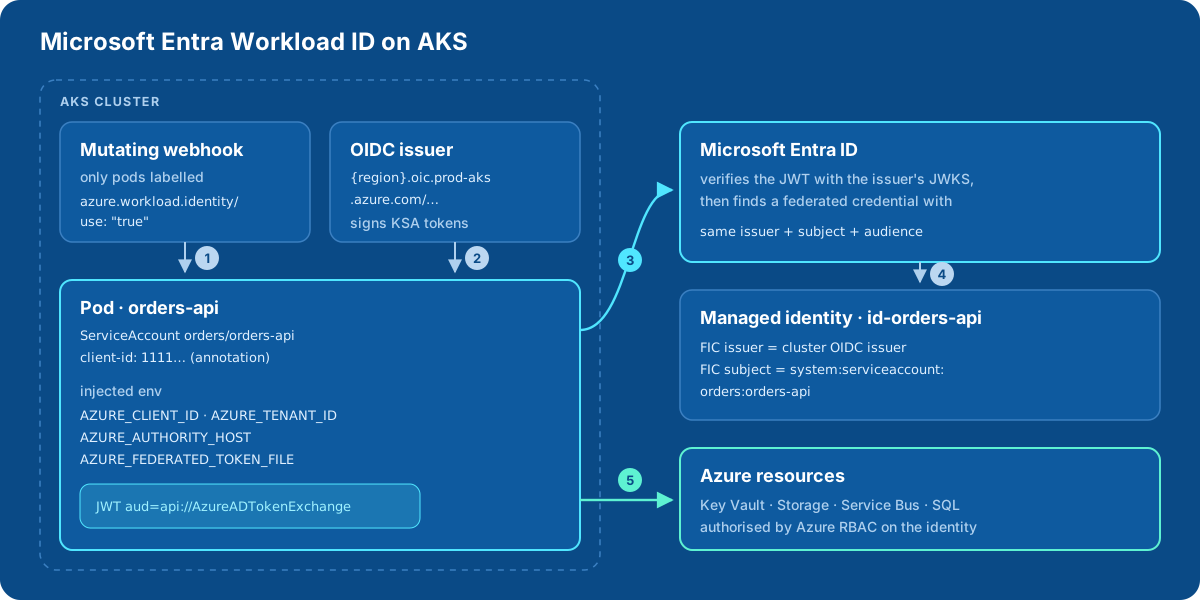
- A mutating webhook sees a pod labelled
azure.workload.identity/use: "true"and injectsAZURE_CLIENT_ID,AZURE_TENANT_ID,AZURE_AUTHORITY_HOST,AZURE_FEDERATED_TOKEN_FILEand a projected service account token. - The token is signed by the cluster’s OIDC issuer, with audience
api://AzureADTokenExchangeand subjectsystem:serviceaccount:orders:orders-api. - The Azure Identity SDK sends that token to Microsoft Entra ID. Entra fetches the issuer’s public keys and verifies the signature.
- Entra looks for a federated identity credential (FIC) on a user-assigned managed identity whose issuer, subject and audience match exactly.
- Entra returns an access token for that identity, and Azure RBAC decides what it may do.
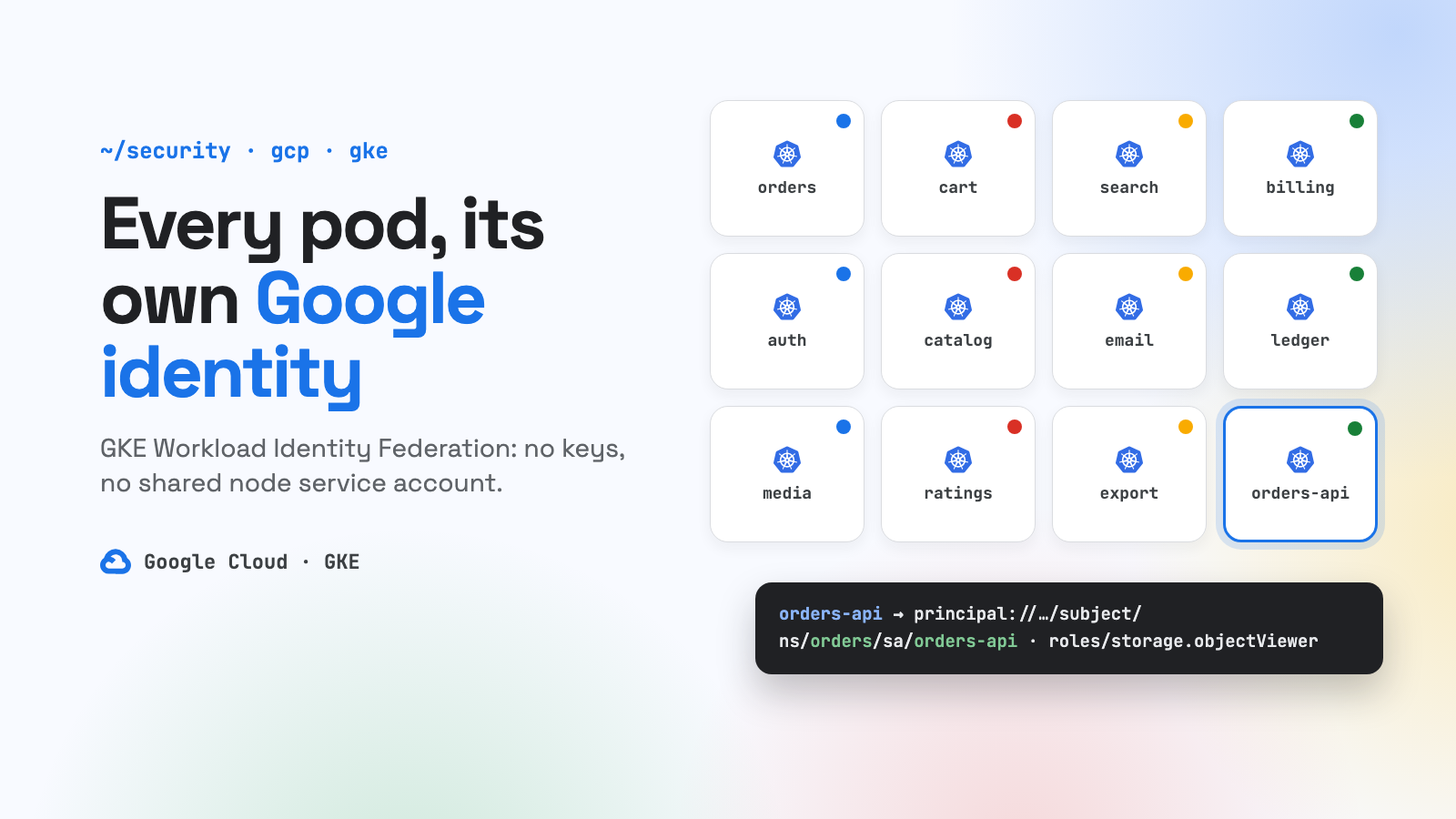
Compared with GKE: on GKE the Kubernetes ServiceAccount is the principal you grant roles to. On Azure there is always a managed identity in between, plus one FIC for each cluster and service account pair.
Step 1: enable it on the cluster
az aks update -g rg-aks-prod -n aks-weu-1 \
  --enable-oidc-issuer \
  --enable-workload-identity

AKS_OIDC_ISSUER=$(az aks show -g rg-aks-prod -n aks-weu-1 \
  --query "oidcIssuerProfile.issuerUrl" -o tsv)
# https://westeurope.oic.prod-aks.azure.com/<tenant-id>/<uuid>/
On AKS Automatic clusters both are already on, so you can skip this step.
Step 2: identity, federated credential, permissions
az identity create -g rg-orders-prod -n id-orders-api
CLIENT_ID=$(az identity show -g rg-orders-prod -n id-orders-api --query clientId -o tsv)
PRINCIPAL_ID=$(az identity show -g rg-orders-prod -n id-orders-api --query principalId -o tsv)

az identity federated-credential create \
  --name fic-aks-weu-1 \
  --identity-name id-orders-api \
  --resource-group rg-orders-prod \
  --issuer "$AKS_OIDC_ISSUER" \
  --subject system:serviceaccount:orders:orders-api \
  --audience api://AzureADTokenExchange

az role assignment create \
  --assignee-object-id "$PRINCIPAL_ID" --assignee-principal-type ServicePrincipal \
  --role "Key Vault Secrets User" \
--scope "$(az keyvault show -n kv-orders-prod --query id -o tsv)"- Key Vault must use the Azure RBAC permission model (
--enable-rbac-authorization) for role assignments to apply. - Creating role assignments needs Role Based Access Control Administrator, User Access Administrator or Owner. Contributor can’t do it.
- A new FIC needs a few seconds to propagate. A new RBAC assignment can take up to 10 minutes.
Step 3: ServiceAccount and pod
apiVersion: v1
kind: ServiceAccount
metadata:
  name: orders-api
  namespace: orders
  annotations:
    azure.workload.identity/client-id: "<CLIENT_ID>"
---
apiVersion: apps/v1
kind: Deployment
metadata:
  name: orders-api
  namespace: orders
spec:
  selector:
    matchLabels: { app: orders-api }
  template:
    metadata:
      labels:
        app: orders-api
        azure.workload.identity/use: "true"   # required, on the POD template
    spec:
      serviceAccountName: orders-api
      containers:
      - name: app
        image: crordersprod.azurecr.io/orders-api:1.8.0
The azure.workload.identity/use: "true" label is required on the pod template. Only labelled pods are mutated, and putting it on the ServiceAccount doesn’t count. If you change the ServiceAccount’s annotations later, restart the pods.
Other useful annotations:
| Where | Annotation | What it does |
|---|---|---|
| ServiceAccount | azure.workload.identity/tenant-id |
tenant of the identity, if different from the cluster’s |
| SA or pod | azure.workload.identity/service-account-token-expiration |
projected token lifetime, 3600–86400 s (default 3600) |
| Pod | azure.workload.identity/skip-containers |
c1;c2: containers that shouldn’t get the token |
| Pod | azure.workload.identity/inject-proxy-sidecar |
IMDS-intercepting sidecar, a temporary bridge for apps still on old SDKs |
Step 4: application code
Use DefaultAzureCredential, which tries WorkloadIdentityCredential from the injected environment. No code is specific to Kubernetes:
import os
from azure.identity import DefaultAzureCredential
from azure.keyvault.secrets import SecretClient

client = SecretClient(vault_url=os.environ["KEYVAULT_URL"], credential=DefaultAzureCredential())
db_password = client.get_secret("db-password").value
Minimum SDK versions: Python azure-identity 1.13.0, .NET Azure.Identity 1.9.0, Java 1.9.0, Go azidentity 1.3.0, Node @azure/identity 3.2.0. Two details trip people up:
- Request scopes in v2 form,
https://management.azure.com/.default, not the raw resource URI. - Don’t hard-code the token path. Read
AZURE_FEDERATED_TOKEN_FILE, which the SDKs already do.
Verify
kubectl -n orders run wi-test --rm -it --restart=Never \
  --image=ghcr.io/azure/azure-workload-identity/msal-go \
  --overrides='{"metadata":{"labels":{"azure.workload.identity/use":"true"}},"spec":{"serviceAccountName":"orders-api"}}' \
  --env KEYVAULT_URL=https://kv-orders-prod.vault.azure.net/ --env SECRET_NAME=db-password
# "successfully got secret"
Secrets as files: Key Vault CSI driver
If the app expects secrets as files or env vars rather than calling Key Vault itself, the Secrets Store CSI driver can use the same workload identity:
az aks enable-addons -g rg-aks-prod -n aks-weu-1 --addons azure-keyvault-secrets-providerapiVersion: secrets-store.csi.x-k8s.io/v1
kind: SecretProviderClass
metadata:
name: orders-kv
namespace: orders
spec:
provider: azure
parameters:
usePodIdentity: "false"
clientID: "<CLIENT_ID>" # the workload identity
keyvaultName: kv-orders-prod
tenantId: "<TENANT_ID>"
objects: |
array:
- |
objectName: db-password
objectType: secretMount it in the pod with a csi volume (driver: secrets-store.csi.k8s.io, volumeAttributes.secretProviderClass: orders-kv). The pod must run as the same ServiceAccount.
Terraform
resource "azurerm_kubernetes_cluster" "weu1" {
  # …
  oidc_issuer_enabled       = true
  workload_identity_enabled = true
}

resource "azurerm_user_assigned_identity" "orders_api" {
  name                = "id-orders-api"
  resource_group_name = "rg-orders-prod"
  location            = "westeurope"
}

resource "azurerm_federated_identity_credential" "orders_api_weu1" {
  name                = "fic-aks-weu-1"
  resource_group_name = "rg-orders-prod"
  parent_id           = azurerm_user_assigned_identity.orders_api.id
  issuer              = azurerm_kubernetes_cluster.weu1.oidc_issuer_url
  subject             = "system:serviceaccount:orders:orders-api"
  audience            = ["api://AzureADTokenExchange"]
}

resource "azurerm_role_assignment" "orders_api_kv" {
  scope                = azurerm_key_vault.orders.id
  role_definition_name = "Key Vault Secrets User"
  principal_id         = azurerm_user_assigned_identity.orders_api.principal_id
}
Many clusters: the 20-FIC limit
Each cluster has its own issuer, so the same app on several clusters needs one FIC per cluster on its identity, and an identity holds at most 20.
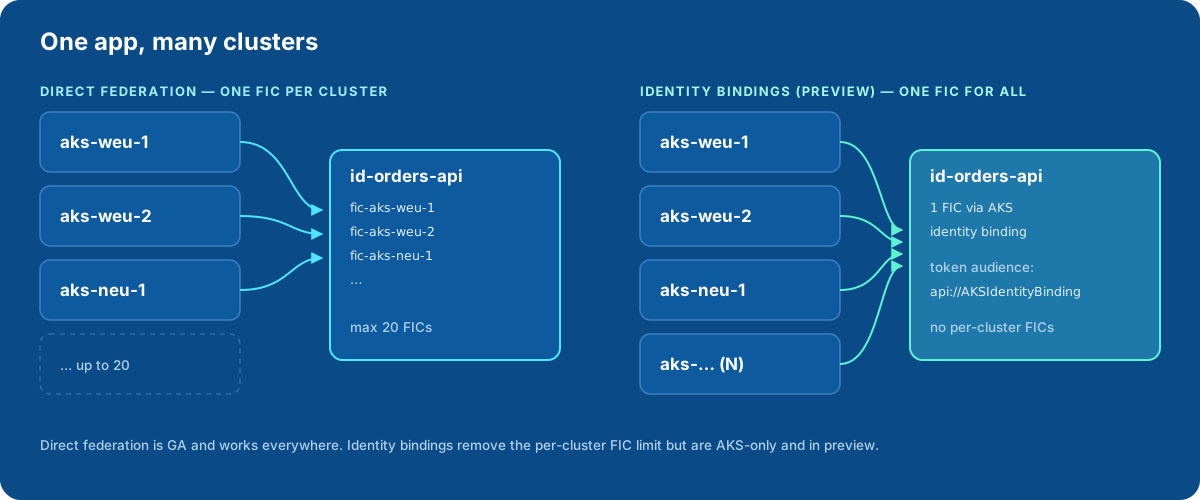
- Fewer than ~20 clusters per app: one FIC per cluster, automated with Terraform. Create FICs sequentially, because parallel writes to the same identity return
409 Conflict. - Fleets: consider identity bindings (preview). Many clusters share one managed identity through a single FIC. The binding’s tokens use the audience
api://AKSIdentityBinding, so don’t reuse that token file for direct federation, or you’ll getAADSTS700212. - Strong isolation: one identity per cluster or environment is also a valid choice. It keeps the blast radius small.
GitOps: let the app’s chart own its Azure identity
So far everything is az commands or a separate Terraform repo. Azure Service Operator v2 (ASO) is Azure’s counterpart to ACK and Config Connector. It manages Azure resources as Kubernetes objects, so the app’s Helm chart can declare its own identity, FIC and role assignments.
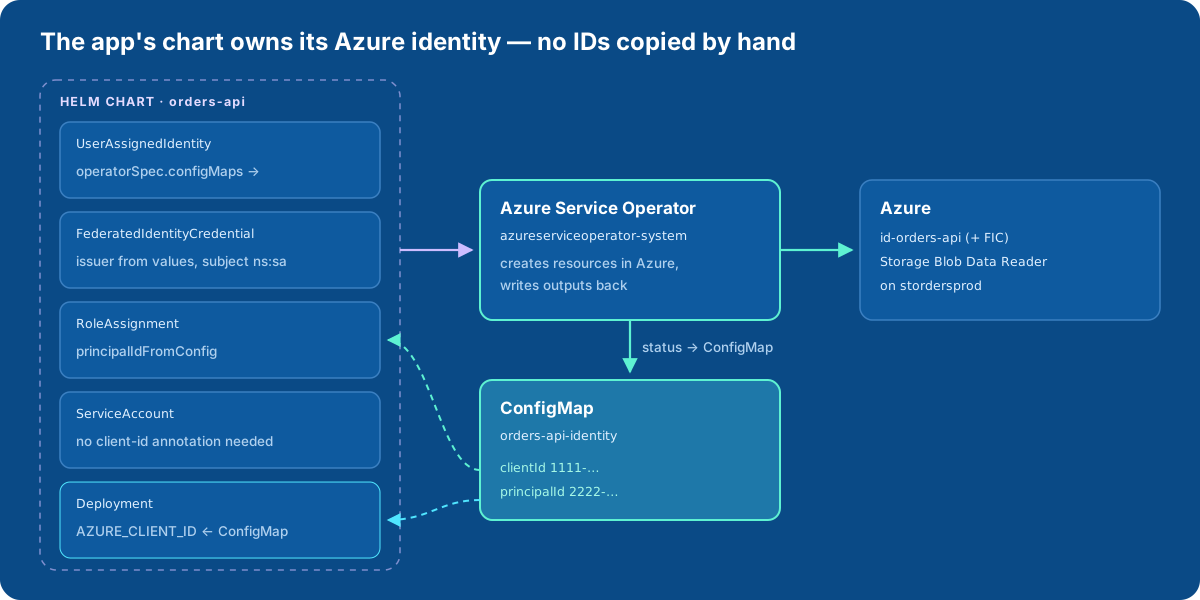
ASO itself authenticates with workload identity: install it with --set useWorkloadIdentityAuth=true, which needs cert-manager, and give its own identity rights on the resource groups it manages. Then the chart contains:
# templates/azure/identity.yaml
apiVersion: managedidentity.azure.com/v1api20230131
kind: UserAssignedIdentity
metadata:
  name: {{ include "orders-api.fullname" . }}
spec:
  location: {{ .Values.azure.location }}
  owner:
    armId: /subscriptions/{{ .Values.azure.subscriptionId }}/resourceGroups/{{ .Values.azure.resourceGroup }}
  operatorSpec:
    configMaps:
      clientId:
        name: {{ include "orders-api.fullname" . }}-identity
        key: clientId
      principalId:
        name: {{ include "orders-api.fullname" . }}-identity
        key: principalId
---
apiVersion: managedidentity.azure.com/v1api20230131
kind: FederatedIdentityCredential
metadata:
  name: {{ include "orders-api.fullname" . }}-{{ .Values.azure.clusterName }}
spec:
  owner:
    name: {{ include "orders-api.fullname" . }}
  issuer: {{ .Values.azure.oidcIssuer }}
  subject: system:serviceaccount:{{ .Release.Namespace }}:{{ include "orders-api.serviceAccountName" . }}
  audiences:
  - api://AzureADTokenExchange
---
apiVersion: authorization.azure.com/v1api20220401
kind: RoleAssignment
metadata:
  name: {{ include "orders-api.fullname" . }}-blob-reader
spec:
  owner:
    armId: {{ .Values.azure.storageAccountId }}    # the scope of the assignment
  principalIdFromConfig:
    name: {{ include "orders-api.fullname" . }}-identity
    key: principalId
  roleDefinitionReference:
    wellKnownName: Storage Blob Data Reader
The Deployment reads the client ID from the same ConfigMap. The webhook only adds env vars that aren’t already set, so the ServiceAccount doesn’t even need the client-id annotation:
# templates/deployment.yaml (excerpt)
template:
  metadata:
    labels:
      azure.workload.identity/use: "true"
  spec:
    serviceAccountName: {{ include "orders-api.serviceAccountName" . }}
    containers:
    - name: app
      env:
      - name: AZURE_CLIENT_ID
        valueFrom:
          configMapKeyRef:
            name: {{ include "orders-api.fullname" . }}-identity
            key: clientId
On the first deploy, pods wait in CreateContainerConfigError until ASO has created the identity and written the ConfigMap. Then they start on their own, the same pattern as the DATABASE_URL example in the ACK article. To keep the identity when the release is deleted, annotate it with serviceoperator.azure.com/reconcile-policy: detach-on-delete.
Gotchas
- Label on the pod, not the ServiceAccount. Without
azure.workload.identity/use: "true"on the pod template, nothing is injected. - Annotation changes need a restart. The webhook only acts when the pod is created.
- Exact match. Issuer (including the trailing
/),system:serviceaccount:<ns>:<name>and audience must match the FIC character for character. Wildcards aren’t supported. - Propagation. New FICs take seconds, and new RBAC assignments can take up to 10 minutes. Build retries into startup instead of treating early
403s as failures. - Don’t use the kubelet identity for apps. Keep the node identity minimal, and give every workload its own managed identity.
- Virtual nodes aren’t supported, and FICs can’t be created on identities in a few regions. Check before you design around them.
- Entra tokens last up to 24 hours and aren’t tied to the Kubernetes token lifetime. Revoking access means removing the RBAC assignment or the FIC, not waiting for the projected token to expire.
Troubleshooting
| Error | Likely cause |
|---|---|
AADSTS70021: No matching federated identity record found |
Subject or audience mismatch, or a brand-new FIC still propagating |
AADSTS700211: … presented assertion issuer |
Issuer mismatch: another cluster’s URL, or a missing trailing / |
AADSTS700212: … presented assertion audience |
Token audience isn’t api://AzureADTokenExchange, for example an identity-binding token |
| Env vars missing in the pod | Pod template lacks the azure.workload.identity/use label, or the webhook isn’t enabled |
403 from Key Vault or Storage |
No RBAC assignment yet, Key Vault still on access policies, or propagation delay |
Wrap-up: the same idea on three clouds
| AWS (EKS) | GCP (GKE) | Azure (AKS) | |
|---|---|---|---|
| Native mechanism | Pod Identity / IRSA | Workload Identity Federation for GKE | Entra Workload ID |
| What gets the permissions | IAM role | the KSA principal itself (or a linked GSA) | user-assigned managed identity |
| Link from KSA | Pod Identity association | none (direct) / KSA annotation | FIC + client-id + pod label |
| Kubernetes-native IaC | ACK | Config Connector | Azure Service Operator |
On AKS, the recipe is: turn on the OIDC issuer and Workload ID, give each workload a user-assigned managed identity with one federated credential per cluster, label the pod, and let DefaultAzureCredential do the rest. Once it works, move the identity, FIC and role assignments into the app’s Helm chart with Azure Service Operator, so access is reviewed, versioned and deleted together with the code that needs it.
Sources
- Microsoft Entra Workload ID on AKS: overview: https://learn.microsoft.com/en-us/azure/aks/workload-identity-overview
- Deploy and configure workload identity on AKS: https://learn.microsoft.com/en-us/azure/aks/workload-identity-deploy-cluster
- Workload identity federation: https://learn.microsoft.com/en-us/entra/workload-id/workload-identity-federation
- Federated identity credential considerations and limits: https://learn.microsoft.com/en-us/entra/workload-id/workload-identity-federation-considerations
- AKS identity bindings (preview): https://learn.microsoft.com/en-us/azure/aks/identity-bindings-concepts
- Key Vault CSI driver with workload identity: https://learn.microsoft.com/en-us/azure/aks/csi-secrets-store-identity-access
- Azure Workload Identity project docs: https://azure.github.io/azure-workload-identity/docs/
- Azure Service Operator v2: https://azure.github.io/azure-service-operator/
Comments