Workload identity on AWS: EKS Pod Identity vs IRSA
How pods get AWS credentials without static keys — how IRSA and EKS Pod Identity work under the hood, where they differ, and how to migrate safely.
Every pod that calls S3, DynamoDB or SQS needs AWS credentials. The worst answer is an access key in a Kubernetes Secret: it never expires, it gets copied into CI logs and .env files, and nobody knows who is still using it. The second-worst answer is the node IAM role: every pod on the node silently inherits the same permissions.
Workload identity fixes this. A pod proves who it is (its Kubernetes service account) and AWS exchanges that proof for short-lived credentials scoped to exactly one IAM role. On EKS there are two ways to do it: IRSA (IAM Roles for Service Accounts, 2019) and EKS Pod Identity (2023).
TL;DR: for new workloads on EKS with Linux EC2 nodes, use EKS Pod Identity. AWS recommends it whenever possible. Keep IRSA for Fargate, Windows nodes, non-EKS clusters, and cases where you need the cluster’s OIDC token to federate into other clouds.
How IRSA works
IRSA is built on plain OIDC federation. Every EKS cluster has an OIDC issuer that signs service account tokens. You register that issuer as an IAM OIDC identity provider in your account, and IAM trusts tokens signed by it.
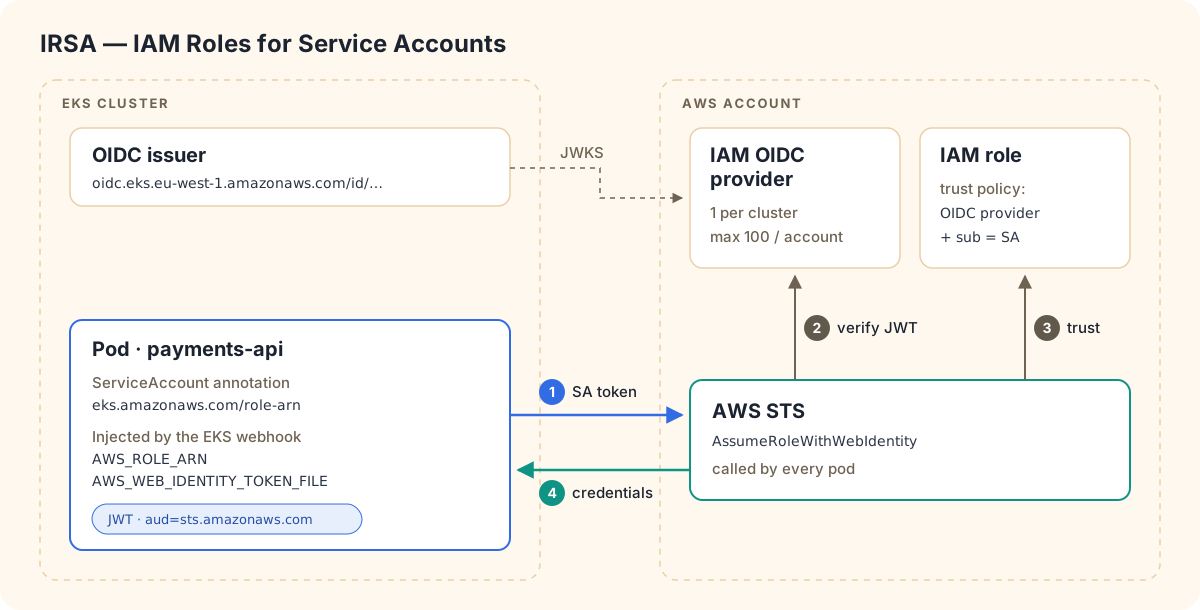
- A mutating webhook sees the service account annotation and injects two environment variables,
AWS_ROLE_ARNandAWS_WEB_IDENTITY_TOKEN_FILE, plus a projected token at/var/run/secrets/eks.amazonaws.com/serviceaccount/token. - The AWS SDK in the pod calls
sts:AssumeRoleWithWebIdentitywith that token. - STS validates the token against the cluster’s OIDC provider and checks the role’s trust policy.
Setup:
# Once per cluster (and per account that should trust it)
eksctl utils associate-iam-oidc-provider --cluster prod-eu-1 --approve
The role’s trust policy must name the cluster’s OIDC provider and the service account:
{
  "Version": "2012-10-17",
  "Statement": [{
    "Effect": "Allow",
    "Principal": {
      "Federated": "arn:aws:iam::111122223333:oidc-provider/oidc.eks.eu-west-1.amazonaws.com/id/EXAMPLED539D4633E53DE1B71EXAMPLE"
    },
    "Action": "sts:AssumeRoleWithWebIdentity",
    "Condition": {
      "StringEquals": {
        "oidc.eks.eu-west-1.amazonaws.com/id/EXAMPLED539D4633E53DE1B71EXAMPLE:sub": "system:serviceaccount:payments:payments-api",
        "oidc.eks.eu-west-1.amazonaws.com/id/EXAMPLED539D4633E53DE1B71EXAMPLE:aud": "sts.amazonaws.com"
      }
    }
  }]
}apiVersion: v1
kind: ServiceAccount
metadata:
name: payments-api
namespace: payments
annotations:
eks.amazonaws.com/role-arn: arn:aws:iam::111122223333:role/payments-apiIt works, but the pain shows up at scale:
- Every new cluster means editing trust policies. The OIDC provider ID is unique per cluster, so a role used by 5 clusters needs 5 statements.
- Trust policies are small. The default limit is 2,048 characters, which is roughly 4 cluster/service-account pairs per role, and around 8 even after a quota increase.
- OIDC providers are capped at 100 per account by default.
- Every pod calls STS itself, so large fleets can run into STS throttling.
How EKS Pod Identity works
Pod Identity takes OIDC out of your hands. EKS itself becomes the trusted party.
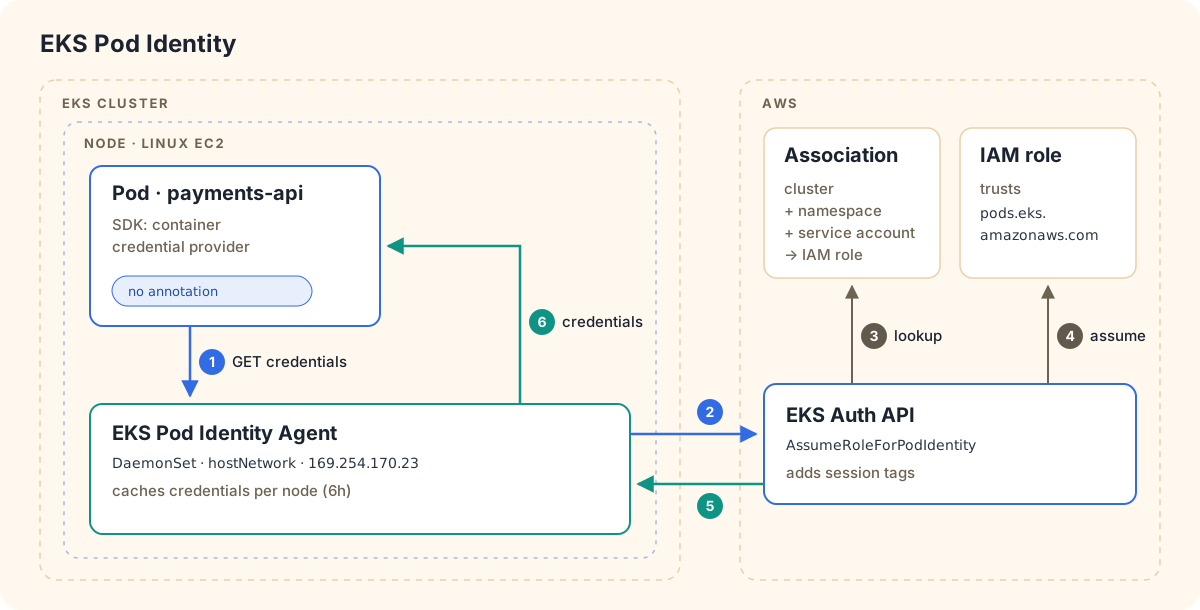
- You install the EKS Pod Identity Agent add-on once per cluster. It is built in if you use EKS Auto Mode.
- You create an association in the EKS API: cluster + namespace + service account → IAM role. Nothing changes inside Kubernetes, and there is no annotation.
- A webhook injects
AWS_CONTAINER_CREDENTIALS_FULL_URIandAWS_CONTAINER_AUTHORIZATION_TOKEN_FILE. The SDK’s container credential provider fetches credentials from the agent on the node, and the agent gets them from EKS Auth.
The trust policy is the same for every cluster:
{
  "Version": "2012-10-17",
  "Statement": [{
    "Effect": "Allow",
    "Principal": { "Service": "pods.eks.amazonaws.com" },
    "Action": ["sts:AssumeRole", "sts:TagSession"]
  }]
}
aws eks create-addon --cluster-name prod-eu-1 --addon-name eks-pod-identity-agent
aws eks create-pod-identity-association \
--cluster-name prod-eu-1 \
--namespace payments \
--service-account payments-api \
--role-arn arn:aws:iam::111122223333:role/payments-apiOr with Terraform:
resource "aws_eks_pod_identity_association" "payments_api" {
  cluster_name    = aws_eks_cluster.prod.name
  namespace       = "payments"
  service_account = "payments-api"
  role_arn        = aws_iam_role.payments_api.arn
}
Adding a 6th, 10th or 50th cluster now means adding one association per cluster, without touching IAM.
Session tags and ABAC
Credentials issued by Pod Identity carry session tags: eks-cluster-arn, eks-cluster-name, kubernetes-namespace, kubernetes-service-account, kubernetes-pod-name and kubernetes-pod-uid. That enables attribute-based access control: one role, with each namespace limited to its own data.
{
  "Effect": "Allow",
  "Action": ["s3:GetObject", "s3:PutObject"],
  "Resource": "arn:aws:s3:::tenant-data/${aws:PrincipalTag/kubernetes-namespace}/*"
}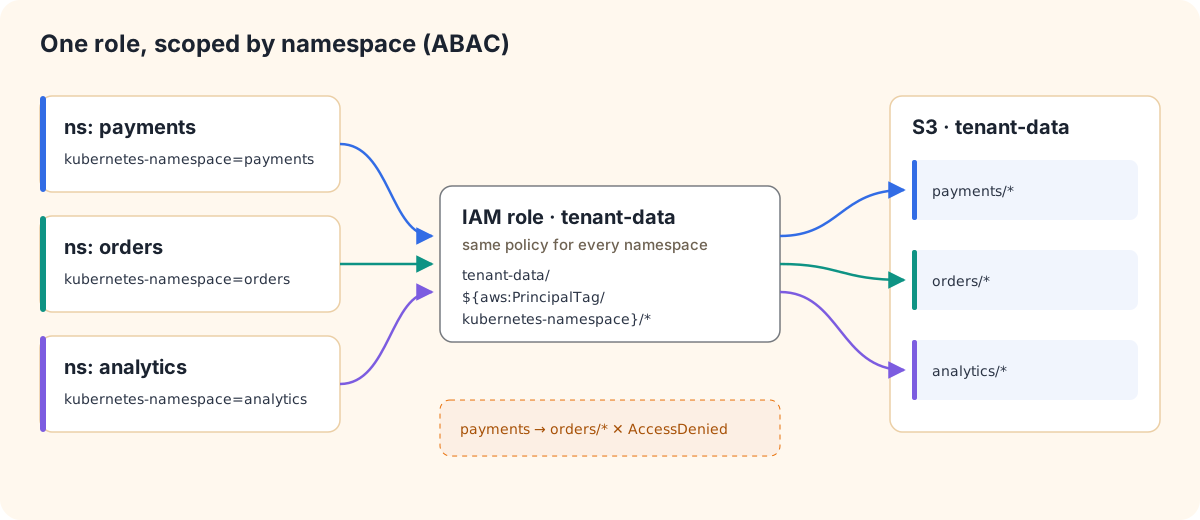
Pods in namespace payments can only touch tenant-data/payments/*. With IRSA there are no session tags, so every pod using a role gets all of its permissions.
Cross-account with target roles
The association role must live in the cluster’s account. To reach resources in another account, add a target role. Pod Identity then chains the two roles for you, with no AssumeRole code in your app:
aws eks create-pod-identity-association \
  --cluster-name prod-eu-1 \
  --namespace payments \
  --service-account payments-api \
  --role-arn arn:aws:iam::111122223333:role/payments-api \
  --target-role-arn arn:aws:iam::444455556666:role/payments-data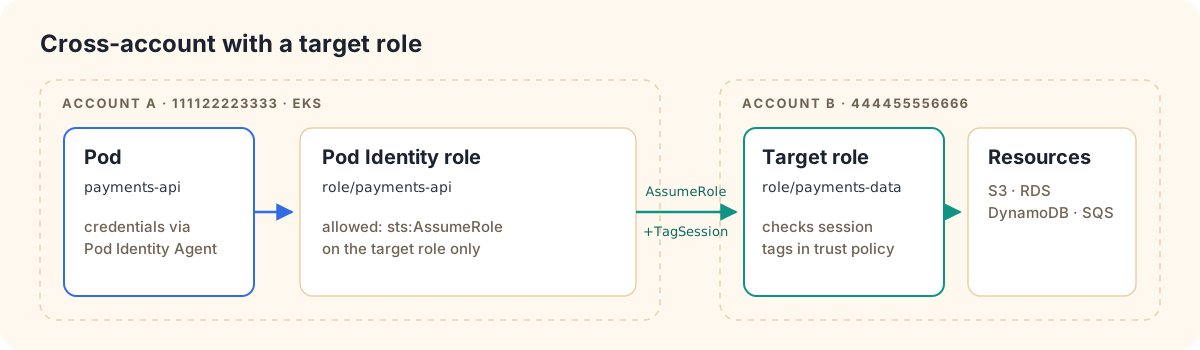
Session tags are transitive, so the target account’s trust policy can still check aws:RequestTag/kubernetes-namespace and aws:RequestTag/kubernetes-service-account.
Side by side
| IRSA | EKS Pod Identity | |
|---|---|---|
| Trust mechanism | IAM OIDC provider per cluster | EKS service principal pods.eks.amazonaws.com |
| Where you configure it | IAM trust policy + SA annotation | EKS API association, no Kubernetes change |
| New cluster | Edit every role’s trust policy | Create associations only |
| Roles per trust policy | ~4 clusters/SAs (2,048-char limit) | No limit (trust policy is generic) |
| Cluster limit | 100 OIDC providers per account (default) | Not applicable |
| Max mappings | n/a | 5,000 associations per cluster |
| STS calls | Each pod calls AssumeRoleWithWebIdentity |
EKS Auth assumes the role; agent caches per node |
| Session tags / ABAC | No | Yes (cluster, namespace, SA, pod) |
| Cross-account | OIDC provider in target account, or manual role chaining | Built-in target role |
| Runs on | EKS, Fargate, Windows, EKS Anywhere, ROSA, self-managed K8s | EKS only, Linux EC2 nodes (no Fargate, Windows or Outposts) |
| Extra component | Pod Identity webhook (managed by EKS) | Pod Identity Agent DaemonSet (hostNetwork, ports 80/2703) |
| Minimum SDK | Any SDK from ~2019 onwards | Newer SDKs (e.g. boto3 1.34.41, Java v2 2.21.30, CLI 2.15.0) |
| Token usable outside AWS | Yes, the OIDC issuer can be trusted by GCP/Azure | No |
Migrating from IRSA to Pod Identity
-
Check SDK versions in every image. Old SDKs don’t know the container credential provider and will silently fall back to the next provider in the chain, usually the node role.
-
Add the trust statement for
pods.eks.amazonaws.comto the existing role, keeping the OIDC statement for now. -
Create the association for the same namespace and service account.
-
Remove the
eks.amazonaws.com/role-arnannotation and restart the pods. This step matters: the SDK’s default credential chain checks web identity (IRSA) before container credentials (Pod Identity), so as long as the annotation exists, the pod keeps using IRSA. -
Verify from inside the pod:
kubectl exec -n payments deploy/payments-api -- env | grep AWS_CONTAINER kubectl exec -n payments deploy/payments-api -- aws sts get-caller-identity -
Clean up the OIDC statement from the trust policy once everything is migrated. Delete the cluster’s OIDC provider only if nothing else uses it.
Production gotchas
- Block IMDS for pods. Workload identity is pointless if a pod can still reach the node role through the instance metadata service. Use IMDSv2 with
HttpPutResponseHopLimit=1on nodes. Pods withhostNetwork: truecan always reach IMDS. - Credentials are cached. The agent caches credentials for 6 hours (59 minutes when a target role is used). Changing the role on an association doesn’t affect running pods until the cache expires, so restart the pods to apply changes immediately.
- Associations are eventually consistent. Expect a few seconds of delay. Create them in your provisioning pipeline, not in an app’s startup path.
- Proxies. If pods use
HTTP(S)_PROXY, add169.254.170.23and[fd00:ec2::23]toNO_PROXY, otherwise credential requests go to the proxy and fail. - IPv6-disabled clusters need IPv6 disabled in the agent config as well.
PackedPolicyTooLargeerrors can come from session tags. Disabling session tags on the association fixes it, at the cost of ABAC.- Manage associations as code. Use Terraform, or Kubernetes-native tools such as the ACK EKS controller’s
PodIdentityAssociationresource, so permissions live in Git next to the app instead of being click-ops in the console.
Which one should you use?
- New EKS workloads on Linux EC2 nodes or EKS Auto Mode: use Pod Identity. You get simpler operations, roles that are reusable across clusters, ABAC, and less STS load.
- Fargate, Windows nodes, EKS Anywhere, ROSA or self-managed Kubernetes: use IRSA. Pod Identity isn’t available there.
- Multi-cloud workloads that also need to authenticate to GCP or Azure: keep the cluster’s OIDC issuer around. Those clouds can trust the same Kubernetes service account token, which Pod Identity can’t offer.
Both approaches give pods short-lived, per-workload credentials with no static keys anywhere. That is the real win. Choosing between IRSA and Pod Identity mostly decides how much IAM plumbing you have to maintain as the number of clusters grows.
Sources
- EKS Pod Identity: https://docs.aws.amazon.com/eks/latest/userguide/pod-identities.html
- Set up the EKS Pod Identity Agent: https://docs.aws.amazon.com/eks/latest/userguide/pod-id-agent-setup.html
- Pod Identity session tags and ABAC: https://docs.aws.amazon.com/eks/latest/userguide/pod-id-abac.html
- Pod Identity target roles (cross-account): https://docs.aws.amazon.com/eks/latest/userguide/pod-id-assign-target-role.html
- IAM roles for service accounts (IRSA): https://docs.aws.amazon.com/eks/latest/userguide/iam-roles-for-service-accounts.html
- Comparing Pod Identity and IRSA: https://docs.aws.amazon.com/eks/latest/userguide/service-accounts.html
Comments