Workload Identity trên Azure: Microsoft Entra Workload ID cho AKS, từ az CLI tới GitOps
Cho mỗi pod trên AKS một danh tính Azure riêng mà không cần client secret: cơ chế Entra Workload ID, triển khai bằng az CLI và Terraform, Key Vault CSI, vượt giới hạn 20 federated credential, và quản lý từ Helm chart của ứng dụng bằng Azure Service Operator.
Một pod trên AKS đọc Key Vault hay ghi vào Storage thì cần một danh tính Azure. Hai lối tắt quen thuộc là tạo app registration với client secret cất trong Kubernetes Secret, hoặc dùng kubelet managed identity của cluster mà mọi pod trên node dùng chung. Cách thứ nhất dễ lộ secret. Cách thứ hai khiến mọi workload có cùng một bộ quyền.
Microsoft Entra Workload ID cho mỗi Kubernetes ServiceAccount một danh tính Azure riêng, dựa trên OIDC federation chuẩn. Không có bí mật nào nằm trong cluster. Nó thay thế AAD Pod Identity cũ, vốn chặn lưu lượng IMDS bằng một daemon trên node và đã bị deprecate.
Bài này khép lại loạt bài: EKS Pod Identity vs IRSA cho AWS, Workload Identity trên GKE cho GCP, cùng hai bài liên cloud AWS → GCP và AWS → Azure.
Cơ chế hoạt động
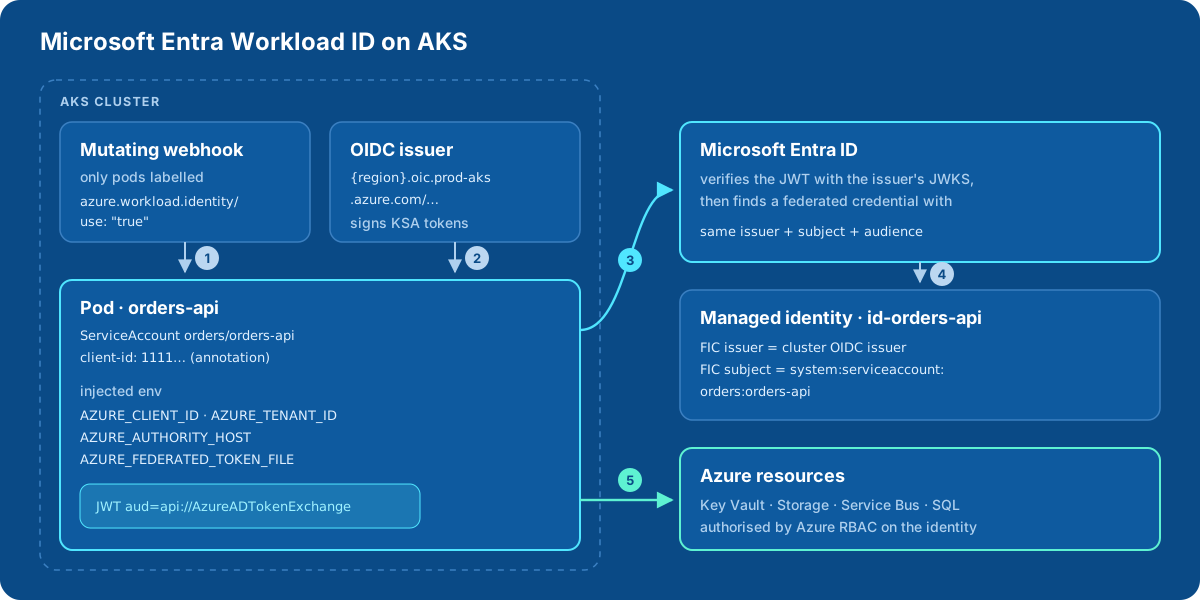
- Một mutating webhook thấy pod có label
azure.workload.identity/use: "true"và inject các biếnAZURE_CLIENT_ID,AZURE_TENANT_ID,AZURE_AUTHORITY_HOST,AZURE_FEDERATED_TOKEN_FILEcùng một projected service account token. - Token được OIDC issuer của cluster ký, với audience
api://AzureADTokenExchangevà subjectsystem:serviceaccount:orders:orders-api. - Azure Identity SDK gửi token đó tới Microsoft Entra ID. Entra tải khoá public của issuer và xác minh chữ ký.
- Entra tìm một federated identity credential (FIC) trên user-assigned managed identity có issuer, subject và audience khớp chính xác.
- Entra trả access token của identity đó, và Azure RBAC quyết định identity được làm gì.
So với GKE: trên GKE, chính Kubernetes ServiceAccount là principal được cấp role. Trên Azure thì luôn có một managed identity đứng giữa, cộng với một FIC cho mỗi cặp cluster và service account.
Bước 1: bật trên cluster
az aks update -g rg-aks-prod -n aks-weu-1 \
  --enable-oidc-issuer \
  --enable-workload-identity

AKS_OIDC_ISSUER=$(az aks show -g rg-aks-prod -n aks-weu-1 \
  --query "oidcIssuerProfile.issuerUrl" -o tsv)
# https://westeurope.oic.prod-aks.azure.com/<tenant-id>/<uuid>/
Cluster AKS Automatic đã bật sẵn cả hai, có thể bỏ qua bước này.
Bước 2: identity, federated credential, phân quyền
az identity create -g rg-orders-prod -n id-orders-api
CLIENT_ID=$(az identity show -g rg-orders-prod -n id-orders-api --query clientId -o tsv)
PRINCIPAL_ID=$(az identity show -g rg-orders-prod -n id-orders-api --query principalId -o tsv)

az identity federated-credential create \
  --name fic-aks-weu-1 \
  --identity-name id-orders-api \
  --resource-group rg-orders-prod \
  --issuer "$AKS_OIDC_ISSUER" \
  --subject system:serviceaccount:orders:orders-api \
  --audience api://AzureADTokenExchange

az role assignment create \
  --assignee-object-id "$PRINCIPAL_ID" --assignee-principal-type ServicePrincipal \
  --role "Key Vault Secrets User" \
--scope "$(az keyvault show -n kv-orders-prod --query id -o tsv)"- Key Vault phải dùng mô hình phân quyền Azure RBAC (
--enable-rbac-authorization) thì role assignment mới có tác dụng. - Tạo role assignment cần quyền Role Based Access Control Administrator, User Access Administrator hoặc Owner. Contributor không làm được.
- FIC mới cần vài giây để lan truyền. RBAC assignment mới có thể mất tới 10 phút.
Bước 3: ServiceAccount và pod
apiVersion: v1
kind: ServiceAccount
metadata:
  name: orders-api
  namespace: orders
  annotations:
    azure.workload.identity/client-id: "<CLIENT_ID>"
---
apiVersion: apps/v1
kind: Deployment
metadata:
  name: orders-api
  namespace: orders
spec:
  selector:
    matchLabels: { app: orders-api }
  template:
    metadata:
      labels:
        app: orders-api
        azure.workload.identity/use: "true"   # bắt buộc, đặt trên POD template
    spec:
      serviceAccountName: orders-api
      containers:
      - name: app
        image: crordersprod.azurecr.io/orders-api:1.8.0
Label azure.workload.identity/use: "true" là bắt buộc và phải nằm trên pod template. Chỉ pod có label mới được webhook xử lý, gắn lên ServiceAccount không có tác dụng. Nếu sau này đổi annotation của ServiceAccount, hãy restart pod.
Các annotation hữu ích khác:
| Đặt ở | Annotation | Tác dụng |
|---|---|---|
| ServiceAccount | azure.workload.identity/tenant-id |
tenant của identity, nếu khác tenant của cluster |
| SA hoặc pod | azure.workload.identity/service-account-token-expiration |
thời hạn projected token, 3600–86400 giây (mặc định 3600) |
| Pod | azure.workload.identity/skip-containers |
c1;c2: các container không nhận token |
| Pod | azure.workload.identity/inject-proxy-sidecar |
sidecar chặn IMDS, chỉ là cầu nối tạm cho ứng dụng còn dùng SDK cũ |
Bước 4: code ứng dụng
Dùng DefaultAzureCredential, nó sẽ thử WorkloadIdentityCredential dựa trên các biến môi trường đã được inject. Không có dòng code nào dành riêng cho Kubernetes:
import os
from azure.identity import DefaultAzureCredential
from azure.keyvault.secrets import SecretClient

client = SecretClient(vault_url=os.environ["KEYVAULT_URL"], credential=DefaultAzureCredential())
db_password = client.get_secret("db-password").value
Phiên bản SDK tối thiểu: Python azure-identity 1.13.0, .NET Azure.Identity 1.9.0, Java 1.9.0, Go azidentity 1.3.0, Node @azure/identity 3.2.0. Hai chi tiết hay làm người ta vấp:
- Xin scope theo dạng v2,
https://management.azure.com/.default, không dùng resource URI thô. - Không hard-code đường dẫn token. Hãy đọc từ
AZURE_FEDERATED_TOKEN_FILE, các SDK đã làm sẵn việc này.
Kiểm tra
kubectl -n orders run wi-test --rm -it --restart=Never \
  --image=ghcr.io/azure/azure-workload-identity/msal-go \
  --overrides='{"metadata":{"labels":{"azure.workload.identity/use":"true"}},"spec":{"serviceAccountName":"orders-api"}}' \
  --env KEYVAULT_URL=https://kv-orders-prod.vault.azure.net/ --env SECRET_NAME=db-password
# "successfully got secret"
Secret dạng file: Key Vault CSI driver
Nếu ứng dụng muốn nhận secret dưới dạng file hoặc biến môi trường thay vì tự gọi Key Vault, Secrets Store CSI driver dùng được chính workload identity đó:
az aks enable-addons -g rg-aks-prod -n aks-weu-1 --addons azure-keyvault-secrets-providerapiVersion: secrets-store.csi.x-k8s.io/v1
kind: SecretProviderClass
metadata:
name: orders-kv
namespace: orders
spec:
provider: azure
parameters:
usePodIdentity: "false"
clientID: "<CLIENT_ID>" # chính workload identity
keyvaultName: kv-orders-prod
tenantId: "<TENANT_ID>"
objects: |
array:
- |
objectName: db-password
objectType: secretMount vào pod bằng một volume csi (driver: secrets-store.csi.k8s.io, volumeAttributes.secretProviderClass: orders-kv). Pod phải chạy với cùng ServiceAccount đó.
Terraform
resource "azurerm_kubernetes_cluster" "weu1" {
  # …
  oidc_issuer_enabled       = true
  workload_identity_enabled = true
}

resource "azurerm_user_assigned_identity" "orders_api" {
  name                = "id-orders-api"
  resource_group_name = "rg-orders-prod"
  location            = "westeurope"
}

resource "azurerm_federated_identity_credential" "orders_api_weu1" {
  name                = "fic-aks-weu-1"
  resource_group_name = "rg-orders-prod"
  parent_id           = azurerm_user_assigned_identity.orders_api.id
  issuer              = azurerm_kubernetes_cluster.weu1.oidc_issuer_url
  subject             = "system:serviceaccount:orders:orders-api"
  audience            = ["api://AzureADTokenExchange"]
}

resource "azurerm_role_assignment" "orders_api_kv" {
  scope                = azurerm_key_vault.orders.id
  role_definition_name = "Key Vault Secrets User"
  principal_id         = azurerm_user_assigned_identity.orders_api.principal_id
}
Nhiều cluster: giới hạn 20 FIC
Mỗi cluster có issuer riêng, nên cùng một ứng dụng chạy trên nhiều cluster cần một FIC cho mỗi cluster trên identity của nó, trong khi mỗi identity chỉ chứa tối đa 20 FIC.
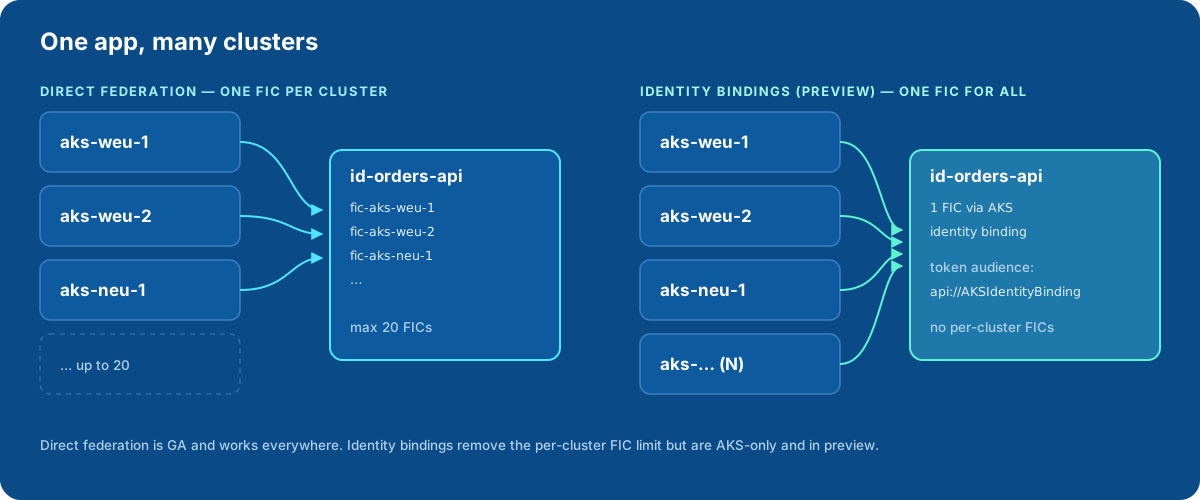
- Mỗi ứng dụng chạy trên dưới khoảng 20 cluster: mỗi cluster một FIC, tự động hoá bằng Terraform. Tạo FIC tuần tự, vì ghi song song vào cùng một identity sẽ bị
409 Conflict. - Fleet lớn: cân nhắc identity bindings (preview). Nhiều cluster dùng chung một managed identity qua một FIC duy nhất. Token của binding dùng audience
api://AKSIdentityBinding, nên đừng dùng lại file token đó cho direct federation, nếu không sẽ gặp lỗiAADSTS700212. - Cần cô lập chặt: mỗi cluster hoặc mỗi môi trường một identity cũng là lựa chọn hợp lý, giúp giới hạn phạm vi ảnh hưởng khi có sự cố.
GitOps: để chart của ứng dụng sở hữu danh tính Azure
Tới giờ mọi thứ đều là lệnh az hoặc một repo Terraform riêng. Azure Service Operator v2 (ASO) là phiên bản Azure của ACK và Config Connector. Nó quản lý tài nguyên Azure dưới dạng object Kubernetes, nhờ đó Helm chart của ứng dụng có thể tự khai báo identity, FIC và role assignment của mình.
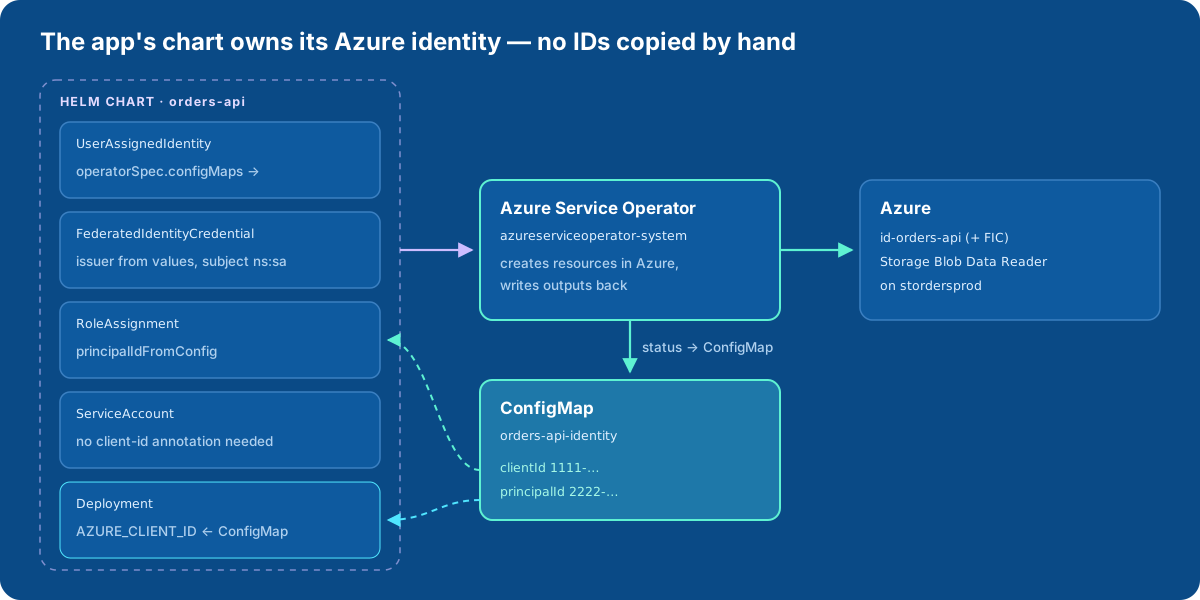
Bản thân ASO cũng xác thực bằng workload identity: cài với --set useWorkloadIdentityAuth=true (cần có cert-manager), và cấp cho identity của ASO quyền trên các resource group nó quản lý. Sau đó chart chứa:
# templates/azure/identity.yaml
apiVersion: managedidentity.azure.com/v1api20230131
kind: UserAssignedIdentity
metadata:
  name: {{ include "orders-api.fullname" . }}
spec:
  location: {{ .Values.azure.location }}
  owner:
    armId: /subscriptions/{{ .Values.azure.subscriptionId }}/resourceGroups/{{ .Values.azure.resourceGroup }}
  operatorSpec:
    configMaps:
      clientId:
        name: {{ include "orders-api.fullname" . }}-identity
        key: clientId
      principalId:
        name: {{ include "orders-api.fullname" . }}-identity
        key: principalId
---
apiVersion: managedidentity.azure.com/v1api20230131
kind: FederatedIdentityCredential
metadata:
  name: {{ include "orders-api.fullname" . }}-{{ .Values.azure.clusterName }}
spec:
  owner:
    name: {{ include "orders-api.fullname" . }}
  issuer: {{ .Values.azure.oidcIssuer }}
  subject: system:serviceaccount:{{ .Release.Namespace }}:{{ include "orders-api.serviceAccountName" . }}
  audiences:
  - api://AzureADTokenExchange
---
apiVersion: authorization.azure.com/v1api20220401
kind: RoleAssignment
metadata:
  name: {{ include "orders-api.fullname" . }}-blob-reader
spec:
  owner:
    armId: {{ .Values.azure.storageAccountId }}    # phạm vi của assignment
  principalIdFromConfig:
    name: {{ include "orders-api.fullname" . }}-identity
    key: principalId
  roleDefinitionReference:
    wellKnownName: Storage Blob Data Reader
Deployment đọc client ID từ cùng ConfigMap đó. Webhook chỉ thêm những biến môi trường chưa có, nên ServiceAccount thậm chí không cần annotation client-id:
# templates/deployment.yaml (trích)
template:
  metadata:
    labels:
      azure.workload.identity/use: "true"
  spec:
    serviceAccountName: {{ include "orders-api.serviceAccountName" . }}
    containers:
    - name: app
      env:
      - name: AZURE_CLIENT_ID
        valueFrom:
          configMapKeyRef:
            name: {{ include "orders-api.fullname" . }}-identity
            key: clientId
Ở lần deploy đầu, pod chờ ở trạng thái CreateContainerConfigError cho tới khi ASO tạo xong identity và ghi ConfigMap, rồi tự khởi động. Đây đúng là pattern trong ví dụ DATABASE_URL ở bài ACK. Muốn giữ lại identity khi release bị xoá, gắn annotation serviceoperator.azure.com/reconcile-policy: detach-on-delete.
Những cái bẫy
- Label đặt trên pod, không phải ServiceAccount. Pod template thiếu
azure.workload.identity/use: "true"thì không có gì được inject. - Đổi annotation phải restart pod. Webhook chỉ xử lý lúc pod được tạo.
- Khớp chính xác. Issuer (kể cả dấu
/ở cuối),system:serviceaccount:<ns>:<name>và audience phải giống FIC từng ký tự. Không hỗ trợ wildcard. - Độ trễ lan truyền. FIC mới mất vài giây, RBAC assignment mới có thể mất tới 10 phút. Hãy có cơ chế thử lại lúc khởi động thay vì coi các lỗi
403ban đầu là thất bại. - Đừng dùng kubelet identity cho ứng dụng. Giữ identity của node ở mức tối thiểu, và cho mỗi workload một managed identity riêng.
- Không hỗ trợ virtual nodes, và ở một vài region không tạo được FIC trên identity. Hãy kiểm tra trước khi thiết kế dựa trên chúng.
- Token Entra sống tới 24 giờ và không phụ thuộc vào thời hạn của token Kubernetes. Muốn thu hồi quyền thì xoá RBAC assignment hoặc FIC, đừng chờ projected token hết hạn.
Xử lý sự cố
| Lỗi | Nguyên nhân thường gặp |
|---|---|
AADSTS70021: No matching federated identity record found |
Subject hoặc audience không khớp, hoặc FIC mới tạo chưa lan truyền xong |
AADSTS700211: … presented assertion issuer |
Issuer không khớp: URL của cluster khác, hoặc thiếu dấu / ở cuối |
AADSTS700212: … presented assertion audience |
Audience của token không phải api://AzureADTokenExchange, ví dụ token của identity binding |
| Pod không có các biến môi trường | Pod template thiếu label azure.workload.identity/use, hoặc webhook chưa được bật |
Key Vault hoặc Storage trả 403 |
Chưa có RBAC assignment, Key Vault vẫn dùng access policy, hoặc đang có độ trễ lan truyền |
Kết luận: cùng một ý tưởng trên ba cloud
| AWS (EKS) | GCP (GKE) | Azure (AKS) | |
|---|---|---|---|
| Cơ chế gốc | Pod Identity / IRSA | Workload Identity Federation for GKE | Entra Workload ID |
| Ai được cấp quyền | IAM role | chính principal của KSA (hoặc GSA liên kết) | user-assigned managed identity |
| Liên kết với KSA | Pod Identity association | không cần (trực tiếp) / annotation trên KSA | FIC + client-id + label trên pod |
| IaC kiểu Kubernetes | ACK | Config Connector | Azure Service Operator |
Trên AKS, công thức là: bật OIDC issuer và Workload ID, cho mỗi workload một user-assigned managed identity với một federated credential cho mỗi cluster, gắn label cho pod, và để DefaultAzureCredential lo phần còn lại. Khi đã chạy ổn, hãy đưa identity, FIC và role assignment vào Helm chart của ứng dụng bằng Azure Service Operator, để quyền truy cập được review, đánh version và xoá cùng với đoạn code cần nó.
Nguồn
- Microsoft Entra Workload ID trên AKS: tổng quan: https://learn.microsoft.com/en-us/azure/aks/workload-identity-overview
- Triển khai workload identity trên AKS: https://learn.microsoft.com/en-us/azure/aks/workload-identity-deploy-cluster
- Workload identity federation: https://learn.microsoft.com/en-us/entra/workload-id/workload-identity-federation
- Lưu ý và giới hạn của federated identity credential: https://learn.microsoft.com/en-us/entra/workload-id/workload-identity-federation-considerations
- AKS identity bindings (preview): https://learn.microsoft.com/en-us/azure/aks/identity-bindings-concepts
- Key Vault CSI driver với workload identity: https://learn.microsoft.com/en-us/azure/aks/csi-secrets-store-identity-access
- Tài liệu dự án Azure Workload Identity: https://azure.github.io/azure-workload-identity/docs/
- Azure Service Operator v2: https://azure.github.io/azure-service-operator/
Bình luận