Workload Identity Federation từ AWS sang Google Cloud — không cần service account key
Cho workload trên EC2, Lambda, ECS và EKS gọi Google Cloud bằng token ngắn hạn: cơ chế trao đổi token, các bước triển khai, cái bẫy trên EKS, và mô hình hub-and-spoke cho nhiều account.
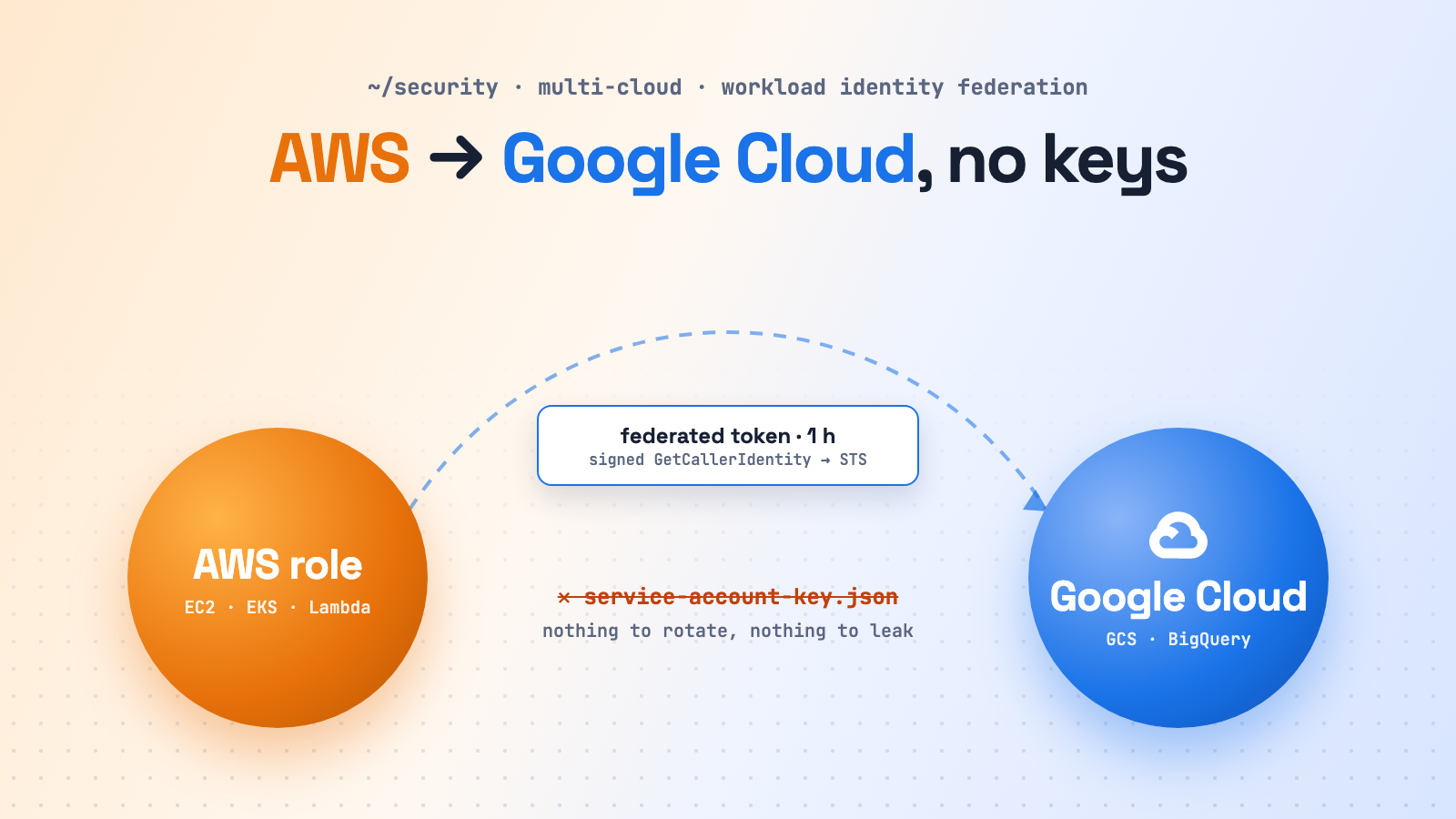
Một service chạy trên AWS cần đọc dataset BigQuery hoặc ghi vào bucket Cloud Storage. Cách nhanh nhất cũng là cách tệ nhất: tạo Google service account, tải key.json, cất vào AWS Secrets Manager rồi mount vào ứng dụng. Key đó không bao giờ hết hạn. Nó bị copy vào CI, vào laptop, và không ai xoay vòng nó. Lộ service account key là một trong những nguyên nhân phổ biến nhất khiến project GCP bị xâm nhập.
Workload Identity Federation (WIF) loại bỏ hoàn toàn key. Workload trên AWS chứng minh nó là ai bằng danh tính nó vốn đã có, tức IAM role. Google đổi bằng chứng đó lấy token Google ngắn hạn. Không có gì bí mật phải lưu, phân phối hay xoay vòng.
Đây là “phiên bản liên cloud” của bài EKS Pod Identity vs IRSA. Bài đó trả lời câu hỏi pod lấy credentials AWS thế nào. Bài này trả lời câu hỏi workload trên AWS lấy credentials Google thế nào.
Cơ chế trao đổi token
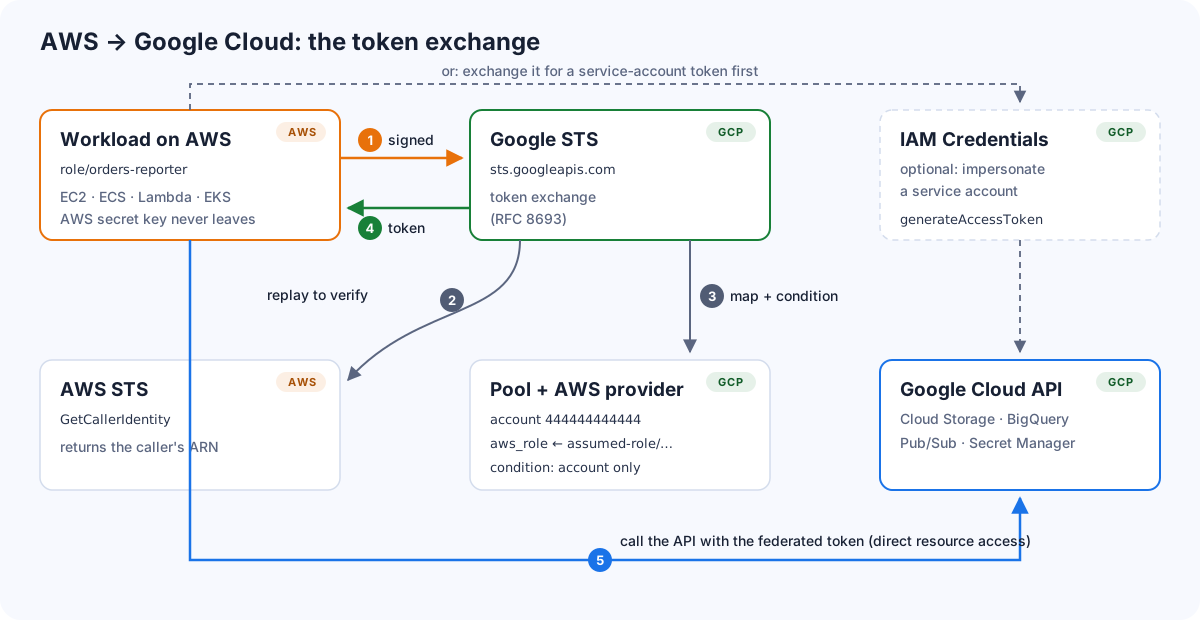
- Thư viện Google lấy AWS credentials của workload và ký (SigV4) một request
GetCallerIdentitytới AWS STS, nhưng không gửi nó tới AWS. - Thư viện gửi request đã ký đó tới Google STS (
sts.googleapis.com) làm “subject token”. Google STS gửi lại request này tới AWS STS, và AWS trả về ARN của bên gọi, ví dụarn:aws:sts::444444444444:assumed-role/orders-reporter/i-0abc…. - Google đối chiếu với workload identity pool và provider của bạn: account AWS này có được tin không, attribute condition có cho phép role này không. Sau đó Google ánh xạ ARN thành các thuộc tính, ví dụ
aws_role. - Google STS trả về federated access token, có hiệu lực khoảng một giờ.
- Workload gọi Google API bằng token đó (direct resource access), hoặc đổi tiếp sang token của một service account (impersonation) với những API chưa nhận danh tính federated.
Google khuyến nghị cấp quyền trực tiếp cho principal federated khi sản phẩm hỗ trợ, và chỉ dùng impersonation khi sản phẩm chưa hỗ trợ.
Hai loại provider
| AWS provider | OIDC provider (issuer của EKS) | |
|---|---|---|
| Danh tính Google nhìn thấy | ARN của IAM role | Kubernetes service account (system:serviceaccount:ns:name) |
| Subject token | GetCallerIdentity đã ký |
JWT của projected service account |
| Chạy ngay, không cần code | EC2 (instance metadata), Lambda (biến môi trường) | Pod trên EKS (token mount dạng file) |
| Cần viết code | ECS task, pod trên EKS (custom credential supplier) | — |
| Độ chi tiết | theo IAM role | theo namespace / service account |
Hai loại này dùng chung được. Một pool có thể chứa một AWS provider cho mỗi account, cộng một OIDC provider cho mỗi EKS cluster.
Path A: EC2 và Lambda với AWS provider
1. Tạo pool và provider
Dùng một project riêng cho danh tính (ở đây là platform-identity, project number 123456789012), và mỗi ranh giới tin cậy một pool, ví dụ production:
gcloud iam workload-identity-pools create aws-prod \
  --project=platform-identity \
  --location=global \
  --display-name="AWS production"

gcloud iam workload-identity-pools providers create-aws aws-prod \
  --project=platform-identity \
  --location=global \
  --workload-identity-pool=aws-prod \
  --account-id=444444444444 \
  --attribute-mapping="google.subject=assertion.account+':'+assertion.arn.extract('assumed-role/{role_name}/'),attribute.account=assertion.account,attribute.aws_role=assertion.arn.extract('assumed-role/{role_name}/')" \
--attribute-condition="assertion.arn.startsWith('arn:aws:sts::444444444444:assumed-role/')"google.subjectlàaccount:role, ví dụ444444444444:orders-reporter. Nó hiện trong Cloud Audit Logs và dài tối đa 77 byte. Ví dụ của chính Google map cả ARN, có ghi luôn session, nhưng tên role dài cộng session name dài sẽ vượt giới hạn 127 byte. Xem giới hạn 127 byte của subject bên dưới.attribute.aws_roletách ra tên role (orders-reporter). Đây là thứ bạn cấp quyền.- Attribute condition chỉ chấp nhận role được assume từ account này. IAM user và root user bị từ chối. Luôn đặt condition.
2. Cấp quyền
Direct resource access, nên dùng. Principal là “mọi session của role orders-reporter đi qua pool aws-prod”:
gcloud storage buckets add-iam-policy-binding gs://analytics-prod-reports \
  --role=roles/storage.objectViewer \
  --member="principalSet://iam.googleapis.com/projects/123456789012/locations/global/workloadIdentityPools/aws-prod/attribute.aws_role/orders-reporter"
Service account impersonation, cho các sản phẩm cần:
gcloud iam service-accounts add-iam-policy-binding \
  orders-reporter@analytics-prod.iam.gserviceaccount.com \
  --role=roles/iam.workloadIdentityUser \
  --member="principalSet://iam.googleapis.com/projects/123456789012/locations/global/workloadIdentityPools/aws-prod/attribute.aws_role/orders-reporter"
3. Tạo file cấu hình credential
gcloud iam workload-identity-pools create-cred-config \
  projects/123456789012/locations/global/workloadIdentityPools/aws-prod/providers/aws-prod \
  --aws \
  --enable-imdsv2 \
  --output-file=gcp-wif.json
# thêm --service-account=orders-reporter@analytics-prod.iam.gserviceaccount.com nếu dùng impersonation
File tạo ra không chứa bí mật nào, chỉ có chỉ dẫn cho thư viện: lấy AWS credentials ở đâu và đổi chúng ở đâu.
{
  "type": "external_account",
  "audience": "//iam.googleapis.com/projects/123456789012/locations/global/workloadIdentityPools/aws-prod/providers/aws-prod",
  "subject_token_type": "urn:ietf:params:aws:token-type:aws4_request",
  "token_url": "https://sts.googleapis.com/v1/token",
  "credential_source": {
    "environment_id": "aws1",
    "region_url": "http://169.254.169.254/latest/meta-data/placement/availability-zone",
    "url": "http://169.254.169.254/latest/meta-data/iam/security-credentials",
    "regional_cred_verification_url": "https://sts.{region}.amazonaws.com?Action=GetCallerIdentity&Version=2011-06-15",
    "imdsv2_session_token_url": "http://169.254.169.254/latest/api/token"
  }
}
Bạn có thể commit file này, đóng vào image, hoặc để trong ConfigMap. Trỏ ứng dụng tới file đó là mọi thư viện Google tự nhận qua Application Default Credentials:
export GOOGLE_APPLICATION_CREDENTIALS=/etc/gcp/gcp-wif.json

# thử nhanh ngay trên instance
gcloud auth login --cred-file=/etc/gcp/gcp-wif.json
gcloud storage ls gs://analytics-prod-reports
Trên EC2, thư viện đọc credentials của role từ instance metadata (IMDSv2 nhờ cờ --enable-imdsv2). Lambda không có metadata service. Thư viện sẽ dùng AWS_ACCESS_KEY_ID, AWS_SECRET_ACCESS_KEY, AWS_SESSION_TOKEN và AWS_REGION, mà Lambda tự đặt sẵn theo role của function.
Cái bẫy trên EKS (và ECS)
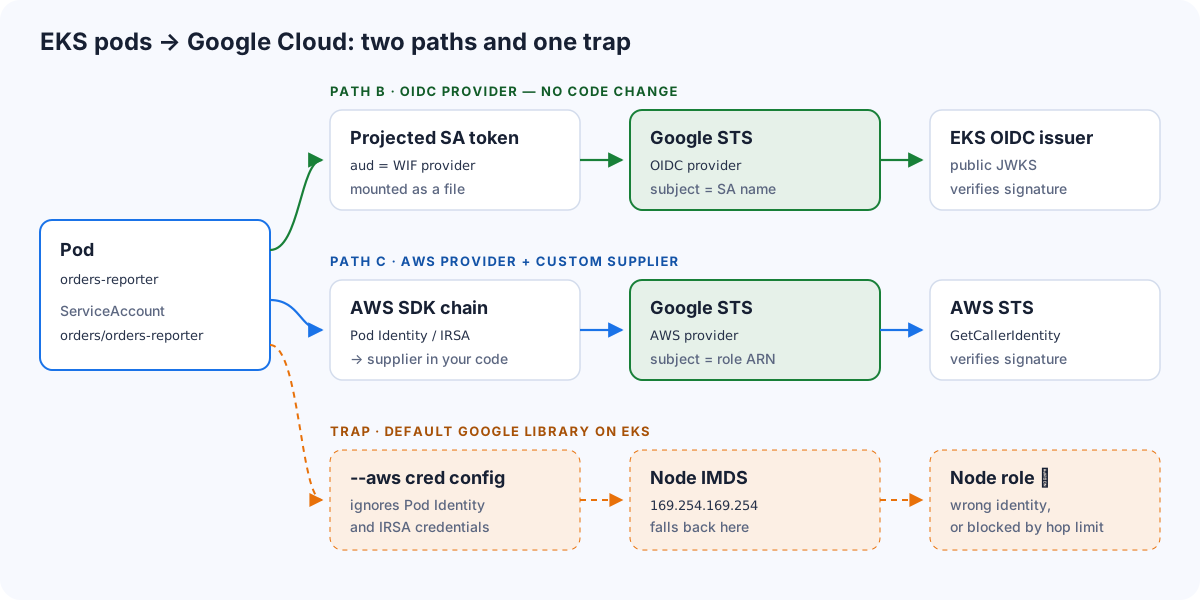
Đây là chỗ phần lớn lần thử đầu tiên bị sai. File cấu hình --aws chỉ biết hai nguồn: instance metadata và biến môi trường. Pod trên EKS nhận AWS credentials qua Pod Identity (một container credentials endpoint) hoặc IRSA (file web identity token). ECS task nhận qua endpoint của task role. Thư viện Google không hiểu cách nào trong số đó.
Vì vậy nó rơi xuống instance metadata, và rơi vào một trong hai trường hợp:
- lấy nhầm IAM role của node: sai danh tính, có thể nhiều quyền hơn hoặc ít quyền hơn dự định;
- hoặc bị timeout, vì IMDSv2 với hop limit 1 đã chặn đúng việc pod lấy role của node.
Path B: OIDC provider (khuyến nghị cho EKS, không sửa code)
Mỗi EKS cluster đã có sẵn một OIDC issuer public. Google có thể tin issuer đó trực tiếp, và pod xác thực bằng token của Kubernetes service account. Phần này không cần thay đổi EKS, cũng không cần IRSA hay Pod Identity.
ISSUER=$(aws eks describe-cluster --name prod-eu-1 \
  --query "cluster.identity.oidc.issuer" --output text)

gcloud iam workload-identity-pools providers create-oidc eks-prod-eu-1 \
  --project=platform-identity \
  --location=global \
  --workload-identity-pool=aws-prod \
  --issuer-uri="$ISSUER" \
  --attribute-mapping="google.subject=assertion.sub,attribute.namespace=assertion['kubernetes.io']['namespace']" \
  --attribute-condition="assertion['kubernetes.io']['namespace'] in ['orders', 'analytics']"

gcloud iam workload-identity-pools create-cred-config \
  projects/123456789012/locations/global/workloadIdentityPools/aws-prod/providers/eks-prod-eu-1 \
  --credential-source-file=/var/run/service-account/token \
  --credential-source-type=text \
  --output-file=credential-configuration.json

kubectl create configmap gcp-wif-config -n orders --from-file=credential-configuration.json
Cấp quyền cho Kubernetes service account làm principal:
gcloud storage buckets add-iam-policy-binding gs://analytics-prod-reports \
  --role=roles/storage.objectViewer \
  --member="principal://iam.googleapis.com/projects/123456789012/locations/global/workloadIdentityPools/aws-prod/subject/system:serviceaccount:orders:orders-reporter"
Mount một projected token có audience là provider, cùng với file cấu hình:
spec:
  serviceAccountName: orders-reporter
  containers:
  - name: app
    image: …/orders-reporter:1.8.0
    env:
    - name: GOOGLE_APPLICATION_CREDENTIALS
      value: /etc/gcp/credential-configuration.json
    volumeMounts:
    - { name: gcp-token, mountPath: /var/run/service-account, readOnly: true }
    - { name: gcp-config, mountPath: /etc/gcp, readOnly: true }
  volumes:
  - name: gcp-token
    projected:
      sources:
      - serviceAccountToken:
          audience: https://iam.googleapis.com/projects/123456789012/locations/global/workloadIdentityPools/aws-prod/providers/eks-prod-eu-1
          expirationSeconds: 3600
          path: token
  - name: gcp-config
    configMap:
      name: gcp-wif-config
Kubelet tự làm mới file token trước khi hết hạn, và thư viện Google đọc lại file đó. Mọi thư viện client chuẩn của Google đều dùng được mà không phải sửa code.
Đánh đổi: mỗi cluster có issuer riêng, nên mỗi cluster cần một provider riêng. Hãy tự động hoá việc này bằng Terraform.
Path C: AWS provider + custom credential supplier
Đôi khi bạn muốn Google nhìn thấy IAM role, đúng danh tính mà workload dùng ở mọi nơi khác trên AWS, ví dụ để giữ một mô hình phân quyền chung cho EC2, Lambda và EKS. Thư viện client của Google cho phép gắn vào một AWS security credentials supplier. Hãy cài supplier này bằng AWS SDK, vì default chain của SDK hiểu được Pod Identity, IRSA và ECS task role:
import boto3
from google.auth import aws, exceptions
from google.cloud import storage

class Boto3CredentialsSupplier(aws.AwsSecurityCredentialsSupplier):
    """Đưa credentials của AWS SDK (Pod Identity, IRSA, ECS, env…) cho google-auth."""

    def __init__(self):
        self._session = boto3.Session()

    def get_aws_security_credentials(self, context, request):
        try:
            c = self._session.get_credentials().get_frozen_credentials()  # boto3 tự refresh
            return aws.AwsSecurityCredentials(c.access_key, c.secret_key, c.token)
        except Exception as e:
            raise exceptions.RefreshError(e, retryable=True)

    def get_aws_region(self, context, request):
        return self._session.region_name or "us-east-1"

credentials = aws.Credentials(
    audience="//iam.googleapis.com/projects/123456789012/locations/global/workloadIdentityPools/aws-prod/providers/aws-prod",
    subject_token_type="urn:ietf:params:aws:token-type:aws4_request",
    aws_security_credentials_supplier=Boto3CredentialsSupplier(),
    scopes=["https://www.googleapis.com/auth/cloud-platform"],
)

client = storage.Client(project="analytics-prod", credentials=credentials)
Thư viện auth cho Go, Java và Node.js cũng có interface supplier tương tự. Phần cấp quyền vẫn dùng attribute.aws_role/<tên-role>, giống hệt path A.
Giới hạn 127 byte của google.subject
google.subject không được dài quá 127 byte. Google STS kiểm tra điều này ở mỗi lần trao đổi token, nên một mapping chạy ổn hàng tháng trời sẽ hỏng ngay khi có một workload mang ARN dài hơn:
"error": "invalid_request",
"error_description": "The size of mapped attribute google.subject exceeds the 127 bytes limit.
Either modify your attribute mapping or the incoming assertion to produce a mapped attribute
that is less than 127 bytes."
Với google.subject=assertion.arn, subject là toàn bộ ARN của assumed role, tính cả session name:
arn:aws:sts::444444444444:assumed-role/<role-name>/<session-name>
└───────────── 39 bytes ──────────────┘└─ ≤ 64 ──┘ └─── ≤ 64 ───┘
Tên role và session name mỗi thứ dài tối đa 64 ký tự, nên ARN có thể tới 168 byte. Khi role cộng session vượt 87 ký tự, trao đổi token thất bại. Session name cũng không phải do bạn chọn: EC2 dùng instance ID (ngắn, an toàn), nhưng Lambda dùng tên function, ECS dùng task ID, còn các công cụ gọi AssumeRole tự đặt tên riêng. Một ví dụ thật, lỗi chỉ vì thừa đúng một byte:
| Giá trị | Byte | |
|---|---|---|
| Role | analytics-prod-reporting-exporter-eu-west-1 |
43 |
| Session (tên Lambda function) | analytics-prod-reporting-exporter-nightly-job |
45 |
assertion.arn |
arn:aws:sts::444444444444:assumed-role/analytics-prod-reporting-exporter-eu-west-1/analytics-prod-reporting-exporter-nightly-job |
128 ✗ |
account:role |
444444444444:analytics-prod-reporting-exporter-eu-west-1 |
56 ✓ |
Cùng một role chạy được từ EC2 nhưng hỏng từ Lambda, nên rất dễ tưởng là lỗi của Lambda. Không phải.
Cách sửa: map subject thành account:role. Cách này bỏ session đi và luôn nằm trong giới hạn 12 + 1 + 64 = 77 byte, bất kể thứ gì chạy sau role:
gcloud iam workload-identity-pools providers update-aws aws-prod \
  --location=global --workload-identity-pool=aws-prod \
  --attribute-mapping="google.subject=assertion.account+':'+assertion.arn.extract('assumed-role/{role_name}/'),attribute.account=assertion.account,attribute.aws_role=assertion.arn.extract('assumed-role/{role_name}/')"
Những điều cần biết trước khi đổi:
- Binding trên
attribute.aws_rolevẫn chạy bình thường. Chúng không dùng subject, đó là lý do bài này cấp quyền quaprincipalSet://…/attribute.aws_role/<role>. - Binding trên
principal://…/subject/<arn>sẽ hỏng. Chúng ghi tên subject cũ. Hãy viết lại thànhprincipal://…/subject/444444444444:<role>(mỗi role một binding, không phải mỗi session) hoặc chuyển sangattribute.aws_role. - Audit log mất session name. Cloud Audit Logs hiển thị subject, nên bạn sẽ thấy role chứ không thấy đúng EC2 instance hay Lambda function nào. Khi cần đào sâu, dùng CloudTrail phía AWS, nơi session vẫn được ghi lại.
- Tiền tố account là cần thiết. Chỉ dùng tên role thì ngắn hơn, nhưng hai account trong cùng pool có thể ra cùng một subject.
account:rolethì luôn duy nhất. - Attribute condition vẫn bảo vệ bạn. Nó chỉ cho ARN dạng
assumed-roleđi qua, nênextract('assumed-role/{role_name}/')luôn tìm được tên role.
EKS với OIDC provider (path B) cũng chịu giới hạn này: subject là system:serviceaccount:<namespace>:<serviceaccount>, 22 byte tiền tố cộng tên của bạn. Tên ngắn thì còn xa giới hạn, nhưng namespace và service account đặt tên quá dài cũng có thể chạm tới.
Hub-and-spoke cho nhiều account và project
Khi có vài AWS account, hàng chục GCP project và vài EKS cluster, hãy tập trung phần federation:
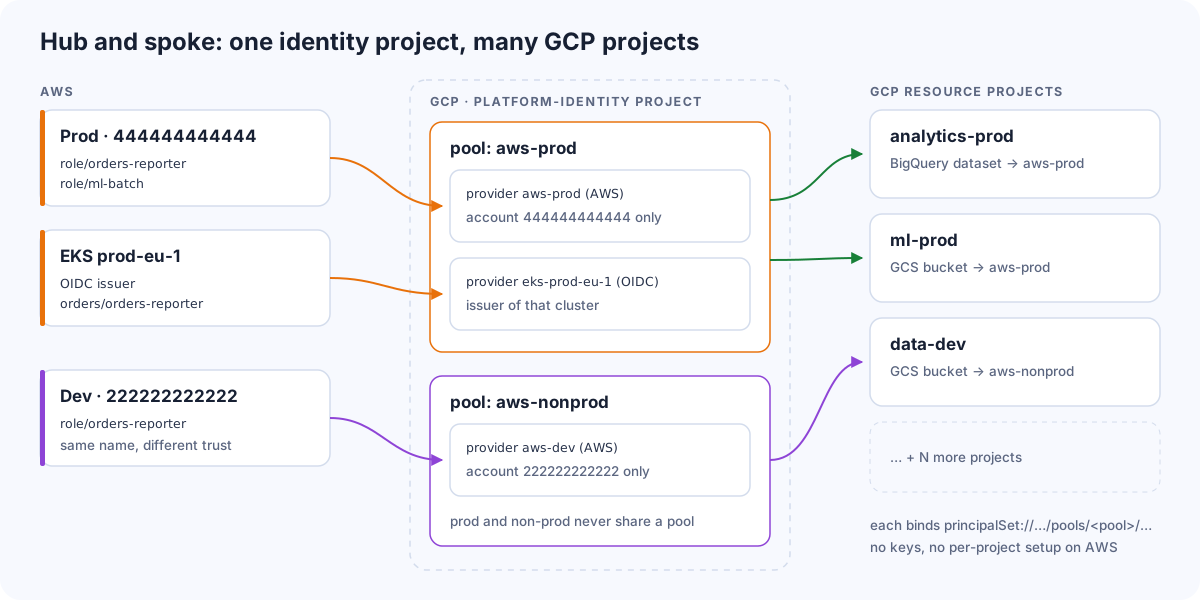
- Một identity project (
platform-identity) chứa mọi pool và provider, do team platform sở hữu. - Mỗi ranh giới tin cậy một pool.
aws-prodchỉ tin các account và cluster production,aws-nonprodtin phần còn lại.attribute.aws_rolechỉ là tên role, nên nếu hai môi trường dùng chung pool,orders-reporterở dev có thể khớp với binding của prod. Tách pool là loại bỏ hẳn rủi ro này. - Mỗi AWS account một provider (loại AWS), và mỗi EKS cluster một provider (loại OIDC).
- Project chứa tài nguyên chỉ thêm binding trỏ tới
principalSet://…/workloadIdentityPools/aws-prod/…. Thêm project thứ 28 chỉ là một thay đổi Terraform.
resource "google_iam_workload_identity_pool" "aws_prod" {
  project                   = "platform-identity"
  workload_identity_pool_id = "aws-prod"
}

resource "google_iam_workload_identity_pool_provider" "aws_prod" {
  project                            = "platform-identity"
  workload_identity_pool_id          = google_iam_workload_identity_pool.aws_prod.workload_identity_pool_id
  workload_identity_pool_provider_id = "aws-prod"
  attribute_mapping = {
    "google.subject"     = "assertion.account + ':' + assertion.arn.extract('assumed-role/{role_name}/')"
    "attribute.account"  = "assertion.account"
    "attribute.aws_role" = "assertion.arn.extract('assumed-role/{role_name}/')"
  }
  attribute_condition = "assertion.arn.startsWith('arn:aws:sts::444444444444:assumed-role/')"
  aws {
    account_id = "444444444444"
  }
}

resource "google_storage_bucket_iam_member" "reports_reader" {
  bucket = "analytics-prod-reports"
  role   = "roles/storage.objectViewer"
  member = "principalSet://iam.googleapis.com/${google_iam_workload_identity_pool.aws_prod.name}/attribute.aws_role/orders-reporter"
}
Checklist bảo mật
- Luôn đặt attribute condition. Giới hạn trong các role được assume từ account cụ thể, hoặc trong namespace cụ thể với EKS. Provider không có condition sẽ tin mọi danh tính trong account đó, kể cả IAM user.
- Cấm key khi federation đã chạy. Bật organisation policy
iam.disableServiceAccountKeyCreationđể không ai quay lại dùngkey.json. - Giới hạn ai được thêm provider. Organisation policy
iam.workloadIdentityPoolAwsAccountsvàiam.workloadIdentityPoolProvidersgiới hạn những AWS account và issuer nào được phép tin. - Ưu tiên direct resource access. Ít service account hơn, và audit log hiện đúng principal thật từ AWS thay vì một service account dùng chung.
- Least privilege ở cả hai phía. AWS role giờ cũng là một danh tính Google. Hãy dành riêng nó cho một workload, đừng dùng lại các role rộng như role của node.
- Chặn pod truy cập instance metadata (IMDSv2, hop limit 1), để pod cấu hình sai sẽ báo lỗi rõ ràng thay vì âm thầm mượn role của node.
Xử lý sự cố
| Triệu chứng | Nguyên nhân thường gặp |
|---|---|
The given credential is rejected by the attribute condition |
Condition không khớp. Kiểm tra account ID, hoặc namespace với EKS. |
Permission 'iam.serviceAccounts.getAccessToken' denied |
Dùng impersonation nhưng thiếu roles/iam.workloadIdentityUser trên service account |
API trả 403 dù đổi token thành công |
Chưa có binding trên tài nguyên, hoặc sản phẩm cần impersonation thay vì direct access |
| Chạy được trên EC2 nhưng sai danh tính hoặc timeout trên EKS / ECS | Thư viện đã rơi xuống instance metadata của node. Dùng path B hoặc C. |
Unable to determine the AWS region |
Không có metadata service. Đặt biến AWS_REGION. |
The size of mapped attribute google.subject exceeds the 127 bytes limit |
google.subject map cả ARN, và role + session name quá dài. Đổi sang map account:role (xem phía trên). |
429 Too Many Requests · The request was throttled due to rate limit: sts.googleapis.com/requests |
Project đã hết quota của Security Token Service. Thường do client không dùng lại token (xem bên dưới). |
429 Too Many Requests từ Google STS
429 Too Many Requests
The request was throttled due to rate limit: sts.googleapis.com/requests. Please retry after a few seconds.
Lỗi này nghĩa là project đã dùng hết rate quota của Security Token Service API. Mặc định là 6.000 lần trao đổi token mỗi project mỗi phút (endpoint regional có quota riêng, 6.000 mỗi region). Nếu bạn impersonate service account thì bước thứ hai, generateAccessToken, tính vào một quota khác là 60.000 request mỗi project mỗi phút.
Với client viết đúng cách, 6.000 mỗi phút là rất nhiều, vì một federated token sống tới một giờ. Khi chạm giới hạn, nguyên nhân gần như luôn là một client đổi token mới cho mỗi request thay vì dùng lại:
- Tạo credentials object mới cho mỗi lần gọi. Thư viện auth của Google cache token bên trong credentials object và tự làm mới ngay trước khi hết hạn. Code tạo client mới, hoặc gọi
google.auth.default(), cho mỗi request hay mỗi message là vứt bỏ cache đó. Hãy tạo client một lần cho mỗi process và dùng lại. - Process sống ngắn ở quy mô lớn. Mỗi lần Lambda cold start, mỗi pod CronJob hay mỗi lần chạy CLI đều bắt đầu với cache rỗng và phải trao đổi token từ đầu. Vài nghìn lần mỗi phút là đủ chạm giới hạn. Đặt client ở global scope để các lần gọi Lambda còn “ấm” dùng lại, và gom việc vào ít process sống lâu hơn khi có thể.
- Retry storm. Một dependency hỏng cộng với retry dồn dập biến một lần trao đổi thành hàng chục lần. Hãy retry lỗi 429 với exponential backoff và jitter, đúng như chính thông báo lỗi yêu cầu.
- Hub-and-spoke lớn dần. Mọi workload trong mọi AWS account đều trao đổi token qua cùng một identity project, nên quota của project đó được dùng chung. Không sao cả, nhưng đó là con số cần theo dõi khi tiếp tục onboard thêm.
Để xử lý, trước hết tìm xem workload nào đang tạo ra các lần trao đổi: nếu đã bật Data Access audit log cho Security Token Service, AWS principal gọi STS chính là google.subject trong Cloud Audit Logs. Sửa phần cache ở đó. Nếu lưu lượng là hợp lệ, mở IAM & Admin → Quotas & System Limits trong project, tìm metric sts.googleapis.com/requests có trong thông báo lỗi, xác nhận mức dùng đã chạm giới hạn, rồi gửi yêu cầu tăng quota.
Kết luận
Workload Identity Federation biến việc “copy file JSON key sang AWS” thành cấu hình không chứa bất kỳ bí mật nào. Trên EC2 và Lambda, chỉ cần một AWS provider và một file cấu hình được sinh ra. Trên EKS, hãy để Google tin OIDC issuer của cluster (path B), hoặc đưa credentials của AWS SDK qua một custom supplier (path C), và đừng bao giờ dựa vào cơ chế fallback xuống instance metadata. Khi quy mô lớn, hãy tập trung các pool vào một identity project, tách pool theo ranh giới tin cậy, và để mỗi GCP project cấp quyền chỉ bằng một IAM binding.
Nguồn
- Workload Identity Federation: https://cloud.google.com/iam/docs/workload-identity-federation
- Workload Identity Federation với AWS và Azure: https://cloud.google.com/iam/docs/workload-identity-federation-with-other-clouds
- Workload Identity Federation với Kubernetes: https://cloud.google.com/iam/docs/workload-identity-federation-with-kubernetes
- Best practice cho Workload Identity Federation: https://cloud.google.com/iam/docs/best-practices-for-using-workload-identity-federation
- AIP-4117: external account credentials: https://google.aip.dev/auth/4117
- Xử lý sự cố Workload Identity Federation (giới hạn 127 byte của subject): https://docs.cloud.google.com/iam/docs/troubleshooting-workload-identity-federation
- Quota và giới hạn của IAM: https://docs.cloud.google.com/iam/quotas
Bình luận