Workload Identity Federation từ Google Cloud sang AWS — không cần access key
Cho workload trên GCE, Cloud Run, Cloud Functions và GKE gọi AWS bằng credentials tạm thời: Google ID token và AssumeRoleWithWebIdentity, lỗi trust policy khiến role mở cho cả internet, cách làm qua OIDC của GKE, và Terraform cho cả hai phía.
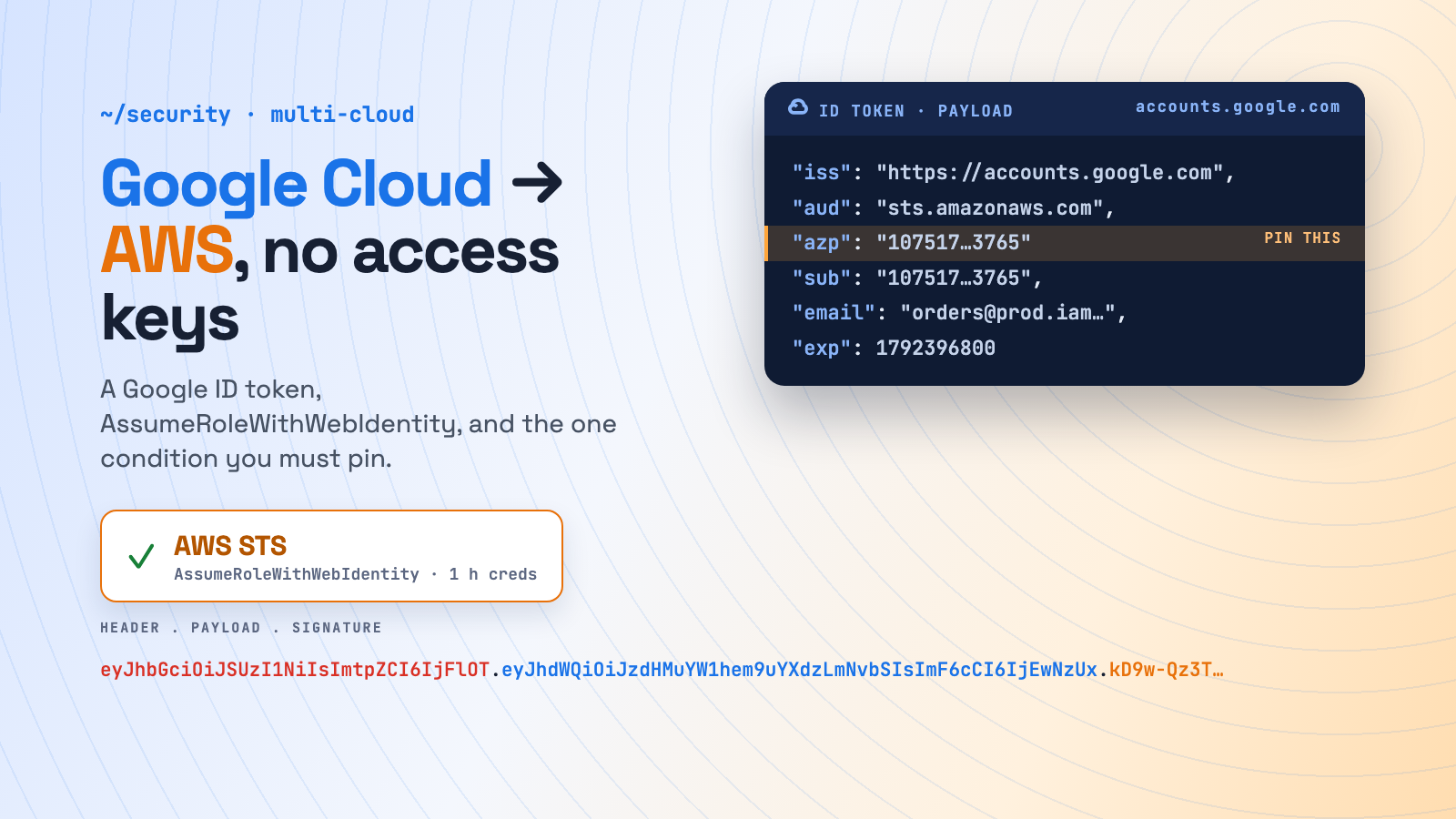
Một service trên Google Cloud cần đẩy file lên S3, đọc SQS queue hay lấy secret từ AWS Secrets Manager. Cách cổ điển là tạo IAM user với access key, cất vào Secret Manager rồi inject qua AWS_ACCESS_KEY_ID. Key đó không bao giờ hết hạn, dùng được từ bất kỳ đâu, và sẽ thành sự cố bảo mật vào ngày nó bị lộ.
AWS không cần những thứ đó. Mọi workload trên GCP vốn đã có danh tính là service account, và Google sẵn sàng ký OIDC ID token cho nó khi được yêu cầu. AWS STS nhận token đó qua AssumeRoleWithWebIdentity và trả về credentials tạm thời của một IAM role. Không có access key nào tồn tại cả.
Đây là chiều ngược lại của bài AWS → Google Cloud. Xem thêm AWS → Azure, Workload Identity trên GKE và Workload Identity trên AKS.
Cơ chế hoạt động
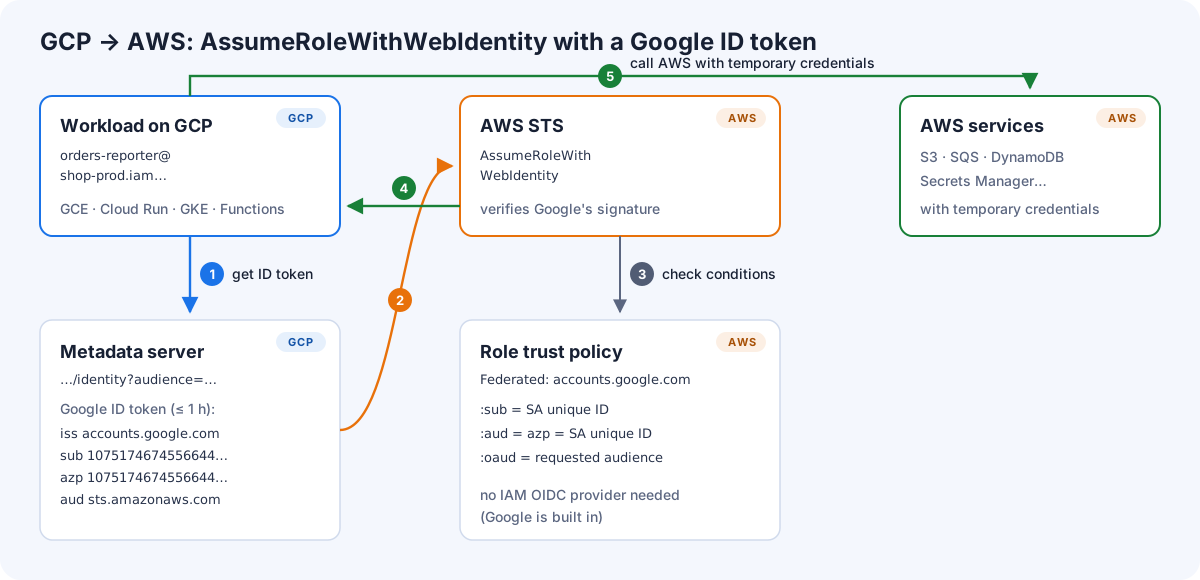
- Workload xin metadata server của GCP một ID token với audience đã thống nhất, ví dụ
sts.amazonaws.com. Google ký một JWT gồmiss=https://accounts.google.com,subvàazp(đều là unique ID dạng số của service account), vàaud(audience của bạn). - Workload gọi
sts:AssumeRoleWithWebIdentitykèm token đó. Lời gọi này không cần ký bằng AWS credentials, vì bản thân token chính là credential. - AWS STS xác minh chữ ký của Google và đánh giá trust policy của role. Google là identity provider có sẵn trong AWS, nên không cần tạo IAM OIDC provider.
- STS trả credentials tạm thời, mặc định có hiệu lực một giờ.
- Workload gọi S3, SQS… như mọi AWS client khác.
Lỗi khiến role mở cho cả internet
accounts.google.com là một issuer dùng chung cho mọi danh tính Google trên hành tinh. Ai có một project GCP miễn phí cũng tạo được service account và xin ID token với aud=sts.amazonaws.com. AWS cũng không bắt bạn kiểm tra thêm gì: Google không nằm trong danh sách các provider dùng chung mà IAM bắt buộc trust policy phải kiểm tra claim cụ thể.
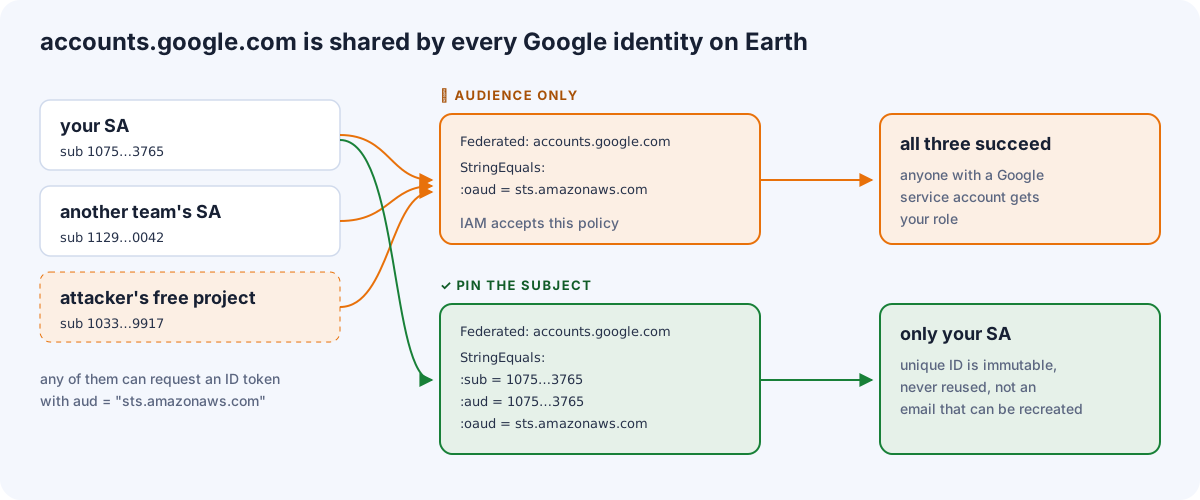
Các condition key cũng không ánh xạ như bạn nghĩ. ID token của service account có đặt claim azp, và khi có azp thì:
| Condition key của AWS | Khớp với claim | Với ID token của service account |
|---|---|---|
accounts.google.com:sub |
sub |
unique ID của SA (ví dụ 107517467455664443765) |
accounts.google.com:aud |
azp (nếu có), không thì aud |
lại là unique ID của SA |
accounts.google.com:oaud |
aud |
audience bạn yêu cầu (sts.amazonaws.com) |
accounts.google.com:email |
email |
email của SA: không dùng làm điều kiện chính |
Vì vậy một trust policy đúng phải ghim cả ba:
{
  "Version": "2012-10-17",
  "Statement": [{
    "Effect": "Allow",
    "Principal": { "Federated": "accounts.google.com" },
    "Action": "sts:AssumeRoleWithWebIdentity",
    "Condition": {
      "StringEquals": {
        "accounts.google.com:sub":  "107517467455664443765",
        "accounts.google.com:aud":  "107517467455664443765",
        "accounts.google.com:oaud": "sts.amazonaws.com"
      }
    }
  }]
}
Dùng unique ID, không dùng email. Nếu ai đó xoá orders-reporter@shop-prod.iam.gserviceaccount.com rồi tạo lại, email sẽ quay lại nhưng unique ID thì không. Role của bạn vẫn chỉ gắn với danh tính ban đầu.
Hai cách lấy token
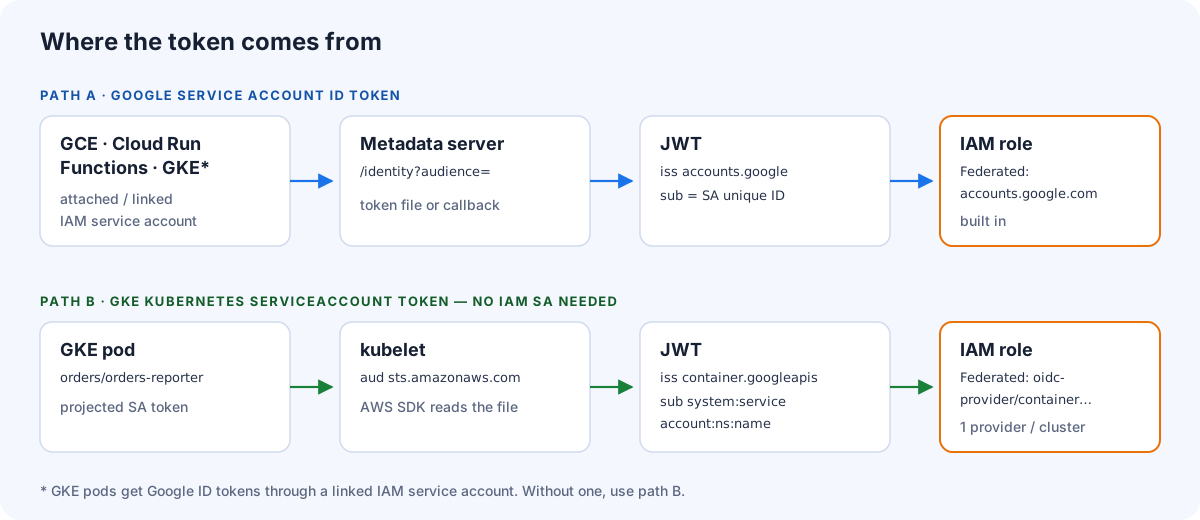
| Path A: ID token của Google SA | Path B: token của ServiceAccount trên GKE | |
|---|---|---|
| Chạy trên | GCE, Cloud Run, Cloud Functions, GKE có liên kết SA | Pod trên GKE |
| Danh tính AWS nhìn thấy | Google service account (unique ID) | system:serviceaccount:<ns>:<name> |
| Thiết lập phía AWS | chỉ cần role (Google có sẵn) | IAM OIDC provider cho mỗi cluster + role |
| Cách lấy token | metadata server, qua sidecar hoặc vài dòng code | kubelet tự project, AWS SDK đọc được ngay |
Path A: ID token của Google service account
1. Phía GCP: một service account riêng
gcloud iam service-accounts create orders-reporter --project=shop-prod

gcloud iam service-accounts describe \
  orders-reporter@shop-prod.iam.gserviceaccount.com \
  --format='value(uniqueId)'
# 107517467455664443765

# gắn vào workload, ví dụ Cloud Run
gcloud run deploy orders-reporter --project=shop-prod --region=europe-west1 \
  --image=europe-docker.pkg.dev/shop-prod/apps/orders-reporter:1.8.0 \
  --service-account=orders-reporter@shop-prod.iam.gserviceaccount.com
2. Phía AWS: tạo role
aws iam create-role --role-name gcp-orders-reporter \
  --assume-role-policy-document file://trust-gcp-orders-reporter.json \
  --max-session-duration 3600

aws iam put-role-policy --role-name gcp-orders-reporter --policy-name s3-write \
  --policy-document '{"Version":"2012-10-17","Statement":[{"Effect":"Allow","Action":["s3:PutObject"],"Resource":"arn:aws:s3:::orders-exports/*"}]}'
trust-gcp-orders-reporter.json là policy ở phần trên.
3a. Phía workload, không sửa code: dùng file token
Mọi AWS SDK đều biết sẵn AssumeRoleWithWebIdentity. Chỉ cần trỏ tới role và file token, SDK tự lo việc đổi token và làm mới:
AWS_ROLE_ARN=arn:aws:iam::444444444444:role/gcp-orders-reporter
AWS_WEB_IDENTITY_TOKEN_FILE=/var/run/aws/token
AWS_ROLE_SESSION_NAME=orders-reporter
AWS_REGION=eu-west-1
Một sidecar nhỏ giữ cho file luôn mới. Google ID token sống tối đa một giờ, nên làm mới mỗi 30 phút. Trên Cloud Run, dùng sidecar container với volume trong bộ nhớ dùng chung. Trên GCE, dùng systemd timer.
while true; do
  curl -sf -H "Metadata-Flavor: Google" \
    "http://metadata.google.internal/computeMetadata/v1/instance/service-accounts/default/identity?audience=sts.amazonaws.com&format=full" \
    -o /var/run/aws/token.tmp \
  && mv /var/run/aws/token.tmp /var/run/aws/token
  sleep 1800
done
3b. Phía workload, viết trong code (Python)
Nếu không dùng sidecar, lấy token ngay trong tiến trình và để botocore tự làm mới credentials trước khi hết hạn:
import boto3
import botocore.session
from botocore.credentials import RefreshableCredentials
from google.auth.transport.requests import Request
from google.oauth2 import id_token

ROLE_ARN = "arn:aws:iam::444444444444:role/gcp-orders-reporter"
sts = boto3.client("sts", region_name="eu-west-1")   # AssumeRoleWithWebIdentity không cần ký

def refresh():
    token = id_token.fetch_id_token(Request(), "sts.amazonaws.com")  # lấy từ metadata server
    c = sts.assume_role_with_web_identity(
        RoleArn=ROLE_ARN, RoleSessionName="orders-reporter", WebIdentityToken=token,
    )["Credentials"]
    return {
        "access_key": c["AccessKeyId"],
        "secret_key": c["SecretAccessKey"],
        "token": c["SessionToken"],
        "expiry_time": c["Expiration"].isoformat(),
    }

core = botocore.session.get_session()
core._credentials = RefreshableCredentials.create_from_metadata(
    metadata=refresh(), refresh_using=refresh, method="gcp-web-identity",
)
s3 = boto3.Session(botocore_session=core, region_name="eu-west-1").client("s3")
s3.put_object(Bucket="orders-exports", Key="daily.csv", Body=b"…")
Thử nhanh từ một VM
TOKEN=$(curl -s -H "Metadata-Flavor: Google" \
  "http://metadata.google.internal/computeMetadata/v1/instance/service-accounts/default/identity?audience=sts.amazonaws.com")

aws sts assume-role-with-web-identity \
  --role-arn arn:aws:iam::444444444444:role/gcp-orders-reporter \
  --role-session-name test --web-identity-token "$TOKEN" \
  --query 'AssumedRoleUser.Arn'
# "arn:aws:sts::444444444444:assumed-role/gcp-orders-reporter/test"
Path B: pod trên GKE dùng OIDC issuer của cluster
Cluster GKE có OIDC issuer cho token của Kubernetes service account. AWS có thể tin issuer đó như mọi OIDC provider khác. Đây chính là cơ chế của IRSA, chỉ khác là issuer thuộc GKE. Phía Google không cần IAM service account, và AWS SDK đọc file token được ngay.
ISSUER=$(kubectl get --raw /.well-known/openid-configuration | jq -r .issuer)
# https://container.googleapis.com/v1/projects/shop-prod/locations/europe-west1/clusters/prod-eu-1
curl -s "$ISSUER/.well-known/openid-configuration" | jq .jwks_uri   # AWS phải truy cập được

aws iam create-open-id-connect-provider \
  --url "$ISSUER" \
  --client-id-list sts.amazonaws.com
{
"Version": "2012-10-17",
"Statement": [{
"Effect": "Allow",
"Principal": {
"Federated": "arn:aws:iam::444444444444:oidc-provider/container.googleapis.com/v1/projects/shop-prod/locations/europe-west1/clusters/prod-eu-1"
},
"Action": "sts:AssumeRoleWithWebIdentity",
"Condition": {
"StringEquals": {
"container.googleapis.com/v1/projects/shop-prod/locations/europe-west1/clusters/prod-eu-1:aud": "sts.amazonaws.com",
"container.googleapis.com/v1/projects/shop-prod/locations/europe-west1/clusters/prod-eu-1:sub": "system:serviceaccount:orders:orders-reporter"
}
}
}]
}spec:
serviceAccountName: orders-reporter
containers:
- name: app
image: europe-docker.pkg.dev/shop-prod/apps/orders-reporter:1.8.0
env:
- { name: AWS_ROLE_ARN, value: arn:aws:iam::444444444444:role/gke-orders-reporter }
- { name: AWS_WEB_IDENTITY_TOKEN_FILE, value: /var/run/secrets/aws/token }
- { name: AWS_REGION, value: eu-west-1 }
volumeMounts:
- { name: aws-token, mountPath: /var/run/secrets/aws, readOnly: true }
volumes:
- name: aws-token
projected:
sources:
- serviceAccountToken:
audience: sts.amazonaws.com
expirationSeconds: 3600
path: tokenĐánh đổi: mỗi cluster cần một IAM OIDC provider, và mỗi AWS account có giới hạn số OIDC provider (mặc định 100). Hãy tự động hoá việc tạo, và xoá provider khi cluster bị huỷ.
Terraform: cả hai phía trong một plan
resource "google_service_account" "orders_reporter" {
  project    = "shop-prod"
  account_id = "orders-reporter"
}

data "aws_iam_policy_document" "trust_gcp" {
  statement {
    actions = ["sts:AssumeRoleWithWebIdentity"]
    principals {
      type        = "Federated"
      identifiers = ["accounts.google.com"]
    }
    condition {
      test     = "StringEquals"
      variable = "accounts.google.com:sub"
      values   = [google_service_account.orders_reporter.unique_id]
    }
    condition {
      test     = "StringEquals"
      variable = "accounts.google.com:aud"
      values   = [google_service_account.orders_reporter.unique_id]
    }
    condition {
      test     = "StringEquals"
      variable = "accounts.google.com:oaud"
      values   = ["sts.amazonaws.com"]
    }
  }
}

resource "aws_iam_role" "gcp_orders_reporter" {
  name                 = "gcp-orders-reporter"
  assume_role_policy   = data.aws_iam_policy_document.trust_gcp.json
  max_session_duration = 3600
}
Unique ID đi thẳng từ resource Google vào trust policy của AWS, nên không ai phải copy tay một dãy 21 chữ số.
Checklist bảo mật
- Ghim
sub(vàaud) vào unique ID, vàoaudvào audience của bạn. Policy thiếu các điều kiện này là đang tin toàn bộ Google. - Kiểm soát ai được tạo token ở phía GCP. Ai impersonate được service account thì cũng xin được ID token của nó, tức là vào được AWS. Hãy rà soát
roles/iam.serviceAccountTokenCreator,roles/iam.serviceAccountOpenIdTokenCreatorvà quyềniam.serviceAccounts.actAs(ai được deploy workload dưới danh nghĩa SA đó). - Mỗi workload một service account, mỗi service account một role. Danh tính dùng chung làm rối audit ở cả hai phía.
- Least privilege cho role, và
MaxSessionDurationngắn. - Đặt session name có ý nghĩa. CloudTrail ghi lại
AssumeRoleWithWebIdentitykèm danh tính Google, và session name giúp các API call sau đó dễ đọc. - Không còn access key nào. Khi federation đã chạy, xoá IAM user cũ và chặn tạo mới bằng SCP.
Xử lý sự cố
| Lỗi | Nguyên nhân thường gặp |
|---|---|
AccessDenied: Not authorized to perform sts:AssumeRoleWithWebIdentity |
Điều kiện trust không khớp. Hay gặp nhất là đặt audience vào :aud thay vì :oaud, hoặc dùng email thay vì unique ID. |
InvalidIdentityToken: Incorrect token audience |
Path B: audience của token không có trong client-id list của OIDC provider |
InvalidIdentityToken: Couldn't retrieve verification key |
Path B: issuer URL sai, hoặc AWS không truy cập được endpoint discovery/JWKS của cluster |
ExpiredTokenException |
File token không được làm mới. Kiểm tra sidecar hoặc timer. |
| Chạy được trên VM nhưng không chạy trên GKE | Pod chưa liên kết IAM service account. Dùng path B hoặc liên kết một SA. |
Kết luận
Federation từ Google Cloud sang AWS chủ yếu là chuyện trust policy: Google là provider có sẵn, nên chỉ cần một role tin accounts.google.com cộng vài dòng để lấy ID token. Chỉ cần làm đúng một chi tiết: ghim unique ID của service account vào sub và aud, và audience vào oaud, vì issuer này dùng chung cho tất cả mọi người. Trên GKE, tin chính OIDC issuer của cluster cho bạn cách làm kiểu IRSA, không phải viết code. Kết hợp với bài AWS → Google Cloud, giờ AWS và Google Cloud đã gọi nhau được theo cả hai chiều mà không cần một key dài hạn nào.
Nguồn
- STS AssumeRoleWithWebIdentity API: https://docs.aws.amazon.com/STS/latest/APIReference/API_AssumeRoleWithWebIdentity.html
- Condition key cho web identity federation (accounts.google.com): https://docs.aws.amazon.com/IAM/latest/UserGuide/reference_policies_iam-condition-keys.html
- Tạo role cho OIDC federation: https://docs.aws.amazon.com/IAM/latest/UserGuide/id_roles_create_for-idp_oidc.html
- Lấy ID token (Google Cloud): https://cloud.google.com/docs/authentication/get-id-token
- Xác minh danh tính instance: https://cloud.google.com/compute/docs/instances/verifying-instance-identity
- GKE Workload Identity Federation: https://cloud.google.com/kubernetes-engine/docs/concepts/workload-identity
Bình luận