Workload Identity Federation from AWS to Google Cloud — without service account keys
Let EC2, Lambda, ECS and EKS workloads call Google Cloud with short-lived tokens: how the token exchange works, step-by-step setup, the EKS trap, and a hub-and-spoke design for many accounts.
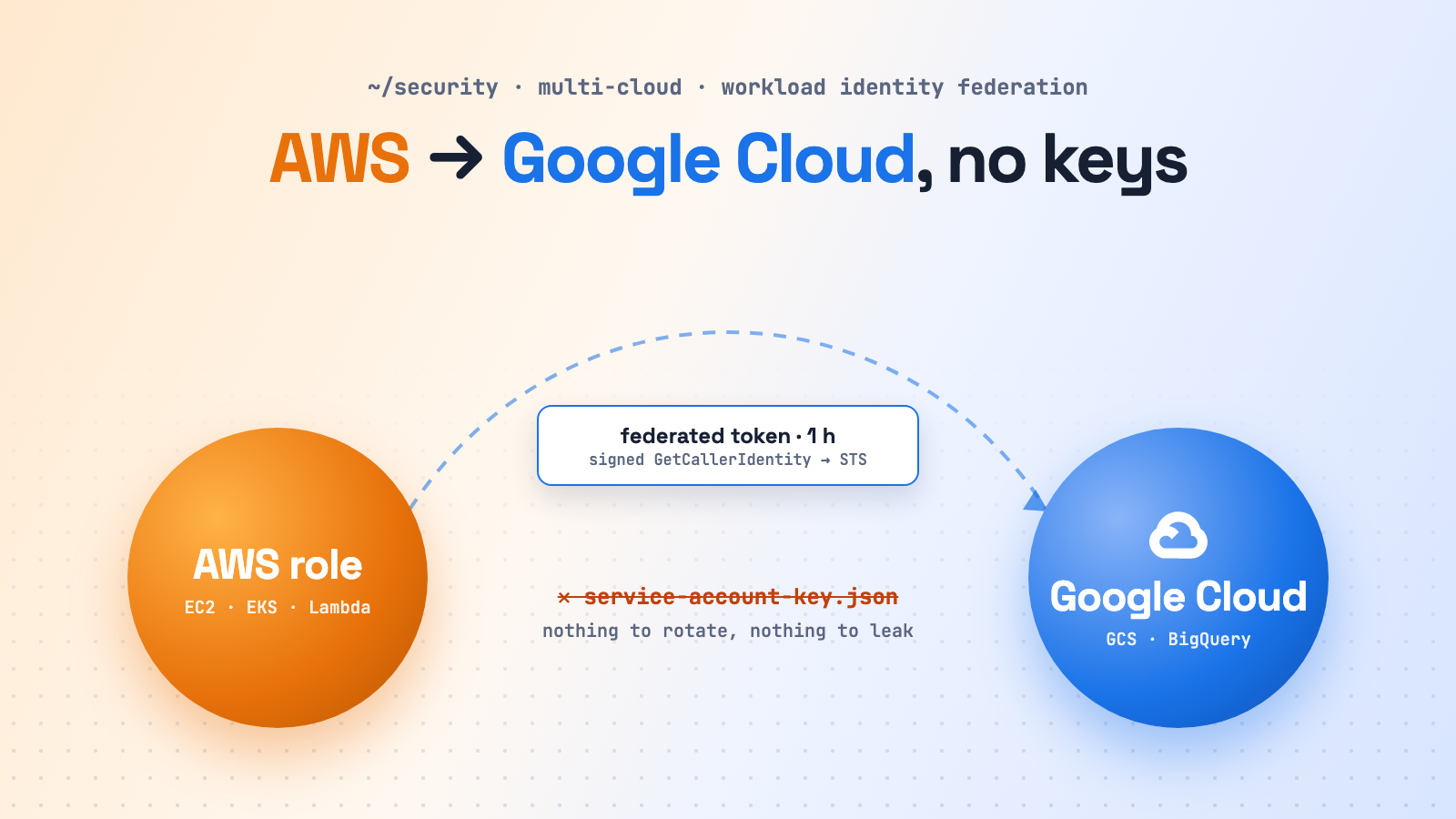
A service running on AWS needs to read a BigQuery dataset or write to a Cloud Storage bucket. The fastest way is also the worst one: create a Google service account, download key.json, store it in AWS Secrets Manager, and mount it into the app. That key never expires. It gets copied into CI and laptops, and nobody rotates it. Leaked service account keys are one of the most common ways GCP projects get compromised.
Workload Identity Federation (WIF) removes the key entirely. The AWS workload proves who it is using the identity it already has, its IAM role. Google exchanges that proof for a short-lived Google token. Nothing secret is stored, shipped or rotated.
This is the cross-cloud sibling of EKS Pod Identity vs IRSA. There the question was how a pod gets AWS credentials. Here it is how an AWS workload gets Google credentials.
How the token exchange works
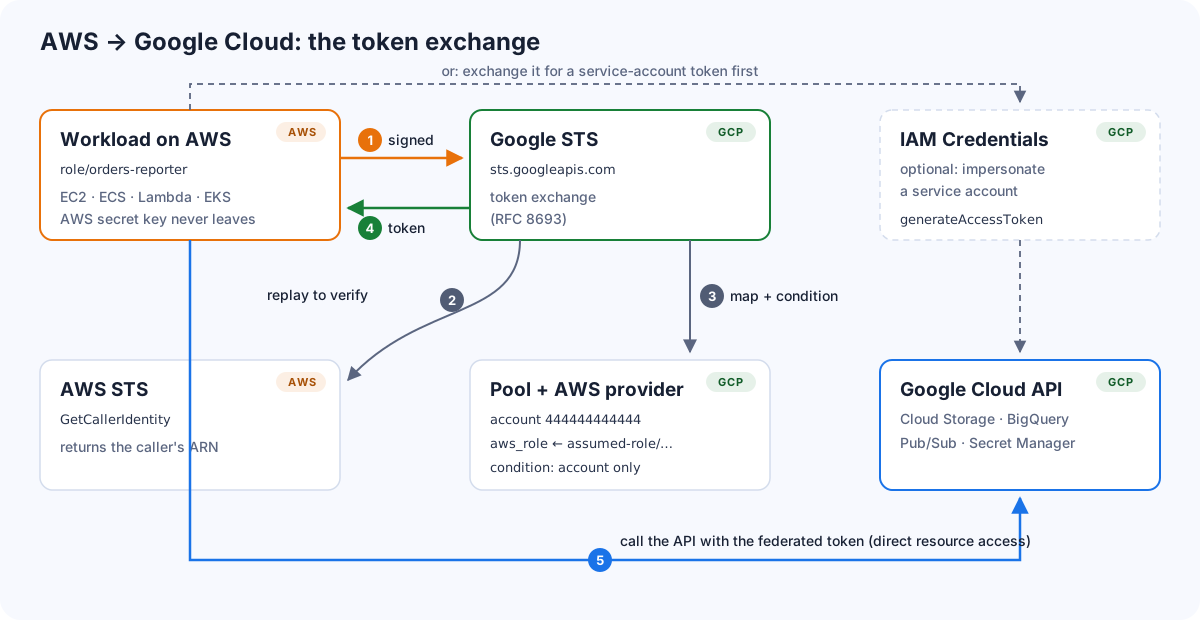
- The Google client library takes the workload’s AWS credentials and signs (SigV4) a request to AWS STS
GetCallerIdentity, but does not send it to AWS. - It sends that signed request to Google STS (
sts.googleapis.com) as the “subject token”. Google STS replays it to AWS STS, and AWS answers with the caller’s ARN, for examplearn:aws:sts::444444444444:assumed-role/orders-reporter/i-0abc…. - Google checks the request against your workload identity pool and provider: is this AWS account trusted, and does the attribute condition allow this role? It then maps the ARN to Google attributes such as
aws_role. - Google STS returns a federated access token, valid for about an hour.
- The workload calls Google APIs with that token (direct resource access), or first exchanges it for a service account token (impersonation) for APIs that don’t accept federated identities yet.
Google’s recommendation is to grant access directly to the federated principal whenever the product supports it, and use service account impersonation only where it doesn’t.
Two kinds of provider
| AWS provider | OIDC provider (EKS issuer) | |
|---|---|---|
| Identity Google sees | IAM role ARN | Kubernetes service account (system:serviceaccount:ns:name) |
| Subject token | Signed GetCallerIdentity |
Projected service account JWT |
| Works out of the box | EC2 (instance metadata), Lambda (env vars) | EKS pods (token mounted as a file) |
| Needs code | ECS tasks, EKS pods (custom credential supplier) | — |
| Granularity | per IAM role | per namespace / service account |
The two are not mutually exclusive. A single pool can contain one AWS provider per account plus one OIDC provider per EKS cluster.
Path A: EC2 and Lambda with an AWS provider
1. Create the pool and the provider
Use a dedicated project for identity (here platform-identity, project number 123456789012) and one pool per trust boundary, for example production:
gcloud iam workload-identity-pools create aws-prod \
  --project=platform-identity \
  --location=global \
  --display-name="AWS production"

gcloud iam workload-identity-pools providers create-aws aws-prod \
  --project=platform-identity \
  --location=global \
  --workload-identity-pool=aws-prod \
  --account-id=444444444444 \
  --attribute-mapping="google.subject=assertion.account+':'+assertion.arn.extract('assumed-role/{role_name}/'),attribute.account=assertion.account,attribute.aws_role=assertion.arn.extract('assumed-role/{role_name}/')" \
--attribute-condition="assertion.arn.startsWith('arn:aws:sts::444444444444:assumed-role/')"google.subjectisaccount:role, for example444444444444:orders-reporter. It shows up in Cloud Audit Logs and is at most 77 bytes. Google’s own examples map the full ARN instead, which also records the session, but a long role name plus a long session name breaks the 127-byte limit. See the 127-byte subject limit below.attribute.aws_roleextracts the role name (orders-reporter). That is what you grant permissions to.- The attribute condition only accepts assumed roles from this account. IAM users and the root user are rejected. Always set a condition.
2. Grant access
Direct resource access, preferred. The principal is “any session of role orders-reporter coming through pool aws-prod”:
gcloud storage buckets add-iam-policy-binding gs://analytics-prod-reports \
  --role=roles/storage.objectViewer \
  --member="principalSet://iam.googleapis.com/projects/123456789012/locations/global/workloadIdentityPools/aws-prod/attribute.aws_role/orders-reporter"
Service account impersonation, for products that need it:
gcloud iam service-accounts add-iam-policy-binding \
  orders-reporter@analytics-prod.iam.gserviceaccount.com \
  --role=roles/iam.workloadIdentityUser \
  --member="principalSet://iam.googleapis.com/projects/123456789012/locations/global/workloadIdentityPools/aws-prod/attribute.aws_role/orders-reporter"
3. Generate the credential configuration
gcloud iam workload-identity-pools create-cred-config \
  projects/123456789012/locations/global/workloadIdentityPools/aws-prod/providers/aws-prod \
  --aws \
  --enable-imdsv2 \
  --output-file=gcp-wif.json
# add --service-account=orders-reporter@analytics-prod.iam.gserviceaccount.com for impersonation
The result contains no secrets, only instructions telling the library where to get AWS credentials and where to exchange them:
{
  "type": "external_account",
  "audience": "//iam.googleapis.com/projects/123456789012/locations/global/workloadIdentityPools/aws-prod/providers/aws-prod",
  "subject_token_type": "urn:ietf:params:aws:token-type:aws4_request",
  "token_url": "https://sts.googleapis.com/v1/token",
  "credential_source": {
    "environment_id": "aws1",
    "region_url": "http://169.254.169.254/latest/meta-data/placement/availability-zone",
    "url": "http://169.254.169.254/latest/meta-data/iam/security-credentials",
    "regional_cred_verification_url": "https://sts.{region}.amazonaws.com?Action=GetCallerIdentity&Version=2011-06-15",
    "imdsv2_session_token_url": "http://169.254.169.254/latest/api/token"
  }
}
You can commit this file, bake it into an image or put it in a ConfigMap. Point the app at it, and every Google client library picks it up through Application Default Credentials:
export GOOGLE_APPLICATION_CREDENTIALS=/etc/gcp/gcp-wif.json

# quick test from the instance
gcloud auth login --cred-file=/etc/gcp/gcp-wif.json
gcloud storage ls gs://analytics-prod-reports
On EC2, the library reads the role credentials from instance metadata (IMDSv2 with --enable-imdsv2). On Lambda there is no metadata service. The library falls back to AWS_ACCESS_KEY_ID, AWS_SECRET_ACCESS_KEY, AWS_SESSION_TOKEN and AWS_REGION, which Lambda sets for the function’s role automatically.
The EKS (and ECS) trap
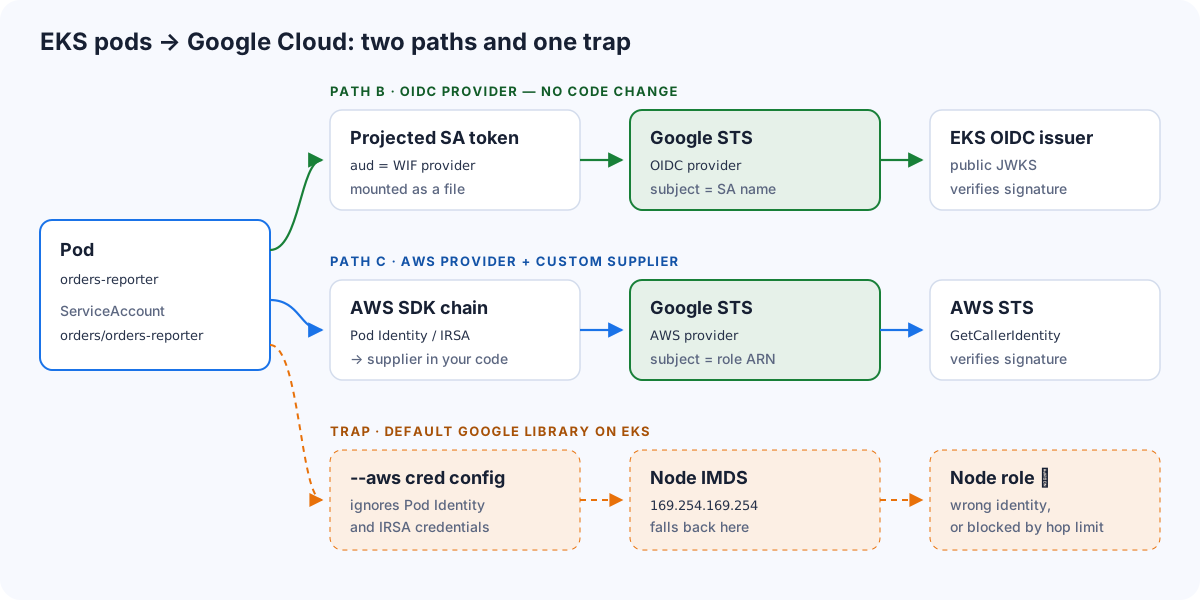
This is where most first attempts go wrong. The --aws credential configuration only knows two sources: instance metadata and environment variables. A pod on EKS gets its AWS credentials from Pod Identity (a container credentials endpoint) or IRSA (a web identity token file). An ECS task gets them from the task-role endpoint. The Google library understands none of these.
So it falls back to instance metadata and either:
- gets the node’s IAM role, the wrong identity, which may have more or less access than intended, or
- times out, because IMDSv2 with a hop limit of 1 correctly blocks pods from the node role.
Path B: OIDC provider (recommended for EKS, no code change)
Every EKS cluster already has a public OIDC issuer. Google can trust it directly, and the pod authenticates with a Kubernetes service account token. No EKS changes and no IRSA or Pod Identity are needed for this part.
ISSUER=$(aws eks describe-cluster --name prod-eu-1 \
  --query "cluster.identity.oidc.issuer" --output text)

gcloud iam workload-identity-pools providers create-oidc eks-prod-eu-1 \
  --project=platform-identity \
  --location=global \
  --workload-identity-pool=aws-prod \
  --issuer-uri="$ISSUER" \
  --attribute-mapping="google.subject=assertion.sub,attribute.namespace=assertion['kubernetes.io']['namespace']" \
  --attribute-condition="assertion['kubernetes.io']['namespace'] in ['orders', 'analytics']"

gcloud iam workload-identity-pools create-cred-config \
  projects/123456789012/locations/global/workloadIdentityPools/aws-prod/providers/eks-prod-eu-1 \
  --credential-source-file=/var/run/service-account/token \
  --credential-source-type=text \
  --output-file=credential-configuration.json

kubectl create configmap gcp-wif-config -n orders --from-file=credential-configuration.json
Grant access to the Kubernetes service account as the principal:
gcloud storage buckets add-iam-policy-binding gs://analytics-prod-reports \
  --role=roles/storage.objectViewer \
  --member="principal://iam.googleapis.com/projects/123456789012/locations/global/workloadIdentityPools/aws-prod/subject/system:serviceaccount:orders:orders-reporter"
Mount a projected token whose audience is the provider, together with the config:
spec:
  serviceAccountName: orders-reporter
  containers:
  - name: app
    image: …/orders-reporter:1.8.0
    env:
    - name: GOOGLE_APPLICATION_CREDENTIALS
      value: /etc/gcp/credential-configuration.json
    volumeMounts:
    - { name: gcp-token, mountPath: /var/run/service-account, readOnly: true }
    - { name: gcp-config, mountPath: /etc/gcp, readOnly: true }
  volumes:
  - name: gcp-token
    projected:
      sources:
      - serviceAccountToken:
          audience: https://iam.googleapis.com/projects/123456789012/locations/global/workloadIdentityPools/aws-prod/providers/eks-prod-eu-1
          expirationSeconds: 3600
          path: token
  - name: gcp-config
    configMap:
      name: gcp-wif-config
The kubelet refreshes the token file before it expires, and the Google library re-reads it. Any standard Google client library works without code changes.
One trade-off: each cluster has its own issuer, so every cluster needs its own provider. Automate it with Terraform.
Path C: AWS provider + custom credential supplier
Sometimes you want Google to see the IAM role, the same identity the workload uses everywhere else in AWS, for example to keep one permission model across EC2, Lambda and EKS. Google’s client libraries let you plug in an AWS security credentials supplier. Back it with the AWS SDK, whose default chain understands Pod Identity, IRSA and ECS task roles:
import boto3
from google.auth import aws, exceptions
from google.cloud import storage

class Boto3CredentialsSupplier(aws.AwsSecurityCredentialsSupplier):
    """Hands the AWS SDK's credentials (Pod Identity, IRSA, ECS, env…) to google-auth."""

    def __init__(self):
        self._session = boto3.Session()

    def get_aws_security_credentials(self, context, request):
        try:
            c = self._session.get_credentials().get_frozen_credentials()  # refreshed by boto3
            return aws.AwsSecurityCredentials(c.access_key, c.secret_key, c.token)
        except Exception as e:
            raise exceptions.RefreshError(e, retryable=True)

    def get_aws_region(self, context, request):
        return self._session.region_name or "us-east-1"

credentials = aws.Credentials(
    audience="//iam.googleapis.com/projects/123456789012/locations/global/workloadIdentityPools/aws-prod/providers/aws-prod",
    subject_token_type="urn:ietf:params:aws:token-type:aws4_request",
    aws_security_credentials_supplier=Boto3CredentialsSupplier(),
    scopes=["https://www.googleapis.com/auth/cloud-platform"],
)

client = storage.Client(project="analytics-prod", credentials=credentials)
The Go, Java and Node.js auth libraries offer the same supplier interface. Grants then use attribute.aws_role/<role-name>, exactly as in path A.
The 127-byte google.subject limit
google.subject can’t be longer than 127 bytes. Google STS checks it on every exchange, so a mapping that worked for months fails as soon as one workload brings a longer ARN:
"error": "invalid_request",
"error_description": "The size of mapped attribute google.subject exceeds the 127 bytes limit.
Either modify your attribute mapping or the incoming assertion to produce a mapped attribute
that is less than 127 bytes."
With google.subject=assertion.arn, the subject is the whole assumed-role ARN, session name included:
arn:aws:sts::444444444444:assumed-role/<role-name>/<session-name>
└───────────── 39 bytes ──────────────┘└─ ≤ 64 ──┘ └─── ≤ 64 ───┘
Role names and session names can each be 64 characters, so the ARN can reach 168 bytes. Once role plus session pass 87 characters, the exchange fails. You don’t choose the session name either: EC2 uses the instance ID (short, safe), but Lambda uses the function name, ECS uses the task ID, and tools that call AssumeRole pick their own. A real example that fails by a single byte:
| Value | Bytes | |
|---|---|---|
| Role | analytics-prod-reporting-exporter-eu-west-1 |
43 |
| Session (Lambda function name) | analytics-prod-reporting-exporter-nightly-job |
45 |
assertion.arn |
arn:aws:sts::444444444444:assumed-role/analytics-prod-reporting-exporter-eu-west-1/analytics-prod-reporting-exporter-nightly-job |
128 ✗ |
account:role |
444444444444:analytics-prod-reporting-exporter-eu-west-1 |
56 ✓ |
The same role works from EC2 and breaks from Lambda, which makes it look like a Lambda bug. It isn’t.
The fix: map the subject to account:role. It drops the session and is bounded at 12 + 1 + 64 = 77 bytes, whatever runs behind the role:
gcloud iam workload-identity-pools providers update-aws aws-prod \
  --location=global --workload-identity-pool=aws-prod \
  --attribute-mapping="google.subject=assertion.account+':'+assertion.arn.extract('assumed-role/{role_name}/'),attribute.account=assertion.account,attribute.aws_role=assertion.arn.extract('assumed-role/{role_name}/')"
Things to know before you change it:
- Bindings on
attribute.aws_rolekeep working. They don’t use the subject, which is why this article grants access withprincipalSet://…/attribute.aws_role/<role>. - Bindings on
principal://…/subject/<arn>break. They name the old subject. Rewrite them asprincipal://…/subject/444444444444:<role>(one per role, not per session) or move them toattribute.aws_role. - Audit logs lose the session name. Cloud Audit Logs show the subject, so you’ll see the role instead of the exact EC2 instance or Lambda function. Use CloudTrail on the AWS side, where the session is still recorded, when you need to go deeper.
- The account prefix matters. A bare role name would be shorter, but two accounts in the same pool could then produce the same subject.
account:rolestays unique. - The attribute condition still protects you. It only lets
assumed-roleARNs through, soextract('assumed-role/{role_name}/')always finds a role name.
EKS with the OIDC provider (path B) has the same limit: its subject is system:serviceaccount:<namespace>:<serviceaccount>, 22 bytes of prefix plus your names. Short names stay well inside it, but very long namespace and service account names can hit it too.
Hub and spoke for many accounts and projects
With a handful of AWS accounts, dozens of GCP projects and a few EKS clusters, keep federation centralised:
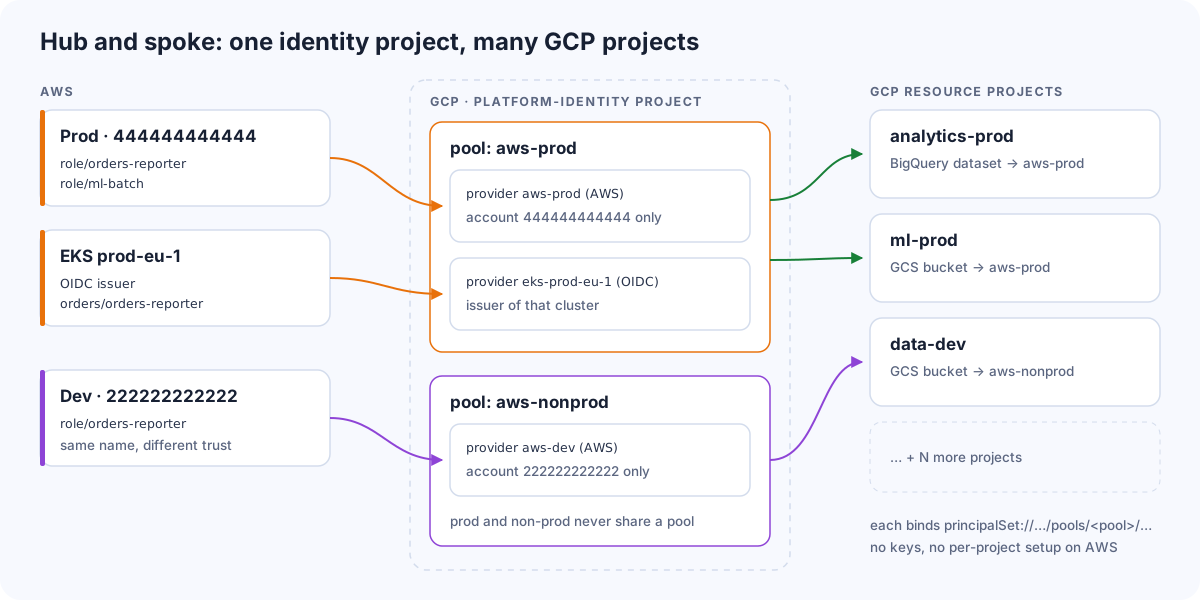
- One identity project (
platform-identity) holds all pools and providers, owned by the platform team. - One pool per trust boundary.
aws-prodtrusts only production accounts and clusters,aws-nonprodthe rest.attribute.aws_roleis just a role name, so if both environments shared a pool,orders-reporterin dev could match a prod binding. Separate pools rule that out. - One provider per AWS account (AWS type) and one per EKS cluster (OIDC type).
- Resource projects only add bindings to
principalSet://…/workloadIdentityPools/aws-prod/…. Onboarding project number 28 is a single Terraform change.
resource "google_iam_workload_identity_pool" "aws_prod" {
  project                   = "platform-identity"
  workload_identity_pool_id = "aws-prod"
}

resource "google_iam_workload_identity_pool_provider" "aws_prod" {
  project                            = "platform-identity"
  workload_identity_pool_id          = google_iam_workload_identity_pool.aws_prod.workload_identity_pool_id
  workload_identity_pool_provider_id = "aws-prod"
  attribute_mapping = {
    "google.subject"     = "assertion.account + ':' + assertion.arn.extract('assumed-role/{role_name}/')"
    "attribute.account"  = "assertion.account"
    "attribute.aws_role" = "assertion.arn.extract('assumed-role/{role_name}/')"
  }
  attribute_condition = "assertion.arn.startsWith('arn:aws:sts::444444444444:assumed-role/')"
  aws {
    account_id = "444444444444"
  }
}

resource "google_storage_bucket_iam_member" "reports_reader" {
  bucket = "analytics-prod-reports"
  role   = "roles/storage.objectViewer"
  member = "principalSet://iam.googleapis.com/${google_iam_workload_identity_pool.aws_prod.name}/attribute.aws_role/orders-reporter"
}
Security checklist
- Always set an attribute condition. Restrict to assumed roles in specific accounts, or to specific namespaces for EKS. A provider without a condition trusts every identity in that account, including IAM users.
- Ban keys once federation works. Enforce the
iam.disableServiceAccountKeyCreationorganisation policy so nobody falls back tokey.json. - Restrict who can add providers. The
iam.workloadIdentityPoolAwsAccountsandiam.workloadIdentityPoolProvidersorganisation policies limit which AWS accounts and issuers can be trusted at all. - Prefer direct resource access. Fewer service accounts, and audit logs show the real AWS principal instead of a shared service account.
- Least privilege on both sides. The AWS role is now also a Google identity. Keep it dedicated to one workload, and don’t reuse broad roles such as a node role.
- Block instance metadata for pods (IMDSv2, hop limit 1), so a misconfigured pod fails loudly instead of silently borrowing the node role.
Troubleshooting
| Symptom | Likely cause |
|---|---|
The given credential is rejected by the attribute condition |
Condition doesn’t match. Check the account ID, or the namespace for EKS. |
Permission 'iam.serviceAccounts.getAccessToken' denied |
Impersonation without roles/iam.workloadIdentityUser on the service account |
403 from the API, token exchange worked |
No binding on the resource, or the product needs impersonation instead of direct access |
| Works on EC2, wrong identity or timeout on EKS / ECS | The library fell back to the node’s instance metadata. Use path B or C. |
Unable to determine the AWS region |
No metadata service. Set AWS_REGION. |
The size of mapped attribute google.subject exceeds the 127 bytes limit |
google.subject maps the full ARN and role + session name are too long. Map account:role instead (see above). |
429 Too Many Requests · The request was throttled due to rate limit: sts.googleapis.com/requests |
The project ran out of Security Token Service quota. Usually clients that don’t reuse tokens (see below). |
429 Too Many Requests from Google STS
429 Too Many Requests
The request was throttled due to rate limit: sts.googleapis.com/requests. Please retry after a few seconds.
This means the project has used up its rate quota for the Security Token Service API. The default is 6,000 token exchanges per project per minute (regional endpoints have their own 6,000 per region). If you impersonate a service account, the second hop, generateAccessToken, counts against a separate quota of 60,000 requests per project per minute.
6,000 a minute is a lot for well-behaved clients, because a federated token lasts an hour. When you hit it, the cause is almost always a client that exchanges a new token for every request instead of reusing one:
- A new credentials object per call. Google’s auth libraries cache the token inside the credentials object and refresh it shortly before it expires. Code that builds a new client, or calls
google.auth.default(), for every request or every message throws that cache away. Create the client once per process and reuse it. - Short-lived processes at scale. Each Lambda cold start, CronJob pod or CLI invocation starts with an empty cache and does a full exchange. A few thousand per minute is enough to hit the limit. Keep clients in global scope so warm Lambda invocations reuse them, and batch work into fewer, longer-lived processes where you can.
- Retry storms. A failing dependency plus aggressive retries turns one exchange into dozens. Retry 429s with exponential backoff and jitter, as the error message itself asks.
- Hub-and-spoke growth. Every workload in every AWS account exchanges through the same identity project, so its quota is shared by all of them. That is fine, but it’s the number to watch as onboarding continues.
To fix it, first find which workload is generating the exchanges: the AWS principal that called STS is the google.subject in Cloud Audit Logs if you’ve enabled Data Access audit logs for the Security Token Service. Fix the caching there. If the traffic is legitimate, open IAM & Admin → Quotas & System Limits in the project, look up the sts.googleapis.com/requests metric shown in the error, confirm usage is at the limit, and request an increase.
Wrap-up
Workload Identity Federation turns “copy a JSON key to AWS” into configuration with nothing secret in it. On EC2 and Lambda, an AWS provider plus a generated config file is all you need. On EKS, trust the cluster’s OIDC issuer (path B) or feed the AWS SDK’s credentials through a custom supplier (path C), and never rely on the default fallback to instance metadata. At scale, centralise pools in one identity project, split them by trust boundary, and let every GCP project grant access with a single IAM binding.
Sources
- Workload Identity Federation: https://cloud.google.com/iam/docs/workload-identity-federation
- Workload Identity Federation with AWS and Azure: https://cloud.google.com/iam/docs/workload-identity-federation-with-other-clouds
- Workload Identity Federation with Kubernetes: https://cloud.google.com/iam/docs/workload-identity-federation-with-kubernetes
- Best practices for Workload Identity Federation: https://cloud.google.com/iam/docs/best-practices-for-using-workload-identity-federation
- AIP-4117: external account credentials: https://google.aip.dev/auth/4117
- Troubleshoot Workload Identity Federation (127-byte subject limit): https://docs.cloud.google.com/iam/docs/troubleshooting-workload-identity-federation
- IAM quotas and limits: https://docs.cloud.google.com/iam/quotas
Comments