Workload Identity Federation from Google Cloud to AWS — no access keys
Let GCE, Cloud Run, Cloud Functions and GKE workloads call AWS with temporary credentials: Google ID tokens and AssumeRoleWithWebIdentity, the trust-policy mistake that opens your role to the whole internet, the GKE OIDC path, and Terraform for both sides.
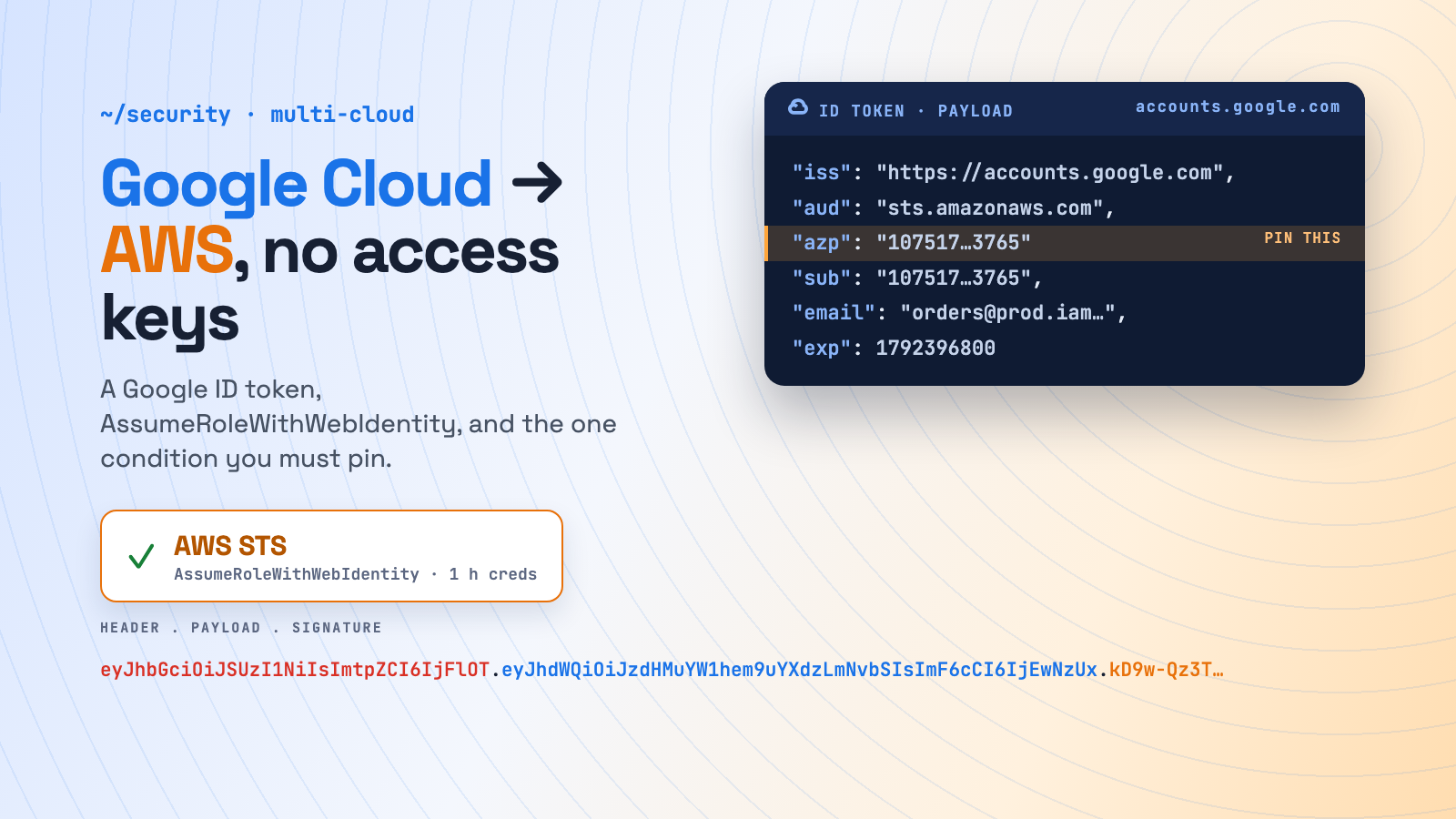
A service on Google Cloud needs to drop files into S3, read an SQS queue or fetch a secret from AWS Secrets Manager. The classic answer is an IAM user with an access key, stored in Secret Manager and injected as AWS_ACCESS_KEY_ID. That key never expires, is valid from anywhere, and becomes a breach the day it leaks.
AWS doesn’t need any of that. Every GCP workload already has an identity, its service account, and Google will sign an OIDC ID token for it on request. AWS STS accepts that token in AssumeRoleWithWebIdentity and returns temporary credentials for an IAM role. No access key exists anywhere.
This is the reverse direction of AWS → Google Cloud. See also AWS → Azure, Workload Identity on GKE and Workload Identity on AKS.
How it works
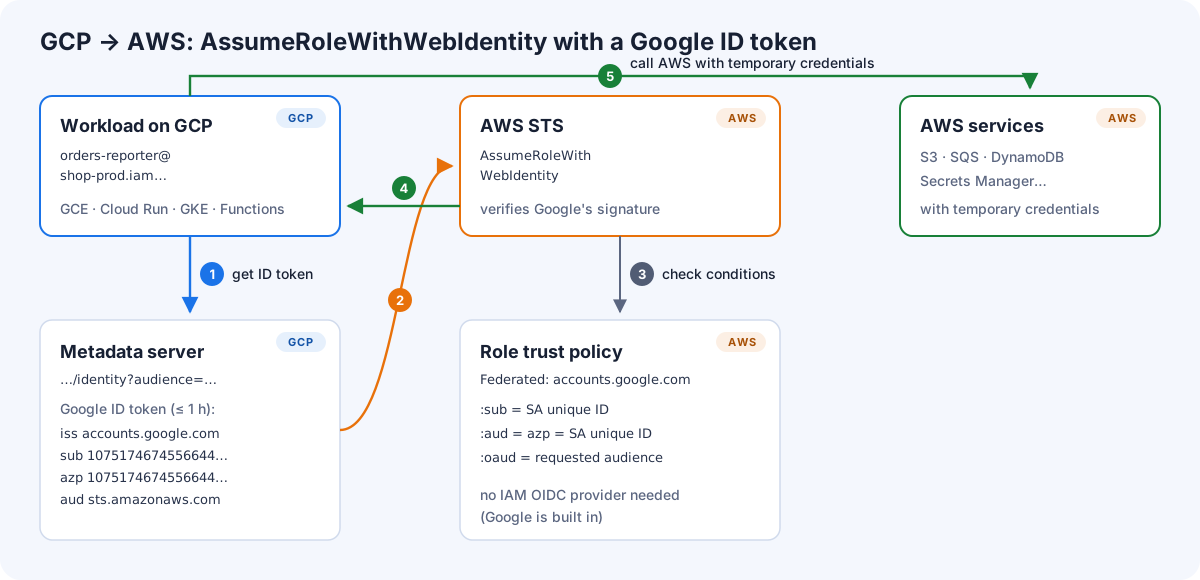
- The workload asks the GCP metadata server for an ID token with an audience you agree on, such as
sts.amazonaws.com. Google signs a JWT containingiss=https://accounts.google.com,subandazp(both the service account’s numeric unique ID) andaud(your audience). - The workload calls
sts:AssumeRoleWithWebIdentitywith that token. The call isn’t signed with AWS credentials, because the token is the credential. - AWS STS verifies Google’s signature and evaluates the role’s trust policy. Google is a built-in identity provider in AWS, so you don’t create an IAM OIDC provider for it.
- STS returns temporary credentials, valid for one hour by default.
- The workload calls S3, SQS and the rest like any other AWS client.
The mistake that opens your role to the whole internet
accounts.google.com is one issuer shared by every Google identity on the planet. Anyone with a free GCP project can create a service account and ask for an ID token with aud=sts.amazonaws.com. AWS doesn’t force you to check anything else: Google isn’t on the list of shared providers where IAM requires specific claims in the trust policy.
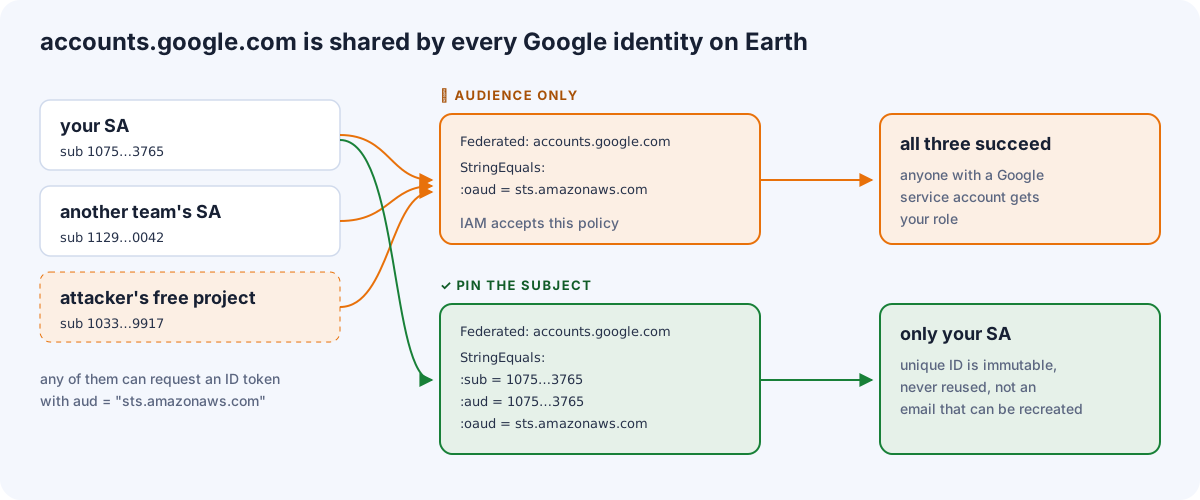
The condition keys also don’t map the way you’d guess. Service account ID tokens set the azp claim, and when azp is present:
| AWS condition key | Matches token claim | For a service account ID token |
|---|---|---|
accounts.google.com:sub |
sub |
the SA’s unique ID (e.g. 107517467455664443765) |
accounts.google.com:aud |
azp (if set), else aud |
the SA’s unique ID again |
accounts.google.com:oaud |
aud |
the audience you requested (sts.amazonaws.com) |
accounts.google.com:email |
email |
the SA email: don’t use it as the primary check |
So a correct trust policy pins all three:
{
  "Version": "2012-10-17",
  "Statement": [{
    "Effect": "Allow",
    "Principal": { "Federated": "accounts.google.com" },
    "Action": "sts:AssumeRoleWithWebIdentity",
    "Condition": {
      "StringEquals": {
        "accounts.google.com:sub":  "107517467455664443765",
        "accounts.google.com:aud":  "107517467455664443765",
        "accounts.google.com:oaud": "sts.amazonaws.com"
      }
    }
  }]
}
Use the unique ID, not the email. If someone deletes orders-reporter@shop-prod.iam.gserviceaccount.com and recreates it, the email comes back but the unique ID doesn’t. Your role stays bound to the original identity.
Two ways to get the token
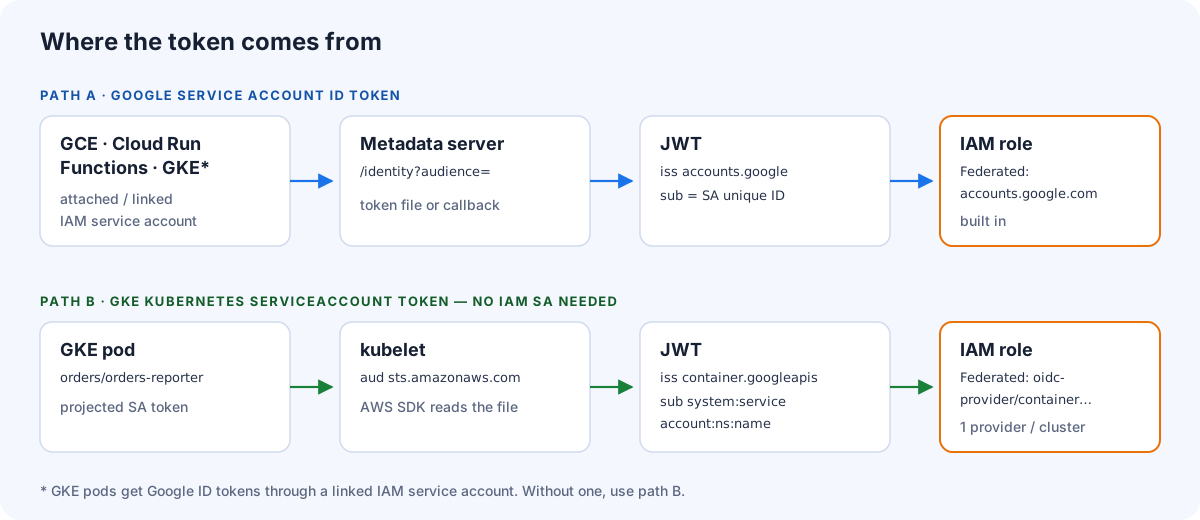
| Path A: Google SA ID token | Path B: GKE ServiceAccount token | |
|---|---|---|
| Runs on | GCE, Cloud Run, Cloud Functions, GKE with a linked SA | GKE pods |
| Identity AWS sees | Google service account (unique ID) | system:serviceaccount:<ns>:<name> |
| AWS setup | role only (Google is built in) | IAM OIDC provider per cluster + role |
| Getting the token | metadata server, through a sidecar or a few lines of code | kubelet projects it, and the AWS SDK reads it natively |
Path A: a Google service account ID token
1. GCP: a dedicated service account
gcloud iam service-accounts create orders-reporter --project=shop-prod

gcloud iam service-accounts describe \
  orders-reporter@shop-prod.iam.gserviceaccount.com \
  --format='value(uniqueId)'
# 107517467455664443765

# attach it to the workload, e.g. Cloud Run
gcloud run deploy orders-reporter --project=shop-prod --region=europe-west1 \
  --image=europe-docker.pkg.dev/shop-prod/apps/orders-reporter:1.8.0 \
  --service-account=orders-reporter@shop-prod.iam.gserviceaccount.com
2. AWS: the role
aws iam create-role --role-name gcp-orders-reporter \
  --assume-role-policy-document file://trust-gcp-orders-reporter.json \
  --max-session-duration 3600

aws iam put-role-policy --role-name gcp-orders-reporter --policy-name s3-write \
  --policy-document '{"Version":"2012-10-17","Statement":[{"Effect":"Allow","Action":["s3:PutObject"],"Resource":"arn:aws:s3:::orders-exports/*"}]}'
trust-gcp-orders-reporter.json is the policy from the previous section.
3a. The workload, with no code: a token file
Every AWS SDK already knows AssumeRoleWithWebIdentity. Point it at a role and a token file, and it handles the exchange and refresh itself:
AWS_ROLE_ARN=arn:aws:iam::444444444444:role/gcp-orders-reporter
AWS_WEB_IDENTITY_TOKEN_FILE=/var/run/aws/token
AWS_ROLE_SESSION_NAME=orders-reporter
AWS_REGION=eu-west-1
A small sidecar keeps the file fresh. Google ID tokens last at most an hour, so refresh every 30 minutes. On Cloud Run, use a sidecar container with a shared in-memory volume. On GCE, use a systemd timer.
while true; do
  curl -sf -H "Metadata-Flavor: Google" \
    "http://metadata.google.internal/computeMetadata/v1/instance/service-accounts/default/identity?audience=sts.amazonaws.com&format=full" \
    -o /var/run/aws/token.tmp \
  && mv /var/run/aws/token.tmp /var/run/aws/token
  sleep 1800
done
3b. The workload, in code (Python)
Without a sidecar, fetch the token in-process and let botocore refresh the credentials before they expire:
import boto3
import botocore.session
from botocore.credentials import RefreshableCredentials
from google.auth.transport.requests import Request
from google.oauth2 import id_token

ROLE_ARN = "arn:aws:iam::444444444444:role/gcp-orders-reporter"
sts = boto3.client("sts", region_name="eu-west-1")   # AssumeRoleWithWebIdentity is unsigned

def refresh():
    token = id_token.fetch_id_token(Request(), "sts.amazonaws.com")  # from the metadata server
    c = sts.assume_role_with_web_identity(
        RoleArn=ROLE_ARN, RoleSessionName="orders-reporter", WebIdentityToken=token,
    )["Credentials"]
    return {
        "access_key": c["AccessKeyId"],
        "secret_key": c["SecretAccessKey"],
        "token": c["SessionToken"],
        "expiry_time": c["Expiration"].isoformat(),
    }

core = botocore.session.get_session()
core._credentials = RefreshableCredentials.create_from_metadata(
    metadata=refresh(), refresh_using=refresh, method="gcp-web-identity",
)
s3 = boto3.Session(botocore_session=core, region_name="eu-west-1").client("s3")
s3.put_object(Bucket="orders-exports", Key="daily.csv", Body=b"…")
Test from a VM
TOKEN=$(curl -s -H "Metadata-Flavor: Google" \
  "http://metadata.google.internal/computeMetadata/v1/instance/service-accounts/default/identity?audience=sts.amazonaws.com")

aws sts assume-role-with-web-identity \
  --role-arn arn:aws:iam::444444444444:role/gcp-orders-reporter \
  --role-session-name test --web-identity-token "$TOKEN" \
  --query 'AssumedRoleUser.Arn'
# "arn:aws:sts::444444444444:assumed-role/gcp-orders-reporter/test"
Path B: GKE pods with the cluster’s OIDC issuer
GKE clusters expose an OIDC issuer for their Kubernetes service account tokens. AWS can trust it like any other OIDC provider. This is the same mechanism as IRSA, just with GKE as the issuer. You don’t need an IAM service account on the Google side, and the AWS SDK reads the token file natively.
ISSUER=$(kubectl get --raw /.well-known/openid-configuration | jq -r .issuer)
# https://container.googleapis.com/v1/projects/shop-prod/locations/europe-west1/clusters/prod-eu-1
curl -s "$ISSUER/.well-known/openid-configuration" | jq .jwks_uri   # must be reachable by AWS

aws iam create-open-id-connect-provider \
  --url "$ISSUER" \
  --client-id-list sts.amazonaws.com
{
"Version": "2012-10-17",
"Statement": [{
"Effect": "Allow",
"Principal": {
"Federated": "arn:aws:iam::444444444444:oidc-provider/container.googleapis.com/v1/projects/shop-prod/locations/europe-west1/clusters/prod-eu-1"
},
"Action": "sts:AssumeRoleWithWebIdentity",
"Condition": {
"StringEquals": {
"container.googleapis.com/v1/projects/shop-prod/locations/europe-west1/clusters/prod-eu-1:aud": "sts.amazonaws.com",
"container.googleapis.com/v1/projects/shop-prod/locations/europe-west1/clusters/prod-eu-1:sub": "system:serviceaccount:orders:orders-reporter"
}
}
}]
}spec:
serviceAccountName: orders-reporter
containers:
- name: app
image: europe-docker.pkg.dev/shop-prod/apps/orders-reporter:1.8.0
env:
- { name: AWS_ROLE_ARN, value: arn:aws:iam::444444444444:role/gke-orders-reporter }
- { name: AWS_WEB_IDENTITY_TOKEN_FILE, value: /var/run/secrets/aws/token }
- { name: AWS_REGION, value: eu-west-1 }
volumeMounts:
- { name: aws-token, mountPath: /var/run/secrets/aws, readOnly: true }
volumes:
- name: aws-token
projected:
sources:
- serviceAccountToken:
audience: sts.amazonaws.com
expirationSeconds: 3600
path: tokenThe trade-off: one IAM OIDC provider per cluster, and an AWS account has a quota of OIDC providers (100 by default). Automate them, and delete providers when clusters go away.
Terraform: both sides in one plan
resource "google_service_account" "orders_reporter" {
  project    = "shop-prod"
  account_id = "orders-reporter"
}

data "aws_iam_policy_document" "trust_gcp" {
  statement {
    actions = ["sts:AssumeRoleWithWebIdentity"]
    principals {
      type        = "Federated"
      identifiers = ["accounts.google.com"]
    }
    condition {
      test     = "StringEquals"
      variable = "accounts.google.com:sub"
      values   = [google_service_account.orders_reporter.unique_id]
    }
    condition {
      test     = "StringEquals"
      variable = "accounts.google.com:aud"
      values   = [google_service_account.orders_reporter.unique_id]
    }
    condition {
      test     = "StringEquals"
      variable = "accounts.google.com:oaud"
      values   = ["sts.amazonaws.com"]
    }
  }
}

resource "aws_iam_role" "gcp_orders_reporter" {
  name                 = "gcp-orders-reporter"
  assume_role_policy   = data.aws_iam_policy_document.trust_gcp.json
  max_session_duration = 3600
}
The unique ID flows straight from the Google resource into the AWS trust policy, so nobody copies a 21-digit number by hand.
Security checklist
- Pin
sub(andaud) to the unique ID andoaudto your audience. A policy without them trusts all of Google. - Control who can mint tokens on the GCP side. Anyone who can impersonate the service account can get an ID token for it, and therefore into AWS. Audit
roles/iam.serviceAccountTokenCreator,roles/iam.serviceAccountOpenIdTokenCreatorandiam.serviceAccounts.actAs(who can deploy workloads as that SA). - One service account per workload, one role per service account. Shared identities blur both audit trails.
- Least privilege on the role and a short
MaxSessionDuration. - Meaningful session names. CloudTrail records
AssumeRoleWithWebIdentitywith the Google identity, and the session name makes later API calls readable. - No access keys at all. Once federation works, delete the old IAM user and prevent new ones with an SCP.
Troubleshooting
| Error | Likely cause |
|---|---|
AccessDenied: Not authorized to perform sts:AssumeRoleWithWebIdentity |
Trust conditions don’t match. Most often the audience was put in :aud instead of :oaud, or the email was used instead of the unique ID. |
InvalidIdentityToken: Incorrect token audience |
Path B: the token’s audience isn’t in the OIDC provider’s client-id list |
InvalidIdentityToken: Couldn't retrieve verification key |
Path B: wrong issuer URL, or AWS can’t reach the cluster’s discovery/JWKS endpoints |
ExpiredTokenException |
The token file isn’t being refreshed. Check the sidecar or timer. |
| Works on a VM, not on GKE | The pod has no linked IAM service account. Use path B or link one. |
Wrap-up
Federating from Google Cloud to AWS is mostly an IAM trust policy: Google is a built-in provider, so a role that trusts accounts.google.com plus a few lines to fetch an ID token is all you need. Get one detail right: pin the service account’s unique ID in sub and aud, and the audience in oaud, because that issuer is shared by everyone. On GKE, trusting the cluster’s own OIDC issuer gives you an IRSA-style, zero-code setup. Combined with the AWS → Google Cloud guide, AWS and Google Cloud can now talk in both directions without a single long-lived key.
Sources
- STS AssumeRoleWithWebIdentity API: https://docs.aws.amazon.com/STS/latest/APIReference/API_AssumeRoleWithWebIdentity.html
- IAM condition keys for web identity federation (accounts.google.com): https://docs.aws.amazon.com/IAM/latest/UserGuide/reference_policies_iam-condition-keys.html
- Create a role for OIDC federation: https://docs.aws.amazon.com/IAM/latest/UserGuide/id_roles_create_for-idp_oidc.html
- Get an ID token (Google Cloud): https://cloud.google.com/docs/authentication/get-id-token
- Verifying the identity of instances: https://cloud.google.com/compute/docs/instances/verifying-instance-identity
- GKE Workload Identity Federation: https://cloud.google.com/kubernetes-engine/docs/concepts/workload-identity
Comments