Workload Identity on GKE: give every pod its own Google identity
A practical guide to Workload Identity Federation for GKE: direct principal access vs linked service accounts, gcloud and Terraform setup, verification, cross-project access, gotchas, and managing it as YAML with Config Connector.
There are two common ways a pod on GKE ends up calling Google APIs, and both are bad:
- A service account key (
key.json) in a Kubernetes Secret. It never expires, gets copied around, and is valid from anywhere. - The node’s service account. Every pod on the node silently gets the same permissions. On older clusters that is often the default Compute Engine service account, which has the Editor role on the whole project.
Workload Identity Federation for GKE fixes both. Each Kubernetes ServiceAccount (KSA) becomes its own Google identity. Pods get short-lived tokens from a metadata server on their node. There are no keys, and nothing is shared between workloads.
This is the GCP-native piece of a series: EKS Pod Identity vs IRSA, AWS → GCP, AWS → Azure.
How it works
When Workload Identity is enabled, GKE runs a GKE metadata server on every node. Google client libraries already ask 169.254.169.254 for credentials, and those requests are now answered by this server for the pod’s KSA instead of the node. Existing code works unchanged.
Every cluster in project shop-prod belongs to the workload identity pool shop-prod.svc.id.goog. Inside that pool, KSA orders-api in namespace orders is the principal:
principal://iam.googleapis.com/projects/123456789012/locations/global/workloadIdentityPools/shop-prod.svc.id.goog/subject/ns/orders/sa/orders-apiThere are two ways to give that identity permissions:
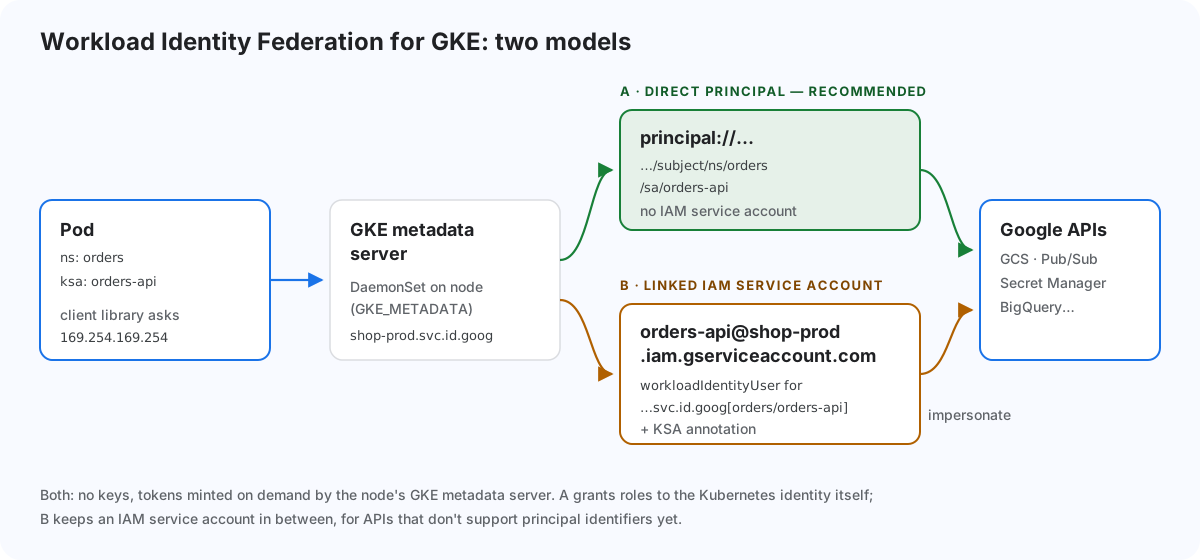
| A: direct principal access (recommended) | B: linked IAM service account | |
|---|---|---|
| What you grant roles to | principal://…/ns/NS/sa/KSA |
an IAM service account (GSA) |
| Extra objects | none | GSA + roles/iam.workloadIdentityUser + KSA annotation |
| Audit logs show | the KSA principal | the GSA |
| Use when | the API supports principal identifiers (most do) | the API doesn’t, or you need a GSA email (e.g. signing URLs) |
Google recommends A whenever the product supports it, and B only for the gaps.
Step 1: enable it on the cluster
# Standard cluster (Autopilot has it on by default)
gcloud container clusters update prod-eu-1 \
  --location=europe-west1 \
  --workload-pool=shop-prod.svc.id.goog

# existing node pools must switch to the GKE metadata server
gcloud container node-pools update default-pool \
  --cluster=prod-eu-1 --location=europe-west1 \
  --workload-metadata=GKE_METADATA
Updating a node pool recreates its nodes. Plan it like any other node upgrade.
While you’re at it, stop giving nodes a powerful identity. Create a dedicated node service account with only roles/container.defaultNodeServiceAccount. With Workload Identity on, pods can’t reach it anyway, so it only needs to run the node.
Step 2a: direct principal access
Create a plain KSA, with no annotation:
apiVersion: v1
kind: ServiceAccount
metadata:
  name: orders-api
  namespace: orders
Grant roles on the resource to the KSA principal:
PRINCIPAL="principal://iam.googleapis.com/projects/123456789012/locations/global/workloadIdentityPools/shop-prod.svc.id.goog/subject/ns/orders/sa/orders-api"

gcloud storage buckets add-iam-policy-binding gs://shop-prod-orders-reports \
  --role=roles/storage.objectViewer --member="$PRINCIPAL"

gcloud pubsub subscriptions add-iam-policy-binding orders-events \
  --project=shop-prod --role=roles/pubsub.subscriber --member="$PRINCIPAL"
For broader grants, use principalSet identifiers instead of a single KSA:
# every KSA in a namespace
principalSet://iam.googleapis.com/projects/123456789012/locations/global/workloadIdentityPools/shop-prod.svc.id.goog/namespace/orders

# every KSA in one cluster
principalSet://iam.googleapis.com/projects/123456789012/locations/global/workloadIdentityPools/shop-prod.svc.id.goog/kubernetes.cluster/https://container.googleapis.com/v1/projects/shop-prod/locations/europe-west1/clusters/prod-eu-1
Step 2b: linked IAM service account (when you need it)
gcloud iam service-accounts create orders-api --project=shop-prod

gcloud iam service-accounts add-iam-policy-binding \
  orders-api@shop-prod.iam.gserviceaccount.com \
  --role=roles/iam.workloadIdentityUser \
  --member="serviceAccount:shop-prod.svc.id.goog[orders/orders-api]"

gcloud storage buckets add-iam-policy-binding gs://shop-prod-orders-reports \
  --role=roles/storage.objectViewer \
--member="serviceAccount:orders-api@shop-prod.iam.gserviceaccount.com"apiVersion: v1
kind: ServiceAccount
metadata:
name: orders-api
namespace: orders
annotations:
iam.gke.io/gcp-service-account: orders-api@shop-prod.iam.gserviceaccount.comBoth the IAM binding and the annotation are required. Missing either one is the most common reason this model “doesn’t work”.
Step 3: use it in the Deployment
There’s nothing GCP-specific in the pod spec. Just use the KSA:
spec:
  template:
    spec:
      serviceAccountName: orders-api
      containers:
      - name: app
        image: europe-docker.pkg.dev/shop-prod/apps/orders-api:1.8.0
Client libraries pick up credentials through Application Default Credentials. Don’t set GOOGLE_APPLICATION_CREDENTIALS and don’t mount a key.
Step 4: verify from inside the cluster
kubectl run wi-test -n orders -it --rm --image=google/cloud-sdk:slim \
  --overrides='{"spec":{"serviceAccountName":"orders-api"}}' -- bash

# inside the pod
curl -s -H "Metadata-Flavor: Google" \
  http://169.254.169.254/computeMetadata/v1/instance/service-accounts/default/email
# A → shop-prod.svc.id.goog        B → orders-api@shop-prod.iam.gserviceaccount.com

gcloud storage ls gs://shop-prod-orders-reports
If the email shows the node’s service account, the node pool isn’t using GKE_METADATA yet.
Terraform
data "google_project" "this" {
  project_id = "shop-prod"
}

resource "google_container_cluster" "prod" {
  name     = "prod-eu-1"
  location = "europe-west1"
  # …
  workload_identity_config {
    workload_pool = "shop-prod.svc.id.goog"
  }
}

resource "google_container_node_pool" "default" {
  cluster = google_container_cluster.prod.name
  # …
  node_config {
    service_account = google_service_account.nodes.email   # minimal node SA
    workload_metadata_config {
      mode = "GKE_METADATA"
    }
  }
}

locals {
  orders_api = "principal://iam.googleapis.com/projects/${data.google_project.this.number}/locations/global/workloadIdentityPools/shop-prod.svc.id.goog/subject/ns/orders/sa/orders-api"
}

resource "google_storage_bucket_iam_member" "orders_reports" {
  bucket = google_storage_bucket.orders_reports.name
  role   = "roles/storage.objectViewer"
  member = local.orders_api
}
Cross-project access
The identity lives in the cluster’s project pool, but it can be granted roles anywhere. To let orders-api (cluster in shop-prod) read a dataset in analytics-prod, add a binding in analytics-prod with the same principal://…/shop-prod.svc.id.goog/… member. Nothing changes in the cluster.
Managing it as YAML with Config Connector
Doing this with gcloud or a separate Terraform repo means the app’s permissions live far from the app. Config Connector is GCP’s equivalent of AWS Controllers for Kubernetes. It turns Google resources, IAM bindings included, into Kubernetes objects, so the app’s Helm chart can own its own identity and permissions.
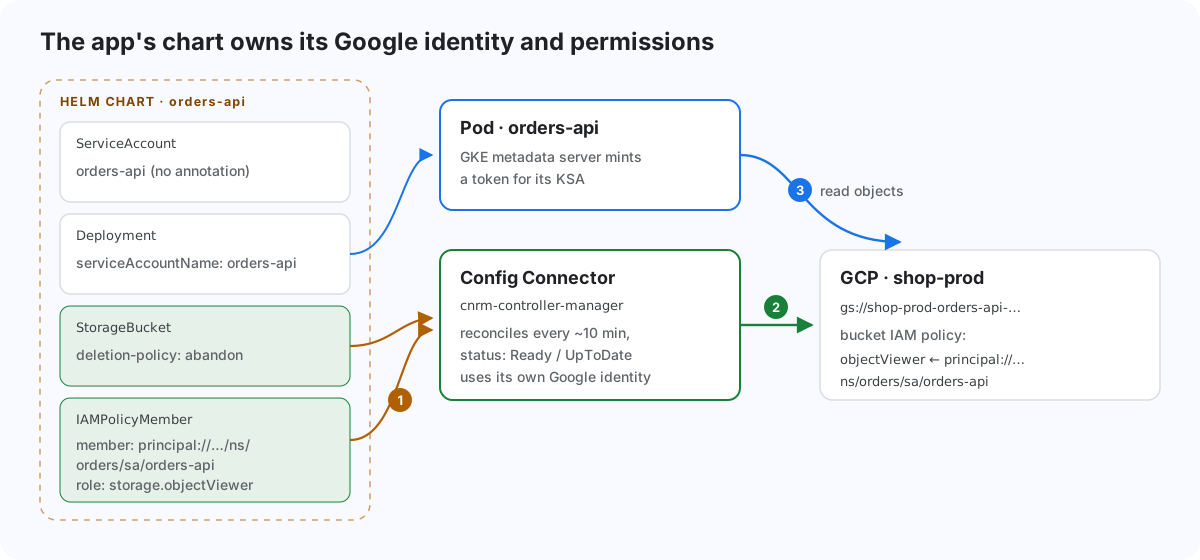
Enable it as a GKE add-on (it needs Workload Identity itself), give its controller a Google identity, and tell it which project to manage:
gcloud container clusters update prod-eu-1 --location=europe-west1 \
  --update-addons ConfigConnector=ENABLED

gcloud iam service-accounts create kcc-controller --project=shop-prod
gcloud projects add-iam-policy-binding shop-prod \
  --member="serviceAccount:kcc-controller@shop-prod.iam.gserviceaccount.com" \
  --role="roles/editor"   # start here, narrow it down for production
gcloud iam service-accounts add-iam-policy-binding \
  kcc-controller@shop-prod.iam.gserviceaccount.com \
  --role=roles/iam.workloadIdentityUser \
--member="serviceAccount:shop-prod.svc.id.goog[cnrm-system/cnrm-controller-manager]"apiVersion: core.cnrm.cloud.google.com/v1beta1
kind: ConfigConnector
metadata:
name: configconnector.core.cnrm.cloud.google.com
spec:
mode: cluster
googleServiceAccount: kcc-controller@shop-prod.iam.gserviceaccount.com
stateIntoSpec: Absent
---
apiVersion: v1
kind: Namespace
metadata:
name: orders
annotations:
cnrm.cloud.google.com/project-id: shop-prodNow the app’s chart can declare its bucket and its permission next to the Deployment:
# templates/gcp/bucket.yaml
apiVersion: storage.cnrm.cloud.google.com/v1beta1
kind: StorageBucket
metadata:
  name: shop-prod-orders-reports           # = the bucket name
  annotations:
    cnrm.cloud.google.com/deletion-policy: abandon   # keep data if the release is deleted
spec:
  location: EU
  uniformBucketLevelAccess: true
  versioning:
    enabled: true
---
# templates/gcp/iam.yaml
apiVersion: iam.cnrm.cloud.google.com/v1beta1
kind: IAMPolicyMember
metadata:
  name: orders-api-reports-reader
spec:
  member: {{ include "orders-api.wiPrincipal" . }}
  role: roles/storage.objectViewer
  resourceRef:
    kind: StorageBucket
    name: shop-prod-orders-reports
# templates/_helpers.tpl — the KSA principal, built once
{{- define "orders-api.wiPrincipal" -}}
principal://iam.googleapis.com/projects/{{ .Values.gcp.projectNumber }}/locations/global/workloadIdentityPools/{{ .Values.gcp.projectId }}.svc.id.goog/subject/ns/{{ .Release.Namespace }}/sa/{{ include "orders-api.serviceAccountName" . }}
{{- end }}For model B, the chart adds an IAMServiceAccount and binds the KSA to it. memberFrom.serviceAccountRef lets one object reference another, so nobody types an email address:
apiVersion: iam.cnrm.cloud.google.com/v1beta1
kind: IAMServiceAccount
metadata:
  name: orders-api            # account ID → orders-api@shop-prod.iam.gserviceaccount.com
spec:
  displayName: orders-api (GKE)
---
apiVersion: iam.cnrm.cloud.google.com/v1beta1
kind: IAMPolicyMember
metadata:
  name: orders-api-wi-user
spec:
  member: serviceAccount:shop-prod.svc.id.goog[orders/orders-api]
  role: roles/iam.workloadIdentityUser
  resourceRef:
    kind: IAMServiceAccount
    name: orders-api
---
apiVersion: iam.cnrm.cloud.google.com/v1beta1
kind: IAMPolicyMember
metadata:
  name: orders-api-reports-reader
spec:
  memberFrom:
    serviceAccountRef:
      name: orders-api
  role: roles/storage.objectViewer
  resourceRef:
    kind: StorageBucket
    name: shop-prod-orders-reports
Many teams, many projects: namespaced mode
With one controller identity holding Editor on every project, any namespace could touch any project. Namespaced mode gives each namespace its own Config Connector controller and its own Google identity:
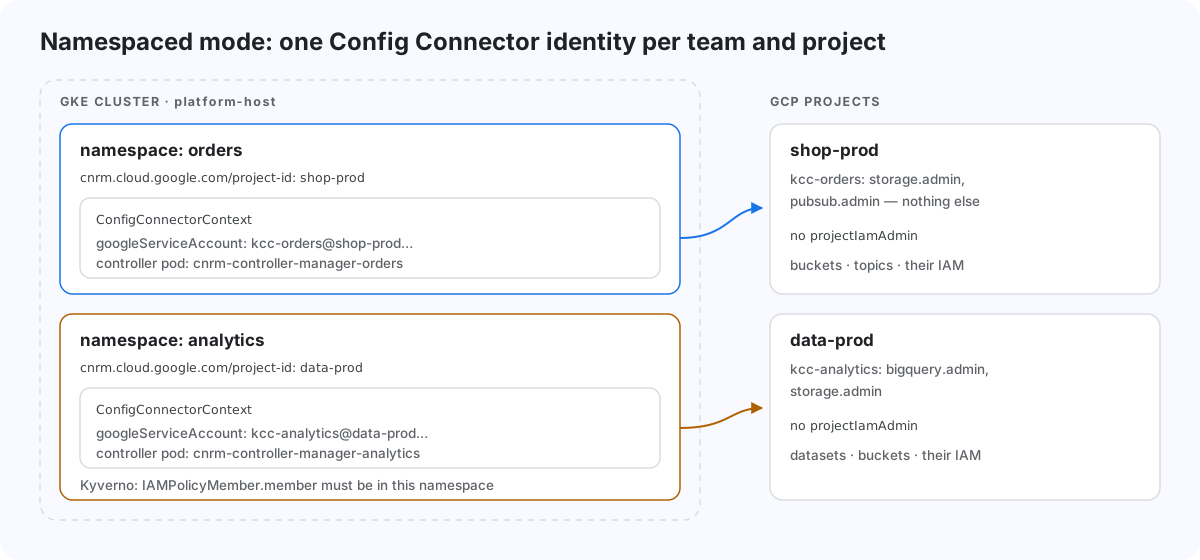
apiVersion: core.cnrm.cloud.google.com/v1beta1
kind: ConfigConnector
metadata:
  name: configconnector.core.cnrm.cloud.google.com
spec:
  mode: namespaced
---
apiVersion: core.cnrm.cloud.google.com/v1beta1
kind: ConfigConnectorContext
metadata:
  name: configconnectorcontext.core.cnrm.cloud.google.com
  namespace: orders
spec:
  googleServiceAccount: kcc-orders@shop-prod.iam.gserviceaccount.com
The per-namespace controller runs as cnrm-system/cnrm-controller-manager-orders, so that’s the KSA that gets roles/iam.workloadIdentityUser on kcc-orders. Give kcc-orders only the admin roles for the resources the team owns, and not resourcemanager.projectIamAdmin. Add a Kyverno or Gatekeeper rule so an IAMPolicyMember in orders can only name principals from …/ns/orders/….
Config Connector gotchas
IAMPolicyMemberis immutable. Changingmemberorrolemeans deleting and recreating the object. In Argo CD, useReplace=trueon these resources.- Never mix
IAMPolicywithIAMPolicyMemberon the same resource.IAMPolicyis authoritative and will wipe bindings you didn’t declare. On a project, that can lock everyone out. - Deleting the object deletes the cloud resource unless it carries
cnrm.cloud.google.com/deletion-policy: abandon. Put it on every bucket and database. BigQueryDatasetcan’t be targeted byIAMPolicyMember. Manage dataset access through the dataset’s ownspec.access.- Resources reconcile roughly every 10 minutes, so console edits are reverted. That is the point, but tell your team.
Gotchas (Workload Identity itself)
- Identity sameness. The pool is per project, not per cluster.
orders/orders-apiin any cluster ofshop-prodis the same principal. Don’t put clusters with different trust levels (dev and prod, or a shared CI cluster) in the same project. If you must, grant to thekubernetes.cluster/…principalSet. hostNetwork: truepods can’t use Workload Identity. They talk to the node’s metadata directly.- Startup race. The GKE metadata server needs a moment after a pod starts. Apps that fetch credentials in the first second should retry, which all Google client libraries do.
- IAM is eventually consistent. A new binding can take a few minutes. Expect brief
403s right after deployment and don’t treat them as failure. - Not every API accepts
principal://yet. When one rejects it, switch that workload to model B. You don’t need to change the others. - Node service account. Keep it minimal. Workload Identity protects pods from it, but
hostNetworkpods and the node itself still use it.
Wrap-up
On GKE, Workload Identity is a cluster setting plus an IAM binding. Grant roles directly to the Kubernetes ServiceAccount principal by default, and fall back to a linked service account only where an API needs it. Then move those bindings out of click-ops: with Config Connector, the app’s Helm chart owns its bucket, its identity and its permissions, reviewed in the same pull request as the code that uses them.
Sources
- GKE Workload Identity Federation: concepts: https://cloud.google.com/kubernetes-engine/docs/concepts/workload-identity
- GKE Workload Identity Federation: how-to: https://cloud.google.com/kubernetes-engine/docs/how-to/workload-identity
- IAM principal identifiers: https://cloud.google.com/iam/docs/principal-identifiers
- Config Connector overview: https://cloud.google.com/config-connector/docs/overview
- Config Connector: namespaces and projects: https://cloud.google.com/config-connector/docs/concepts/namespaces-and-projects
Comments