IAM Roles Anywhere: AWS as the identity hub for on-prem workloads into AWS, Google Cloud and Azure
Give machines with no cloud identity — on-prem VMs, edge devices, self-hosted CI — short-lived X.509 certificates from Vault PKI, turn them into AWS role sessions with IAM Roles Anywhere, and federate onward to Google Cloud and Azure without a single static key.
Everything in this series so far assumed the workload already has a cloud identity: a pod on EKS, GKE or AKS, an EC2 instance, a Cloud Run service. Plenty of real workloads don’t. Think of a VMware cluster in a data centre, a batch server under someone’s desk, edge devices in a factory, or self-hosted CI runners. Those are exactly the machines that end up with an AWS_ACCESS_KEY_ID, a GCP key.json and an Azure client secret, all in one .env file.
IAM Roles Anywhere gives those machines an AWS identity based on something they can have: an X.509 certificate from your own CA. Combine that with what the earlier articles covered, Google Cloud’s AWS provider and AWS outbound identity federation into Azure, and AWS becomes an identity hub. One certificate on the machine, one AWS role session, and from there short-lived access to AWS, Google Cloud and Azure.
Builds on: AWS → Google Cloud, AWS → Azure, and the multi-account control plane idea.
How IAM Roles Anywhere works
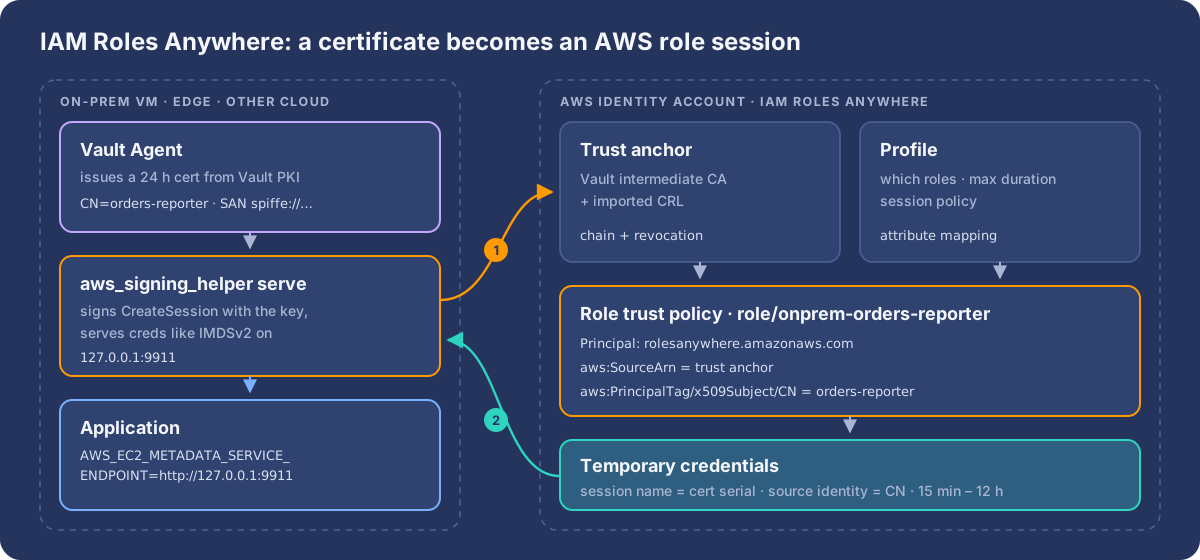
There are three resources:
- Trust anchor: the CA AWS trusts. Either your own CA certificate bundle (here a Vault PKI intermediate), or AWS Private CA (see the cert-manager option for Kubernetes).
- Profile: which roles can be assumed through it, the maximum session duration (15 minutes to 12 hours), and optional session policies.
- Role: an ordinary IAM role whose trust policy names the service principal
rolesanywhere.amazonaws.com.
The machine runs aws_signing_helper, AWS’s open-source credential helper. It signs a CreateSession request with the certificate’s private key, which can live in a file, a TPM, a PKCS#11 HSM or the OS keychain. AWS validates the chain against the trust anchor, checks any imported CRL, and evaluates the role’s trust policy. Several certificate fields become session principal tags you can write conditions on:
| From the certificate | Becomes |
|---|---|
Subject RDNs (CN, OU, …) |
aws:PrincipalTag/x509Subject/CN, … |
| Issuer RDNs | aws:PrincipalTag/x509Issuer/CN, … |
| Subject CN | source identity (CN=orders-reporter) |
| Serial number (hex) | role session name |
That last row matters for audit: every CloudTrail event carries the certificate serial, so you can always trace an API call back to one specific certificate.
Step 1: a CA for workloads (Vault PKI)
Use a dedicated intermediate CA for workloads, never your corporate root, and issue short-lived end-entity certificates. AWS’s requirements are X.509v3, CA:false, the Digital Signature key usage, and SHA-256 or stronger.
vault secrets enable -path=pki_workloads pki
vault secrets tune -max-lease-ttl=43800h pki_workloads

# intermediate CA, signed by your offline root
vault write -field=csr pki_workloads/intermediate/generate/internal \
  common_name="Workloads Intermediate CA" > workloads-int.csr
#   … sign workloads-int.csr with the root → workloads-int.pem
vault write pki_workloads/intermediate/set-signed certificate=@workloads-int.pem

# one role per workload: fixed CN, 24 h certs
vault write pki_workloads/roles/orders-reporter \
  allowed_domains="orders-reporter" allow_bare_domains=true \
  key_type=ec key_bits=256 ttl=24h max_ttl=24h \
  key_usage="DigitalSignature" ext_key_usage="ClientAuth" server_flag=false
On each machine, Vault Agent authenticates (for example with AppRole or TLS), requests a certificate from pki_workloads/issue/orders-reporter, writes cert.pem and key.pem, and renews them before they expire. The credential helper notices updated files and uses the new certificate on the next refresh, so rotation needs no restart. This is the simplest setup, but it leaves a private key on disk. To keep it off disk entirely, see the in-memory variant below.
Step 2: trust anchor, profile and role (AWS identity account)
Put Roles Anywhere in a dedicated identity account (999999999999). That account becomes the hub.
resource "aws_rolesanywhere_trust_anchor" "vault_workloads" {
  name    = "vault-workloads"
  enabled = true
  source {
    source_type = "CERTIFICATE_BUNDLE"
    source_data {
      x509_certificate_data = file("workloads-int.pem")
    }
  }
}

resource "aws_rolesanywhere_profile" "onprem" {
  name             = "onprem-workloads"
  enabled          = true
  role_arns        = [aws_iam_role.onprem_orders_reporter.arn]
  duration_seconds = 3600
}
The role’s trust policy pins the trust anchor (aws:SourceArn, against confused-deputy attacks) and the workload’s identity in the certificate:
{
  "Version": "2012-10-17",
  "Statement": [{
    "Effect": "Allow",
    "Principal": { "Service": "rolesanywhere.amazonaws.com" },
    "Action": ["sts:AssumeRole", "sts:TagSession", "sts:SetSourceIdentity"],
    "Condition": {
      "ArnEquals": {
        "aws:SourceArn": "arn:aws:rolesanywhere:eu-west-1:999999999999:trust-anchor/<TA_ID>"
      },
      "StringEquals": {
        "aws:PrincipalTag/x509Subject/CN": "orders-reporter"
      }
    }
  }]
}
Without the x509Subject/CN condition, any certificate from that CA could assume the role. The trust anchor alone only proves that the certificate came from your CA. It doesn’t say which workload is calling.
Step 3: credentials on the machine
Run the helper as a long-lived service in serve mode. It exposes an IMDSv2-compatible endpoint on 127.0.0.1:9911 and refreshes credentials five minutes before they expire:
# /etc/systemd/system/aws-roles-anywhere.service
[Service]
ExecStart=/usr/local/bin/aws_signing_helper serve \
  --certificate /etc/vault-agent/orders-reporter/cert.pem \
  --private-key /etc/vault-agent/orders-reporter/key.pem \
  --trust-anchor-arn arn:aws:rolesanywhere:eu-west-1:999999999999:trust-anchor/<TA_ID> \
  --profile-arn      arn:aws:rolesanywhere:eu-west-1:999999999999:profile/<PROFILE_ID> \
  --role-arn         arn:aws:iam::999999999999:role/onprem-orders-reporter \
  --hop-limit 1
Restart=always
# application environment — no code change for any AWS SDK
AWS_EC2_METADATA_SERVICE_ENDPOINT=http://127.0.0.1:9911
AWS_REGION=eu-west-1Any local process that can reach 127.0.0.1:9911 can fetch these credentials, so dedicate the machine or VM to one workload. If you can’t, use credential-process in ~/.aws/config instead, which keeps credentials inside the calling process.
Step 4: reaching other AWS accounts
From the hub role, normal role chaining reaches workload accounts. The target role trusts arn:aws:iam::999999999999:role/onprem-orders-reporter and nothing else. Role chaining caps those sessions at one hour, and the SDK refreshes them transparently.
# ~/.aws/config
[profile prod]
role_arn          = arn:aws:iam::444444444444:role/orders-reporter
credential_source = Ec2InstanceMetadata   # = the Roles Anywhere endpoint above
Better: the service fetches its certificate from Vault, in memory
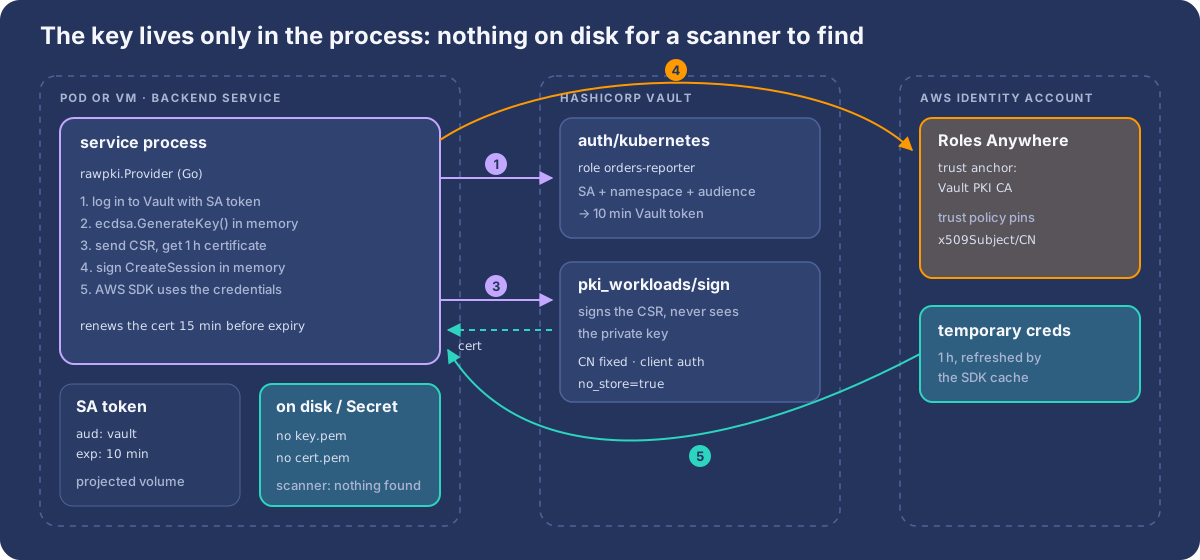
Steps 1 to 3 put cert.pem and key.pem on disk, and the Kubernetes variant below puts them in a Secret. Both work, but a private key at rest is exactly what cloud security scanners such as Wiz look for: they read VM disks and snapshots and Kubernetes Secrets, and an exportable key that grants an AWS role is a finding every time. The finding is fair. A disk snapshot, a backup or a stolen volume carries a working key with it.
The fix is to let the backend service itself talk to Vault through its auth library: it logs in with its own workload identity, generates a key pair in memory, sends Vault only a certificate signing request, and signs the Roles Anywhere request with that in-memory key. Nothing is written to disk or to etcd, so there’s nothing for a scanner to find, on Kubernetes and on VMs alike.
Vault: Kubernetes login, a sign-only policy, short certificates
# PKI role for this workload: fixed CN, client auth only, 1 h certificates, nothing stored
vault write pki_workloads/roles/orders-reporter \
  allowed_domains="orders-reporter" allow_bare_domains=true \
  allow_subdomains=false enforce_hostnames=false \
  key_type=ec key_bits=256 ttl=1h max_ttl=1h \
  key_usage="DigitalSignature" ext_key_usage="ClientAuth" \
  server_flag=false client_flag=true \
  no_store=true

# the workload may only ask Vault to *sign* (not issue) for its own role
vault policy write orders-reporter-pki - <<'EOF'
path "pki_workloads/sign/orders-reporter" {
  capabilities = ["update"]
}
EOF

# Kubernetes auth: Vault runs outside the cluster, so give it the cluster CA
vault auth enable kubernetes
vault write auth/kubernetes/config \
  kubernetes_host="https://k8s-api.internal:6443" \
  kubernetes_ca_cert=@k8s-ca.crt disable_local_ca_jwt=true

vault write auth/kubernetes/role/orders-reporter \
  bound_service_account_names=orders-reporter \
  bound_service_account_namespaces=orders \
  audience=vault \
  token_policies=orders-reporter-pki \
  token_ttl=10m token_max_ttl=10m
Three details matter:
sign, notissue.pki/issuegenerates the key inside Vault and returns it in the response.pki/signtakes a CSR, so the key never leaves the process. In the test below Vault’s response contains noprivate_keyat all.server_flag=false. Vault PKI roles add server auth by default, andext_key_usageonly adds to that. Turn it off so the certificate is client-auth only.no_store=true. Every process start and renewal mints a certificate. Don’t make Vault keep them all.
Without token_reviewer_jwt, Vault validates each login by calling the Kubernetes TokenReview API with the client’s own token, so the workload’s ServiceAccount needs the system:auth-delegator ClusterRole. Alternatively, configure one reviewer token for the whole cluster.
The pod: a short-lived token for Vault, nothing else
spec:
  serviceAccountName: orders-reporter
  automountServiceAccountToken: false      # no default API token in the pod
  containers:
    - name: app
      image: registry.example.com/orders-reporter:1.5.0
      env:
        - { name: VAULT_ADDR, value: "https://vault.internal:8200" }
      volumeMounts:
        - { name: vault-token, mountPath: /var/run/secrets/vault, readOnly: true }
  volumes:
    - name: vault-token
      projected:
        sources:
          - serviceAccountToken:
              audience: vault            # matches the Vault role's audience
              expirationSeconds: 600
              path: token
The kubelet rotates this token. It’s only good for logging in to Vault, and it expires in ten minutes.
The service: Vault login, in-memory key, Roles Anywhere, AWS SDK
AWS’s credential helper is also a Go library. Its GenerateCredentials function takes any Signer, so a service can hand it a key that lives only in memory. This package does the whole flow and plugs into the AWS SDK as a credentials provider:
// Package rawpki gets AWS credentials through IAM Roles Anywhere with a
// certificate that only ever exists in memory.
package rawpki

import (
	"context"
	"crypto"
	"crypto/ecdsa"
	"crypto/elliptic"
	"crypto/rand"
	"crypto/x509"
	"crypto/x509/pkix"
	"encoding/pem"
	"fmt"
	"io"
	"sync"
	"time"

	"github.com/aws/aws-sdk-go-v2/aws"
	ra "github.com/aws/rolesanywhere-credential-helper/aws_signing_helper"
	vault "github.com/hashicorp/vault/api"
	k8sauth "github.com/hashicorp/vault/api/auth/kubernetes"
)

type Config struct {
	VaultRole      string // Vault kubernetes auth role
	TokenPath      string // projected ServiceAccount token, audience "vault"
	PKIPath        string // "pki_workloads/sign/orders-reporter"
	CommonName     string // must match the PKI role and the AWS trust policy
	TrustAnchorArn string
	ProfileArn     string
	RoleArn        string
}

// memSigner implements the credential helper's Signer over an in-memory key.
type memSigner struct {
	key  *ecdsa.PrivateKey
	cert *x509.Certificate
}

func (s *memSigner) Public() crypto.PublicKey { return &s.key.PublicKey }
func (s *memSigner) Sign(r io.Reader, d []byte, o crypto.SignerOpts) ([]byte, error) {
	return s.key.Sign(r, d, o)
}
func (s *memSigner) Certificate() (*x509.Certificate, error)        { return s.cert, nil }
func (s *memSigner) CertificateChain() ([]*x509.Certificate, error) { return nil, nil }
func (s *memSigner) Close()                                         {}

type Provider struct {
	cfg    Config
	vault  *vault.Client
	mu     sync.Mutex
	signer *memSigner
}

func New(cfg Config) (*Provider, error) {
	vc, err := vault.NewClient(vault.DefaultConfig()) // VAULT_ADDR, VAULT_CACERT from env
	if err != nil {
		return nil, err
	}
	return &Provider{cfg: cfg, vault: vc}, nil
}

// issue logs in to Vault and gets a certificate for a key generated here.
func (p *Provider) issue(ctx context.Context) (*memSigner, error) {
	auth, err := k8sauth.NewKubernetesAuth(p.cfg.VaultRole, k8sauth.WithServiceAccountTokenPath(p.cfg.TokenPath))
	if err != nil {
		return nil, err
	}
	if _, err := p.vault.Auth().Login(ctx, auth); err != nil {
		return nil, fmt.Errorf("vault login: %w", err)
	}
	key, err := ecdsa.GenerateKey(elliptic.P256(), rand.Reader)
	if err != nil {
		return nil, err
	}
	csr, err := x509.CreateCertificateRequest(rand.Reader,
		&x509.CertificateRequest{Subject: pkix.Name{CommonName: p.cfg.CommonName}}, key)
	if err != nil {
		return nil, err
	}
	sec, err := p.vault.Logical().WriteWithContext(ctx, p.cfg.PKIPath, map[string]any{
		"csr":         string(pem.EncodeToMemory(&pem.Block{Type: "CERTIFICATE REQUEST", Bytes: csr})),
		"common_name": p.cfg.CommonName,
	})
	if err != nil {
		return nil, fmt.Errorf("vault pki sign: %w", err)
	}
	block, _ := pem.Decode([]byte(sec.Data["certificate"].(string)))
	cert, err := x509.ParseCertificate(block.Bytes)
	if err != nil {
		return nil, err
	}
	return &memSigner{key: key, cert: cert}, nil
}

// Retrieve implements aws.CredentialsProvider.
func (p *Provider) Retrieve(ctx context.Context) (aws.Credentials, error) {
	p.mu.Lock()
	defer p.mu.Unlock()
	if p.signer == nil || time.Until(p.signer.cert.NotAfter) < 15*time.Minute {
		s, err := p.issue(ctx)
		if err != nil {
			return aws.Credentials{}, err
		}
		p.signer = s
	}
	out, err := ra.GenerateCredentials(&ra.CredentialsOpts{
		TrustAnchorArnStr: p.cfg.TrustAnchorArn,
		ProfileArnStr:     p.cfg.ProfileArn,
		RoleArn:           p.cfg.RoleArn,
		SessionDuration:   3600,
	}, p.signer, "AWS4-X509-ECDSA-SHA256")
	if err != nil {
		return aws.Credentials{}, err
	}
	exp, _ := time.Parse(time.RFC3339, out.Expiration)
	return aws.Credentials{
		AccessKeyID: out.AccessKeyId, SecretAccessKey: out.SecretAccessKey, SessionToken: out.SessionToken,
		Source: "vault-pki+rolesanywhere", CanExpire: true, Expires: exp,
	}, nil
}
Wiring it into the SDK is one option on the config. Every AWS client built from it uses the in-memory identity, and the SDK’s credentials cache refreshes before expiry:
p, _ := rawpki.New(rawpki.Config{
	VaultRole:      "orders-reporter",
	TokenPath:      "/var/run/secrets/vault/token",
	PKIPath:        "pki_workloads/sign/orders-reporter",
	CommonName:     "orders-reporter",
	TrustAnchorArn: "arn:aws:rolesanywhere:eu-west-1:999999999999:trust-anchor/<TA_ID>",
	ProfileArn:     "arn:aws:rolesanywhere:eu-west-1:999999999999:profile/<PROFILE_ID>",
	RoleArn:        "arn:aws:iam::999999999999:role/onprem-orders-reporter",
})
cfg, _ := config.LoadDefaultConfig(ctx, config.WithRegion("eu-west-1"),
	config.WithCredentialsProvider(aws.NewCredentialsCache(p)))
s3c := s3.NewFromConfig(cfg)
Tested: the package compiles against
rolesanywhere-credential-helperv1.8.5,hashicorp/vault/apiv1.23.0,api/auth/kubernetesv0.12.0 and AWS SDK for Go v2. Against Vault 2.2.0, the PKI role and policy above signed an in-memory CSR and returned a certificate with Digital Signature and client auth only, valid for one hour, matching the in-memory key, with noprivate_keyin the response, and refused a CSR for another CN. The Kubernetes login and theCreateSessioncall need a real cluster and AWS account, so they were not part of this test.
VMs get the same benefit. The Provider doesn’t care where it runs. Only the login changes: swap k8sauth for the Vault auth method that matches the machine, for example the aws, gcp or azure auth method on cloud VMs, jwt with a token from the platform’s metadata service, or AppRole with a response-wrapped SecretID as a last resort. The key is still generated in memory, so agentless disk scanning finds nothing on the VM either.
Services not written in Go. The X.509 request signing that Roles Anywhere needs lives in the Go credential helper. For Java, Python or Node.js services, run this provider as a small sidecar that serves the same IMDS-compatible endpoint on 127.0.0.1 that aws_signing_helper serve does. The application stays unchanged, and the key still never touches disk.
What this costs:
- Vault is on the start-up path. Every process logs in and signs a certificate when it starts and about every 45 minutes after that. Run Vault highly available, and retry with backoff so a short Vault outage delays a refresh instead of failing it.
- One certificate per process, not per workload. That’s free with Vault PKI and
no_store=true, unlike AWS Private CA’s per-certificate price and its 100 million cap. - Memory is not a vault. Someone who is root on the host can still read the process memory. This removes keys at rest from disks, snapshots, backups and etcd, but it doesn’t defend against a compromised running host. Keep certificates and sessions short so a stolen key is worthless within the hour.
Option: AWS Private CA and cert-manager for Kubernetes
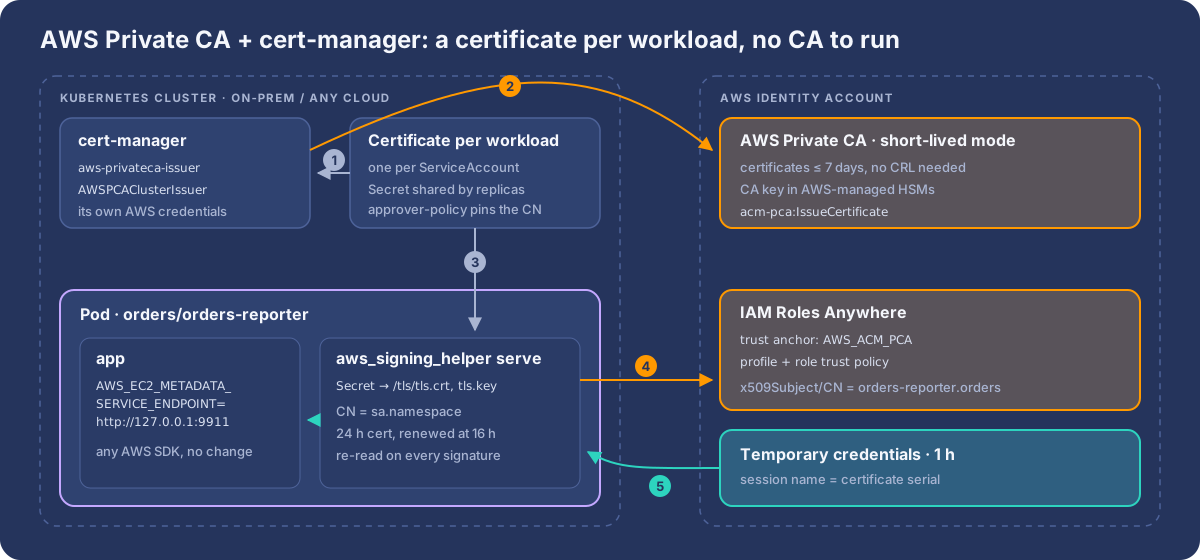
Vault PKI is a good fit when you already run Vault. If your workloads without a cloud identity are Kubernetes pods, for example on-prem clusters, k3s at the edge, or clusters in another cloud, there’s a variant with no CA to operate: AWS Private CA signs the certificates, and cert-manager puts a fresh one into every pod.
In production: this is how pods on Huawei Cloud CCE and Yandex Managed Kubernetes clusters reach AWS. Those clusters have no AWS identity of their own, and with this setup no workload holds an AWS access key either. The rollout follows AWS’s guide Connect your on-premises Kubernetes cluster to AWS APIs using IAM Roles Anywhere, with one deliberate change: one certificate per workload instead of the CSI driver’s certificate per pod, because of a Private CA quota you can’t raise (step 4).
| Vault PKI | AWS Private CA (short-lived mode) | |
|---|---|---|
| Who runs the CA | You (HA, unseal, upgrades) | AWS. CA keys stay in AWS-managed HSMs |
| Trust anchor | CERTIFICATE_BUNDLE: upload the CA cert, re-upload when it rotates |
AWS_ACM_PCA: point at the CA ARN |
| Certificate lifetime | Anything | 7 days maximum |
| Revocation | Publish a CRL and ImportCrl it |
Not needed for short-lived certificates. Expiry is the revocation |
| Cost | Your infrastructure | $50 per CA per month + $0.058 per certificate (general-purpose mode: $400 + $0.75) |
| Best for | VMs, bare metal, mixed fleets | Kubernetes workloads via cert-manager |
1. A short-lived issuing CA
AWS requires a short-lived CA to be the last CA in the hierarchy, so create it as a subordinate under a root you already have: an AWS Private CA root, or your own offline root.
aws acm-pca create-certificate-authority \
  --certificate-authority-type SUBORDINATE \
  --usage-mode SHORT_LIVED_CERTIFICATE \
  --certificate-authority-configuration '{"KeyAlgorithm":"EC_prime256v1","SigningAlgorithm":"SHA256WITHECDSA","Subject":{"CommonName":"k8s-workloads-issuing"}}'
Activate it once: fetch its CSR (get-certificate-authority-csr), sign it with the root (with an AWS Private CA root, use the SubordinateCACertificate_PathLen0/V1 template), and import-certificate-authority-certificate. Cost follows the number of certificates you issue, so issue per workload rather than per pod (step 4): 500 workloads renewing every 16 hours is about 22,500 certificates a month, roughly $1,300 at $0.058.
2. A trust anchor backed by the CA
aws rolesanywhere create-trust-anchor --name k8s-workloads --enabled \
  --source "sourceType=AWS_ACM_PCA,sourceData={acmPcaArn=arn:aws:acm-pca:eu-west-1:999999999999:certificate-authority/<CA_ID>}"
There’s no certificate bundle to upload or rotate. Two details from the documentation matter here:
- For an
AWS_ACM_PCAtrust anchor, the API reference says the root certificate of that CA is used for validation. If the same root signs other CAs, their certificates validate too. Pin the issuing CA in the role trust policy withaws:PrincipalTag/x509Issuer/CN. - Only the validity period of a Private CA trust anchor can change after creation. When the CA certificate is renewed, call
update-trust-anchorso Roles Anywhere picks up the new validity.
The profile and roles are the same as in step 2. The role trust policy now keys on what cert-manager puts in the certificate:
"Condition": {
  "ArnEquals":    { "aws:SourceArn": "arn:aws:rolesanywhere:eu-west-1:999999999999:trust-anchor/<TA_ID>" },
  "StringEquals": {
    "aws:PrincipalTag/x509Issuer/CN":  "k8s-workloads-issuing",
    "aws:PrincipalTag/x509Subject/CN": "orders-reporter.orders"
  }
}
3. cert-manager and the Private CA issuer
Install cert-manager, its CSI driver and the aws-privateca-issuer plugin, then point a cluster issuer at the CA:
helm repo add awspca https://cert-manager.github.io/aws-privateca-issuer
helm install aws-privateca-issuer awspca/aws-privateca-issuer -n cert-managerapiVersion: awspca.cert-manager.io/v1beta1
kind: AWSPCAClusterIssuer
metadata:
name: k8s-workloads
spec:
arn: arn:aws:acm-pca:eu-west-1:999999999999:certificate-authority/<CA_ID>
region: eu-west-1The issuer needs acm-pca:IssueCertificate, acm-pca:GetCertificate and acm-pca:DescribeCertificateAuthority on that one CA, and that is the chicken-and-egg part: on a cluster with no cloud identity, where do its credentials come from? In order of preference:
- The cluster runs on GKE or AKS. Federate the issuer’s ServiceAccount into AWS the keyless way (Google Cloud → AWS). No secret at all.
- Give the issuer its own Roles Anywhere identity. The plugin supports IAM Roles Anywhere. Bootstrap one certificate for it by hand, and let it renew itself from the same CA afterwards.
- Last resort: a single access key that can only call those three actions on that one CA. That’s one narrowly scoped secret for the whole cluster, instead of one per workload.
4. One certificate per workload, not per pod
AWS’s own guide for this setup uses the cert-manager CSI driver, which gives every pod its own key pair generated on the node. That’s elegant, but every pod start and every renewal is a new IssueCertificate call, and AWS Private CA has a hard ceiling on that:
| AWS Private CA quota | Default | Adjustable |
|---|---|---|
| Certificates issued per CA, lifetime | 100,000,000 (1,000,000 with complete CRLs) | No |
IssueCertificate rate |
25 per second per account and Region | Yes |
With per-pod certificates, the count grows with pods × renewals + churn: autoscaling, rolling deploys, CronJobs and crash loops each mint new certificates. A fleet that churns 100,000 pods a day reaches the cap in under three years, and pays $0.058 for each of those certificates along the way. When a CA hits the cap, the only way out is a new CA and a new trust anchor. On the Huawei and Yandex clusters this was the reason to drop the CSI driver.
The fix is to issue one certificate per workload (per ServiceAccount) with a cert-manager Certificate, store it in a Secret, and let every replica mount the same Secret. The certificate count now grows with the number of workloads, not pods:
apiVersion: cert-manager.io/v1
kind: Certificate
metadata:
  name: orders-reporter-aws
  namespace: orders
spec:
  secretName: orders-reporter-aws-identity
  commonName: orders-reporter.orders        # <serviceaccount>.<namespace>
  duration: 24h
  renewBefore: 8h
  usages: ["client auth"]
  privateKey:
    algorithm: ECDSA
    size: 256
    rotationPolicy: Always
  issuerRef:
    name: k8s-workloads
    kind: AWSPCAClusterIssuer
group: awspca.cert-manager.ioapiVersion: apps/v1
kind: Deployment
metadata:
name: orders-reporter
namespace: orders
spec:
replicas: 6 # all six share one certificate
selector:
matchLabels: { app: orders-reporter }
template:
metadata:
labels: { app: orders-reporter }
spec:
serviceAccountName: orders-reporter
containers:
- name: app
image: registry.example.com/orders-reporter:1.4.2
env:
- { name: AWS_EC2_METADATA_SERVICE_ENDPOINT, value: "http://127.0.0.1:9911" }
- { name: AWS_REGION, value: eu-west-1 }
- name: aws-credentials # sidecar; build a small image from the release binary
image: registry.example.com/aws-signing-helper:1.8.5
args:
- serve
- --certificate=/tls/tls.crt
- --private-key=/tls/tls.key
- --trust-anchor-arn=arn:aws:rolesanywhere:eu-west-1:999999999999:trust-anchor/<TA_ID>
- --profile-arn=arn:aws:rolesanywhere:eu-west-1:999999999999:profile/<PROFILE_ID>
- --role-arn=arn:aws:iam::999999999999:role/k8s-orders-reporter
volumeMounts:
- { name: aws-identity, mountPath: /tls, readOnly: true }
volumes:
- name: aws-identity
secret:
secretName: orders-reporter-aws-identityA Certificate lets anyone who can create one in their namespace ask for any common name, including another team’s. Close that with cert-manager approver-policy, as AWS’s guide also does: one cluster-wide policy that only approves client auth certificates whose CN ends with the requester’s own namespace.
apiVersion: policy.cert-manager.io/v1alpha1
kind: CertificateRequestPolicy
metadata:
  name: aws-workload-identity
spec:
  allowed:
    commonName:
      value: "*"
      required: true
      validations:
        - rule: "self.endsWith('.' + cr.namespace)"
          message: "commonName must be <serviceaccount>.<namespace>"
    usages: ["client auth"]
  selector:
    issuerRef:
      name: k8s-workloads
      kind: AWSPCAClusterIssuer
      group: awspca.cert-manager.io
Bind the use verb on this policy to cert-manager’s controller ServiceAccount, because it’s the controller that creates CertificateRequests for Certificate resources. Combined with the trust policy that pins x509Subject/CN, a team can only ever obtain the AWS roles meant for its own namespace.
What you give up, and what to watch:
- The private key lives in a Secret, so in etcd. Turn on encryption at rest and keep
get secretsin workload namespaces as tight as any other credential. - Replicas share an identity. All six pods present the same certificate, so CloudTrail shows the same session name (the certificate serial) for each of them. Permissions are per workload anyway, but you can no longer tell pods apart on the AWS side.
- Rotation still needs no restart. Mount the Secret as a volume, not with
subPath, so the kubelet updates the files when cert-manager renews. The signing helper reads the certificate and key from disk on every signature, soservepicks up the new pair by itself. Keep the key algorithm the same across renewals, because the signature algorithm is chosen once at startup. usages: ["client auth"]and nothing else. The issuer picks the Private CA template from the exact list of usages:client authalone maps toEndEntityClientAuthCertificate/V1, and any other combination falls back to a CSR pass-through template. Check that the issued certificate has Digital Signature in its key usage (openssl x509 -noout -text), because Roles Anywhere rejects certificates without it.- The sidecar shares the pod’s localhost, so only containers in that pod can reach
127.0.0.1:9911. - No official container image exists for the signing helper. Build one from the published release binary and pin its version.
The CSI driver is still a good choice for small, stable fleets, where keys that never touch etcd are worth more than the certificate count. Swap the secret: volume for a csi.cert-manager.io volume with issuer-kind: AWSPCAClusterIssuer, common-name: "${SERVICE_ACCOUNT_NAME}.${POD_NAMESPACE}" and key-usages: "client auth", and keep an eye on the CA’s issued-certificate count.
AWS as the hub for Google Cloud and Azure
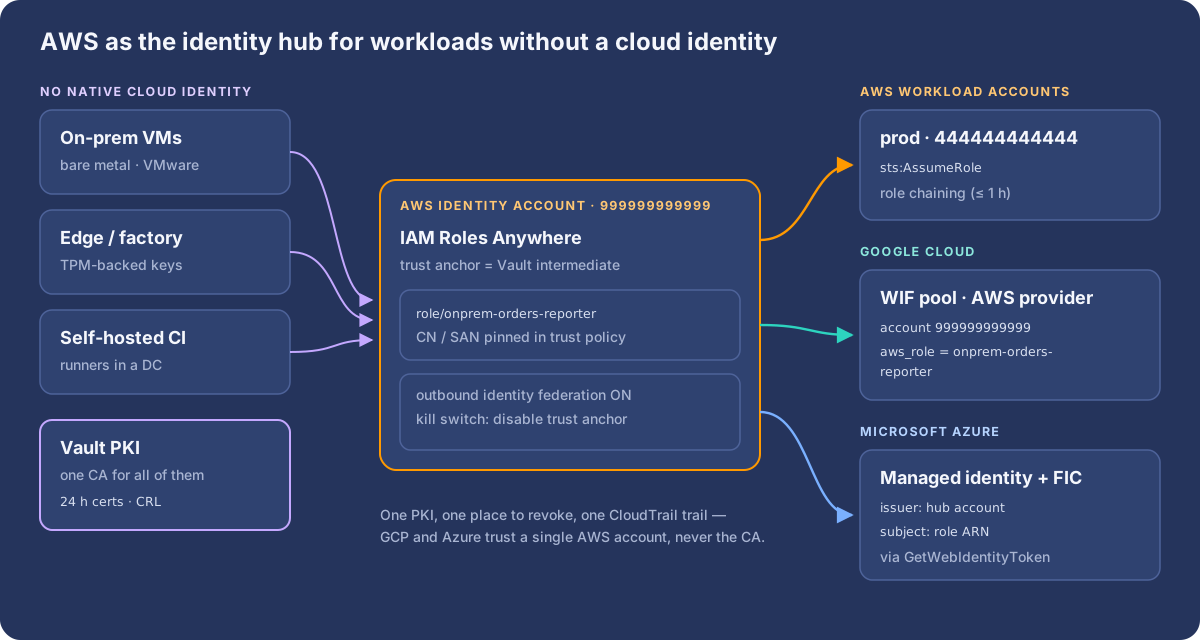
Google Cloud: an AWS provider pointed at the local endpoint
Set up the pool exactly as in AWS → Google Cloud: an AWS provider for account 999999999999, and a grant to principalSet://…/attribute.aws_role/onprem-orders-reporter. The session name is now a certificate serial, but the role name stays stable, which is what you grant on.
The generated --aws credential configuration reads AWS credentials from 169.254.169.254. Point it at the helper’s endpoint instead. The helper doesn’t serve the region path, so drop it and set AWS_REGION:
gcloud iam workload-identity-pools create-cred-config \
  projects/123456789012/locations/global/workloadIdentityPools/aws-prod/providers/aws-hub \
  --aws --enable-imdsv2 --output-file=gcp-wif.json

jq '.credential_source.url = "http://127.0.0.1:9911/latest/meta-data/iam/security-credentials"
  | .credential_source.imdsv2_session_token_url = "http://127.0.0.1:9911/latest/api/token"
  | del(.credential_source.region_url)' gcp-wif.json > gcp-wif-onprem.json

export GOOGLE_APPLICATION_CREDENTIALS=/etc/gcp/gcp-wif-onprem.json
export AWS_REGION=eu-west-1
This works with the Python google-auth library: it reads the region from AWS_REGION first and accepts any metadata URL. For other languages, or if you’d rather not edit the file, use the custom AWS credential supplier from the GCP article, backed by the AWS SDK. It picks up the Roles Anywhere credentials through the same AWS_EC2_METADATA_SERVICE_ENDPOINT.
Azure: outbound identity federation from the hub
Enable IAM outbound identity federation in the identity account. That gives you one issuer for all on-prem workloads. Then follow AWS → Azure:
- Allow the role
sts:GetWebIdentityToken, only for audienceapi://AzureADTokenExchange, algorithmRS256and a short duration. - On the Azure managed identity, add a federated credential with the identity account’s issuer and subject
arn:aws:iam::999999999999:role/onprem-orders-reporter.
import boto3
from azure.identity import ClientAssertionCredential

sts = boto3.client("sts", region_name="eu-west-1")   # credentials come from 127.0.0.1:9911

credential = ClientAssertionCredential(
    tenant_id="<entra-tenant-id>",
    client_id="<client-id of id-orders-reporter>",
    func=lambda: sts.get_web_identity_token(
        Audience=["api://AzureADTokenExchange"], SigningAlgorithm="RS256", DurationSeconds=300,
    )["WebIdentityToken"],
)
Prefer no code? The sidecar or timer that writes a token file for AZURE_FEDERATED_TOKEN_FILE, shown in the Azure article, works unchanged here.
Revocation: layered kill switches
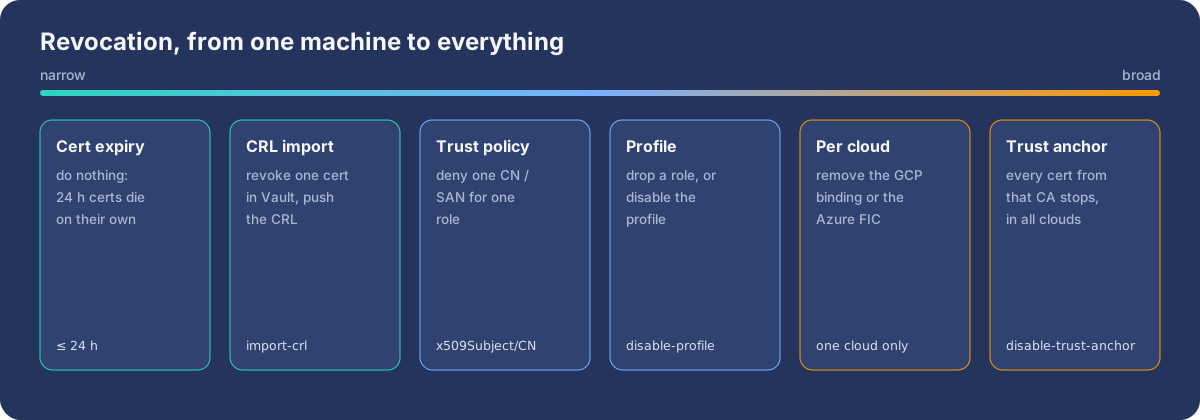
- Expiry. With 24-hour certificates, a stolen key stops working by itself within a day.
- One certificate. Revoke it in Vault and import the CRL with
aws rolesanywhere import-crl. AWS checks imported CRLs, but doesn’t call CRL distribution points or OCSP itself, so automate the push. With an AWS Private CA trust anchor the rule is the same: Roles Anywhere only checks imported CRLs, so a general-purpose Private CA’s CRL also has to be pushed withimport-crl. A short-lived-mode CA skips this entirely and relies on expiry. - One workload. Remove its role from the profile, or tighten the trust policy.
- Everything from that CA.
aws rolesanywhere disable-trust-anchor. - One cloud. Remove the GCP binding or the Azure FIC.
Revoking stops new sessions. Credentials already issued stay valid until they expire, so keep duration_seconds short. For an emergency, also attach a deny policy on the role using aws:TokenIssueTime, which is what the IAM console’s Revoke active sessions button does.
Hub or not? The trade-offs
| Hub through AWS | Each cloud federates on its own | |
|---|---|---|
| PKI integrations | one (Roles Anywhere) | one per cloud |
| Revocation | one place covers all clouds | per cloud |
| Audit | CloudTrail shows every session with the cert serial | three different log formats |
| Availability | GCP/Azure access depends on AWS STS too | independent |
| Latency on first call | one more hop | direct |
| Session limits | role chaining caps at 1 h | native limits |
There are honest alternatives. Google Cloud can also federate X.509 certificates directly, and SPIFFE/SPIRE can act as an OIDC issuer that all three clouds trust. The AWS hub shines when AWS is already your main cloud and identity account, when you want one place to revoke and audit, and when the machines live outside any cloud.
Checklist
- A dedicated intermediate CA for workloads, with short-lived certificates (hours, not years), and keys in a TPM or HSM where possible.
- Trust policies pin
aws:SourceArn(the trust anchor) and the certificate’sx509Subject/CN. - One role per workload and one Vault role per workload, so a certificate can only ever claim its own name.
- No private keys at rest. Backend services log in to Vault themselves (Kubernetes auth, or the VM’s platform auth), generate the key in memory and use
pki/sign, so disk and snapshot scanners have nothing to flag. serveon single-purpose machines, with--hop-limit 1. Otherwise usecredential-process.- Automate CRL import, keep profile durations short, and practise disabling the trust anchor.
- GCP grants on
attribute.aws_role/<role>. Azure FICs on the role ARN. Neither cloud needs to know about your CA.
Wrap-up
IAM Roles Anywhere closes the last gap in workload identity: machines that don’t belong to any cloud. Give them short-lived certificates from a workload CA, and they get AWS role sessions with conditions on the certificate’s own fields, audited down to the serial number. Federate onward from one AWS identity account, and the same certificate opens Google Cloud and Azure too, with no access keys, no key.json and no client secrets anywhere.
Sources
- IAM Roles Anywhere user guide: https://docs.aws.amazon.com/rolesanywhere/latest/userguide/introduction.html
- IAM Roles Anywhere trust model: https://docs.aws.amazon.com/rolesanywhere/latest/userguide/trust-model.html
- Credential helper (aws_signing_helper): https://docs.aws.amazon.com/rolesanywhere/latest/userguide/credential-helper.html
- rolesanywhere-credential-helper source: https://github.com/aws/rolesanywhere-credential-helper
- Vault PKI secrets engine: https://developer.hashicorp.com/vault/docs/secrets/pki
- Workload Identity Federation with AWS (Google Cloud): https://cloud.google.com/iam/docs/workload-identity-federation-with-other-clouds
- AWS outbound identity federation: https://docs.aws.amazon.com/IAM/latest/UserGuide/id_roles_providers_outbound.html
- Entra workload identity federation: https://learn.microsoft.com/en-us/entra/workload-id/workload-identity-federation
- Vault Kubernetes auth method: https://developer.hashicorp.com/vault/docs/auth/kubernetes
- Vault PKI API, sign certificate: https://developer.hashicorp.com/vault/api-docs/secret/pki#sign-certificate
- Vault Go client, Kubernetes auth: https://pkg.go.dev/github.com/hashicorp/vault/api/auth/kubernetes
- Credential helper as a Go library (
aws_signing_helper): https://pkg.go.dev/github.com/aws/rolesanywhere-credential-helper/aws_signing_helper - AWS Private CA modes (general-purpose and short-lived): https://docs.aws.amazon.com/privateca/latest/userguide/short-lived-certificates.html
- AWS Private CA pricing: https://aws.amazon.com/private-ca/pricing/
create-trust-anchor(AWS_ACM_PCA source): https://docs.aws.amazon.com/cli/latest/reference/rolesanywhere/create-trust-anchor.html- aws-privateca-issuer for cert-manager: https://github.com/cert-manager/aws-privateca-issuer
- cert-manager CSI driver: https://cert-manager.io/docs/usage/csi-driver/
Comments